

If your small business runs an HVAC system at the same temperature 24 hours a day, leaves lights on after close because nobody remembered to flip the switch, or has no idea whether the walk-in cooler is running at 38 degrees or 48 degrees, you are leaving real money on the table every single month. According to the ENERGY STAR Small Business Program, the average commercial building wastes roughly 30 percent of the energy it consumes, and the U.S. EIA Commercial Buildings Energy Consumption Survey (CBECS) reports that heating and cooling alone account for roughly 35 to 40 percent of total commercial building energy use. For a small business paying $500 a month in electricity, that often means $150 a month going to waste before anyone touches a thermostat. The fix is not a $50,000 commercial HVAC retrofit. It is a smart energy management platform that automates the things people forget to do, alerts you when something goes wrong, and gives you the data to confirm that changes are actually saving money. This article walks through how Alarm.com energy management works, what features are included with the Surety Business Plus plan, the hardware that makes it work, real-world use cases by industry, and an honest ROI calculation so you can decide whether the math works for your business.
Why Energy Management Is the Easiest Win for a Small Business
Most small business owners do not think of themselves as energy buyers in the same way they think of themselves as labor or inventory buyers, which is exactly why energy is one of the most common places they overspend. The U.S. Department of Energy's guidance on thermostats estimates that properly using a programmable thermostat can save about 10 percent per year on heating and cooling costs, and that figure assumes only setpoint scheduling. Add automatic setback when the building is empty, lighting that turns itself off, alerts when equipment starts to fail, and the upside grows from there. The U.S. EIA monthly electricity report puts the average U.S. commercial electricity rate at roughly 12.7 cents per kilowatt-hour as of 2024, which means even small percentage reductions on a typical commercial bill produce real dollar savings month after month. ENERGY STAR estimates that a 10 percent reduction in energy costs for a commercial building is roughly equivalent to a 1.5 percent increase in net operating income for a typical small business, which is the kind of margin small operators rarely find in any other line item.
The other reason energy management is the easiest win is that the savings compound with no ongoing effort once the system is set up. A schedule does not get tired and forget to drop the setpoint. A geo-fence does not get distracted on the way out the door. An alert does not miss the rising temperature in the walk-in cooler at 2 AM on a Sunday. The whole point of automation is to remove the human variable from the things that should not depend on a human in the first place.
How Alarm.com Energy Management Differs From a Standalone Smart Thermostat
There are plenty of consumer smart thermostats on the market, and most of them work fine in a home. The reason a small business is better served by Alarm.com energy management is that the platform is integrated rather than siloed. A consumer thermostat manages temperature. An Alarm.com energy management system manages temperature, lighting, plug loads, energy meters, and security state from a single platform and a single app, which means features that a single-purpose thermostat cannot do are simple here. Arming the security system at close automatically shifts the thermostat to setback. The owner's phone leaving a geo-fenced radius around the business automatically tells the platform the building is empty. A Z-Wave switch on the back office circuit can run on the same schedule as the front lights without any third-party hub or integration. An energy meter at the electrical panel reports kilowatt-hours in the same dashboard that shows camera clips and door events.
The other practical difference is multi-thermostat, multi-device support. A consumer thermostat product is usually sold and managed one unit at a time, designed primarily for a home with a single HVAC system. An Alarm.com account can have multiple thermostats on it (one per HVAC zone), remote temperature sensors that can override the on-thermostat reading, and a wide range of other devices distributed across an entire building or several buildings, all managed from one app. For a business with a back office on its own HVAC system, a customer-facing front room on another, a stockroom, and a walk-in cooler, that breadth matters.
Alarm.com energy management is included with the Surety Business Plus plan, which builds on the standard Business Alarm plan by adding energy management and automation. Pricing is $26 per month self-monitored or $33 per month with professional monitoring, on a month-to-month basis with no contract. The plan is delivered through Surety Business as an authorized Alarm.com dealer, since Alarm.com is not sold direct to consumers or businesses.
Feature-by-Feature: What Alarm.com Energy Management Actually Does
The platform breaks down into eight distinct capabilities, each of which solves a specific problem a small business owner has probably already encountered.
Thermostat Scheduling
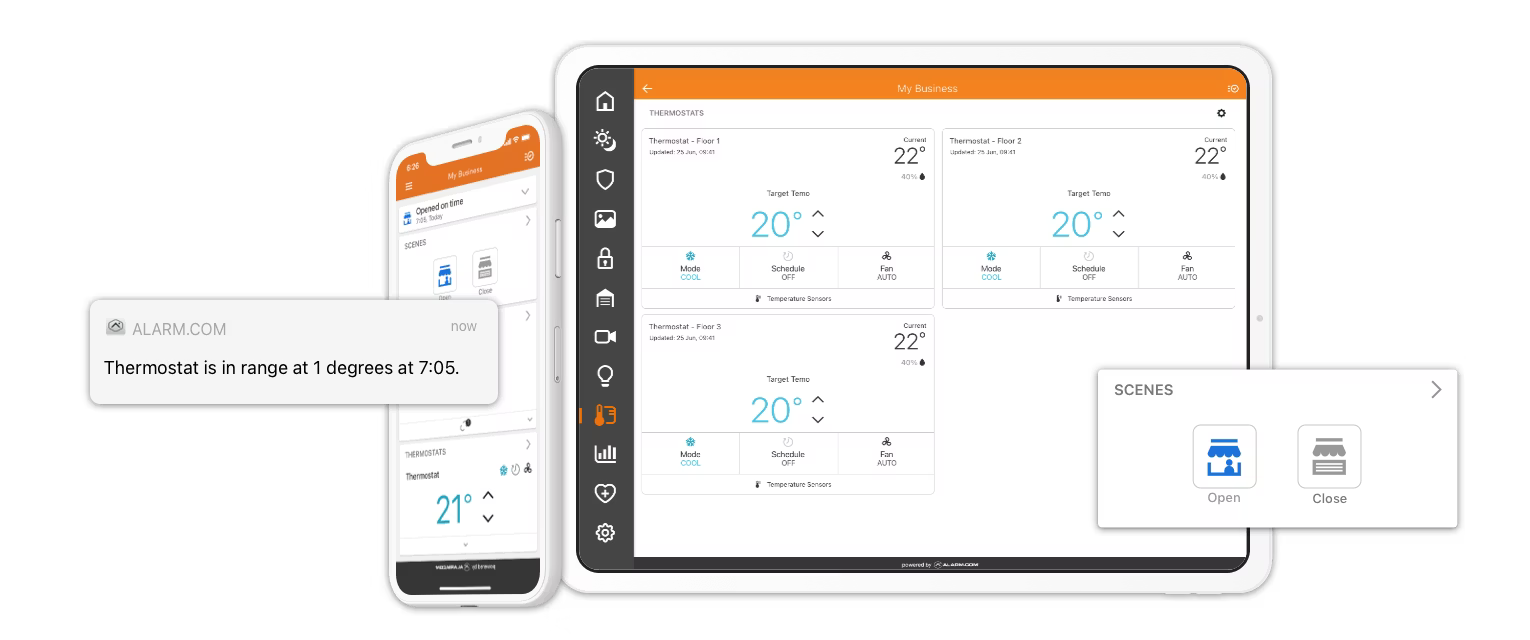
Alarm.com supports temperature setpoints by time of day and day of week. A typical commercial schedule might heat the building to 70 degrees at 7:30 AM Monday through Friday, set back to 60 degrees at 6:30 PM after close, and drop to 55 degrees overnight and on weekends. Schedule increments are on the half hour (you can set a setpoint at 7:00, 7:30, 8:00, etc.) and the minimum interval between setpoints is one hour. A single Alarm.com account can host multiple thermostats, so a building with a separate back-office HVAC system can put a thermostat on each zone and run each one on its own schedule. The benefit is simple: the building is comfortable when people are there, and not wasting energy when it is empty.
Security System Integration (Smart Away / Setback on Arm)
When the security system is armed to Away mode, Alarm.com automatically shifts thermostats to an energy-saving setback temperature. When the system is disarmed in the morning, it resumes the schedule. The practical implication is that even a small business that never builds out a thermostat schedule still gets meaningful energy savings, because the act of arming and disarming the security system itself acts as an energy management trigger. This integration is built into Business Plus and works out of the box.
Geo-Fencing
Thermostats adjust automatically when the owner or designated users arrive at or leave the business based on the phone's GPS location. The platform detects that you have left and shifts to energy-save mode. It detects that you are on your way back and starts warming or cooling the space before you arrive, so the building is comfortable when you walk in without running the HVAC for hours of an empty room. No app interaction is needed; the geo-fence runs on its own.
Temperature and Humidity Monitoring
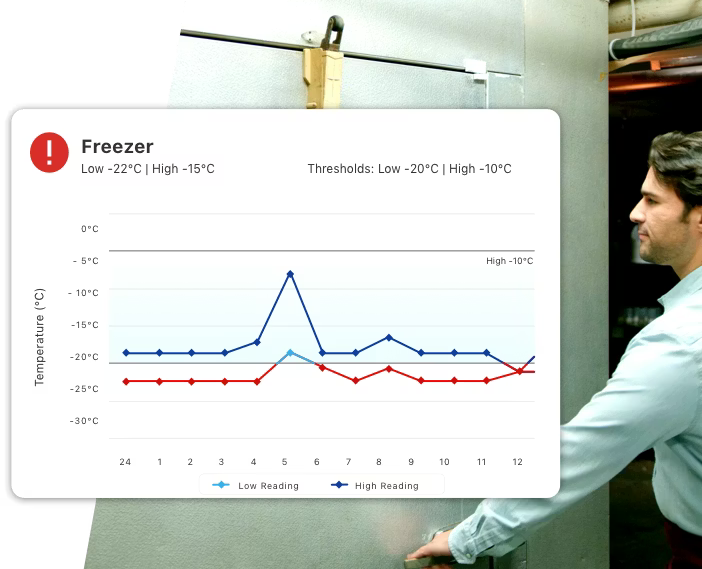
Alarm.com supports alert thresholds for both temperature and humidity. If a walk-in cooler climbs above 40 degrees, the owner gets a phone alert. If a warehouse drops below freezing, same alert. Humidity monitoring is equally useful for medical and dental offices (sterile equipment), wine storage, print shops, and any space where ambient conditions affect inventory, equipment, or operations. The platform supports remote temperature sensors for zone-level monitoring separate from the thermostat, so you can monitor a walk-in cooler, a server closet, and a storage room without buying additional thermostats.
Lighting Automation
Z-Wave smart switches and plugs connected to Alarm.com can run on schedules (turn on at opening time, off after close), respond to security events (all lights on when the alarm trips), or respond to sunrise and sunset offsets so exterior lighting tracks the actual day length through the year. You can tie lighting to the arm and disarm routine so lights turn off automatically when the last person leaves and the system arms. The platform supports both PowerG and Z-Wave automation devices.
When choosing Z-Wave hardware, prefer Z-Wave Long Range (Z-Wave LR) over classic Z-Wave where possible. Manufacturer specs for Z-Wave LR cite up to about 1 mile of range and classic Z-Wave cites a few hundred feet, but those figures are open-air line-of-sight and are rarely what you actually get inside a real building. Walls, framing, ductwork, large appliances, and metal shelving all attenuate the signal, sometimes dramatically. The practical takeaway is not that classic Z-Wave will reach across a field, it is that Z-Wave LR is much more likely to reach across a building than classic Z-Wave, and it does so without needing a mesh of repeater devices in between. For a typical small commercial space (a restaurant, a retail store, a warehouse with concrete walls, an office spread across multiple rooms), Z-Wave LR is the safer choice. Alarm.com's own automation devices (thermostats, sensors, plugs, switches) use Z-Wave.
The IQ PowerG automation devices listed below are DSC-branded devices that use the PowerG protocol natively with the Qolsys panel and report into Alarm.com through the panel. PowerG is itself a long-range protocol with range and reliability characteristics even exceeding Z-Wave LR, which is one of the reasons it performs well in commercial buildings without needing a mesh of repeaters. Surety primarily sells the IQ PowerG automation devices (the IQ PowerG Smart Dimmer, IQ PowerG Smart Switch, IQ Smart Socket PG, IQ Smart Plug PG, and IQ Outdoor Plug PG) because these are not as available through retail channels, but a wide range of compatible Z-Wave devices from other brands work with Alarm.com and are easy to find online. Zooz and Shelly are two brands worth calling out specifically as makers of some of the best Z-Wave devices available, and both are widely available at online retailers or direct from the manufacturer.
Energy Monitoring (Usage Tracking and Consumption Visibility)
Alarm.com Energy Monitoring lets you see actual energy usage over time in kilowatt-hours and dollars at multiple levels: whole-location monitoring via an Aeotec Energy Meter or Green Button utility data import, large-circuit monitoring at the panel for specific high-draw loads like HVAC or commercial refrigeration, and individual appliance-level monitoring for a single piece of equipment. You can track consumption patterns, set energy reduction goals, and create automation rules that respond to usage data to help cut waste. Reductions are visualized over time so you can confirm that the changes you made are actually working. This is meaningfully different from thermostat scheduling: scheduling is about automating setpoints, energy monitoring is about answering the question "what is actually consuming energy and how much?" For a small business owner who suspects an aging chest freezer or an old compressor is running up the bill, this is the feature that confirms or rules it out with real data instead of guesses.
The supported energy monitoring hardware includes the Aeotec Energy Meter Gen 8 (ZWA046, a clamp-on Z-Wave ammeter installed at the electrical panel for whole-location monitoring; Gen 1 and Gen 2 are also supported but Gen 8 is the current model), the Z-Wave Heavy Duty Smart Switch (ZW078, used to monitor and control large-circuit loads like HVAC units, water heaters, or commercial refrigeration), and the Jasco Energy Metering Appliance Module (Z-45653WB, which plugs in line with a single appliance and reports its draw). Many Z-Wave smart plugs and switches from third-party brands also include built-in energy metering (Zooz and Shelly both make metering models), and you can browse the full list of compatible devices in the Alarm.com hardware compatibility directory or check with Surety before purchasing.
In addition to monitoring, Alarm.com offers an opt-in Thermostat Rewards program that lets you earn recurring incentives from your local utility company in exchange for allowing the thermostat setpoint to be adjusted a few degrees on the hottest summer or coldest winter days. These are called peak demand events, and utilities offer them to balance grid load during high-demand periods. You are notified before any adjustment event and can opt out at any time simply by changing the setpoint on your thermostat; you are never locked in. Some programs include a pre-cool or pre-heat period before the event so the space stays comfortable throughout. Enrollment is done through the Alarm.com web dashboard or mobile app. The important caveat is that Thermostat Rewards availability depends entirely on your local utility company. Not all utilities offer a demand response program, and eligibility varies by region. You can check availability for your specific address when you enroll your thermostat in the Alarm.com app. Surety also maintains a list of active Alarm.com Thermostat Rewards programs on the Surety support forum, which is a useful starting point, though the list can fall out of date as utilities add or end programs; check with Surety to confirm current availability before counting on it. Treat this as a potential bonus where your utility participates, not as a feature you can count on universally.
Multi-Location Energy Comparison
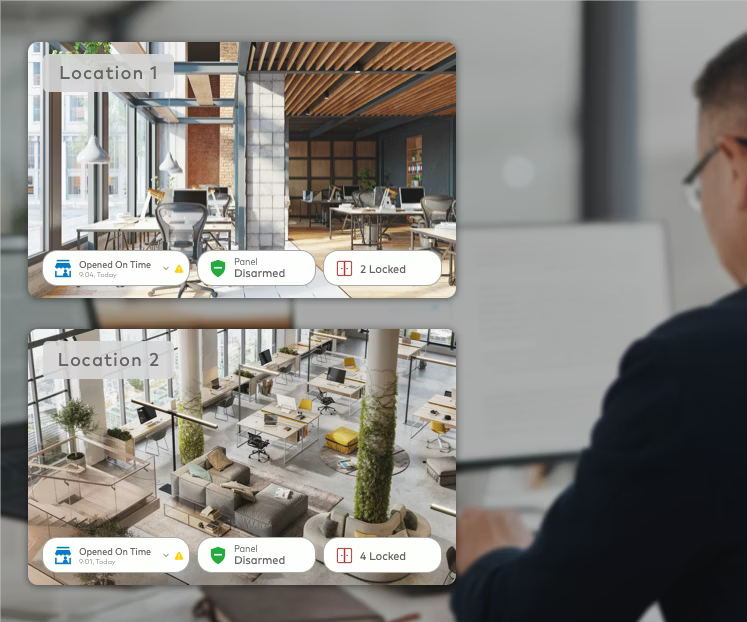
For businesses with multiple locations on a Surety Business Enterprise account, the platform lets you compare temperature patterns and energy behaviors across all sites side by side. The practical use is to identify which locations are running efficiently and which need attention; if one of three retail stores is consistently running 20 percent higher per-square-foot energy use than the other two, that is a signal worth investigating. This builds on the Alarm.com multi-site enterprise management platform, which already consolidates security, video, access control, and user management across locations into a single dashboard.
Advanced Scene Control (Open and Close Routines)
Business Plus includes Advanced Scene Control. A single "Close" tap in the Alarm.com app can arm the security system, lock all doors, set the thermostat to overnight setback, and turn off all lights simultaneously. This is the practical daily workflow that makes energy management reliable, because it does not depend on staff remembering individual steps in the right order. For a deeper walkthrough of how Scenes, Schedules, and Rules combine into a complete business operations workflow, see the article on Alarm.com automation rules, scenes, and schedules for small business.
Hardware: What Connects to the Platform
Alarm.com energy management runs on top of a flexible hardware ecosystem. The platform is open enough that you are not locked into expensive proprietary equipment, which is one of its meaningful advantages over closed commercial systems. The most relevant pieces of hardware fall into four categories: thermostats, temperature and humidity sensors, lighting and plug control devices, and energy meters.
For thermostats, the Alarm.com Intelligent Thermostat T40K is the flagship commercial smart thermostat (Alarm.com brand), and the Alarm.com Intelligent Thermostat ADC-T25 is a compact model better suited to smaller spaces. Beyond the Alarm.com-branded models, the platform supports a wide range of compatible third-party thermostats; many Z-Wave thermostats from other manufacturers work with Alarm.com, so you do not have to replace a thermostat you already like. Check with Surety to confirm whether your existing thermostat is compatible before buying new hardware.
For temperature and humidity, the Alarm.com ADC-S40-T Remote Temperature Sensor is a Z-Wave temperature sensor that reports readings in the Alarm.com app. It works with any compatible thermostat for alert-based monitoring, but its deeper integration (providing an averaged temperature reading that the thermostat uses to control the HVAC instead of relying solely on the temperature at the thermostat itself) is exclusive to Alarm.com-branded thermostats like the T40K and ADC-T25. This is particularly useful in larger rooms or open-plan spaces where the thermostat is mounted in a location that does not represent the actual average room temperature.
The DSC PG9905 PowerG Temperature Sensor is a PowerG wireless temperature sensor that reports temperature readings to the security panel and Alarm.com app; because it uses the PowerG protocol, it has excellent range and reliability, which makes it a strong choice for standalone temperature monitoring in walk-in coolers, server rooms, or storage areas independent of any thermostat. The PG9905 also accepts an optional external temperature probe, which extends its usefulness to spaces where the sensor body itself cannot sit (inside a refrigerator or freezer, or mounted outdoors) by letting the probe sit in the monitored environment while the radio stays where it has good signal.
For lighting and plug control, the relevant Surety-sold hardware includes the IQ PowerG Smart Dimmer, the IQ PowerG Smart Switch, the IQ Smart Socket PG, the IQ Smart Plug PG, and the IQ Outdoor Plug PG. These are Qolsys-branded PowerG devices that pair with the Qolsys panel and report into Alarm.com through it. Surety primarily sells them because they are not widely available through retail channels. For Z-Wave hardware (which is what Alarm.com's own automation devices use), Z-Wave Long Range (Z-Wave LR) compatible devices from brands like Zooz, Shelly, Honeywell, Leviton, GE/Jasco, and Aeotec are widely available online, and Zooz and Shelly in particular make some of the best Z-Wave devices on the market today, including models with built-in energy metering. The protocol tradeoffs for choosing Z-Wave LR over classic Z-Wave are covered in the Lighting Automation section above.
For energy meters, the Aeotec Energy Meter Gen 8 (ZWA046) is the current clamp-on Z-Wave whole-location meter (Gen 1 and Gen 2 are also supported), the Z-Wave Heavy Duty Smart Switch (ZW078) monitors and controls large-circuit loads like HVAC units, commercial refrigeration, or water heaters, and the Jasco Energy Metering Appliance Module (Z-45653WB) handles individual appliance-level monitoring. Additional compatible devices are listed in the Alarm.com hardware compatibility directory, and you should verify Alarm.com compatibility there or by checking with Surety before purchasing third-party metering devices.
Which Businesses Benefit Most
The features above translate into meaningful savings and operational improvements for several common small-business types. The specifics differ by industry but the structure is similar across them: automate the things that should not depend on a human, get alerted to the things that affect inventory or equipment, and use data to confirm changes are working.
A restaurant or café typically runs HVAC hard during prep and service, which makes scheduled setback after close a high-impact savings lever. Walk-in cooler and freezer temperature alerts catch equipment failures before food inventory is lost, which routinely pays for the entire system in a single avoided incident. A "Close" Scene tied to the closing routine arms the system, adjusts the thermostat, and turns off display case lighting in one tap, which removes the closing checklist headache.
A medical or dental office has stricter environmental requirements than most small businesses. Humidity monitoring helps ensure sterilization equipment rooms stay within safe ranges. Temperature alerts notify staff if overnight HVAC fails and refrigerated medication storage is at risk. Reliable environmental logging is also useful in HIPAA-adjacent contexts where documenting the operating conditions of clinical spaces matters.
A retail shop benefits primarily from geo-fencing and lighting automation. The owner's morning commute starts warming the store before they arrive, so opening is comfortable without running HVAC overnight. Lighting schedules align with store hours, and peak demand management (where the local utility offers a Thermostat Rewards program) reduces utility bill spikes during summer cooling months.
A warehouse or self-storage facility usually has no full-time staff on site, which makes remote monitoring the only practical option. Humidity and temperature sensors deployed across zones alert managers to conditions that could damage inventory or violate storage agreements. Lighting can run on a sunset offset so exterior lights track the actual season without manual adjustments through the year.
A small office is the simplest case. The business arms every evening at close, and the Smart Away feature automatically holds the thermostat at setback until someone returns. Monthly energy reports help the owner compare against prior months and confirm the system is doing its job.
ROI: Estimating Your Savings
The savings math for energy management is more straightforward than it is for fleet tracking or video analytics, because the inputs are clean: your monthly utility bill, the share of that bill going to HVAC, and a reasonable percentage reduction from automated scheduling and setback. Use the standard ROI formula and plug in honest numbers.
ROI (%) = ((Annual Savings − Annual Cost) ÷ Annual Cost) × 100
Walk through a concrete example. Take a 2,000 square foot small business location paying roughly $500 per month in electricity. Using the EIA CBECS figure that HVAC accounts for 35 to 40 percent of total commercial energy use, assume 40 percent of the bill (about $200 per month) goes to heating and cooling. A 15 percent reduction (a conservative figure compared to the DOE estimate of around 10 percent from programmable thermostat use alone, since this includes setback on arm, geo-fencing, and scheduled setback together) saves $30 per month, or $360 per year. The Business Plus plan is $26 per month self-monitored, or $312 per year, which means the energy savings alone nearly offset the entire plan cost. The plan also includes full security alarm monitoring, intrusion sensors, and the rest of the Alarm.com platform, so the energy savings are effectively bundled with everything else at the same price.
The math gets more compelling at larger utility bills. A business paying $1,500 per month with HVAC at 40 percent of the bill spends $600 per month on heating and cooling. A 15 percent reduction is $90 per month, or $1,080 per year, which is more than three times the cost of the self-monitored plan. Add lighting automation (most small businesses leave lights on overnight or after close at least occasionally) and the savings grow further. Add a Thermostat Rewards utility incentive where it is available, and the picture improves again. The honest caveat is that all of these savings depend on the system actually being configured: a Business Plus account with no schedule set, no Smart Away enabled, and no Scenes built will not produce the same savings as one where the closing routine actually fires every night. The features only work if they are turned on.
Manual vs. Alarm.com-Managed Energy: Side by Side
The clearest way to see the difference is to compare what energy management looks like manually versus on the Alarm.com platform. The table below covers the dimensions where the two approaches diverge.
| Dimension | Manual / Standalone Approach | Alarm.com-Managed (Business Plus) |
|---|---|---|
| Thermostat control | Wall thermostat, manually adjusted | Schedule by time of day and day of week, one thermostat per HVAC zone, app control |
| After-hours setback | Depends on staff remembering at close | Automatic on arm-Away or geo-fence exit; runs every night |
| Multi-location visibility | Separate logins or no remote view at all | Single dashboard across all sites, side-by-side comparison |
| Equipment failure alerts | Discovered when food spoils or staff complain | Phone alert when temperature or humidity crosses threshold |
| Lighting control | Wall switches, manual on/off | Scheduled on/off, sunrise/sunset offsets, response to alarm or arm events |
| Energy usage data | Monthly utility bill total only | Real-time kWh and dollar usage, whole-location, circuit, and appliance level |
| Open/close routine | Multi-step checklist, easy to forget steps | One-tap Scene arms, locks, setback, lights off in one action |
The point of the comparison is not that manual control is impossible, it is that automated control removes the human variable from the things that matter most for energy waste, and it does so at a price that is paid back in many cases by the energy savings alone.
How to Get Started With Surety Business
Energy management is included in the Surety Business Plus plan, which adds energy management and Advanced Scene Control on top of the standard Business Alarm plan. Pricing is $26 per month self-monitored or $33 per month with professional monitoring, both on a month-to-month basis with no contract, no activation fees, and no equipment lease. Surety Business is an authorized Alarm.com dealer for small and medium-sized businesses, and the same plan that delivers energy management also covers security alarm, video, access control, and the rest of the commercial Alarm.com platform from a single account and a single app. Hardware can be sourced directly from Surety (PowerG devices, Alarm.com-branded thermostats, and some Z-Wave other devices), or you can buy compatible devices on your own; Surety is happy to help confirm compatibility before you purchase. The setup workflow is straightforward: pick the plan, install or pair the thermostats and energy hardware you want to use, build a schedule and a Close Scene, and turn on Smart Away. From there, the system runs on its own.
Frequently Asked Questions
- Will I save more with Alarm.com energy management than with a Nest or Ecobee?
For a single-zone home, probably not by much. For a small business, almost certainly yes, because the Alarm.com platform integrates with the security system (automatic setback when the system is armed), supports multiple thermostats on a single account (one per HVAC zone) along with remote temperature sensors, runs lighting and plug loads on the same schedules, and includes energy meters that report actual kilowatt-hour usage. A consumer thermostat manages temperature on its own; Alarm.com manages all of your thermostats, lighting, plug loads, security state, and energy meters together.
- Do I need to replace my existing thermostat to use Alarm.com energy management?
Not necessarily. Alarm.com supports a wide range of compatible third-party Z-Wave thermostats in addition to its own branded T40K and ADC-T25 models, so many existing thermostats can be brought onto the platform without replacement. Check with Surety to confirm whether your specific thermostat is compatible before buying new hardware. Note that the deeper averaged-sensor integration with the ADC-S40-T Remote Temperature Sensor is exclusive to Alarm.com-branded thermostats.
- Is Thermostat Rewards available in my area?
It depends entirely on your local utility company. Not all utilities offer a demand response program, and eligibility varies by region. You can check availability for your specific business address when you enroll your thermostat in the Alarm.com app or web dashboard, and Surety maintains a list of active Alarm.com Thermostat Rewards programs on the Surety support forum that is worth a look, but the list can fall out of date so check with Surety to confirm. Treat the program as a potential bonus where it is available, not as a guaranteed feature.
- What is the difference between thermostat scheduling and energy monitoring?
Thermostat scheduling automates setpoints by time of day and day of week so the HVAC is not running unnecessarily when the building is empty. Energy monitoring measures actual electricity usage in kilowatt-hours and dollars at the whole-location, circuit, or individual-appliance level, so you can see what is consuming energy and how much. Scheduling automates behavior; monitoring tells you what is happening. They complement each other; most businesses benefit from both.
- What does the energy management plan cost and is there a contract?
Energy management is included in the Surety Business Plus plan, which is $26 per month self-monitored or $33 per month with professional monitoring. Both options are month-to-month with no contracts, no activation fees, and no hidden equipment lease. Hardware is purchased separately and is one-time, not leased.
- Can I monitor a walk-in cooler or server room without buying a new thermostat?
Yes. Standalone temperature sensors (the Alarm.com ADC-S40-T over Z-Wave or the DSC PG9905 over PowerG) report temperature readings to the panel and the Alarm.com app independently of any thermostat. You can set alert thresholds (for example, notify if the cooler climbs above 40 degrees or the server room above 80 degrees) so you get a phone alert as soon as conditions move outside the safe range, without having to install a thermostat in that space.
