

Your driver calls in from a job site two hours away: the check engine light just came on. Is it the gas cap? A misfiring cylinder? A transmission warning that means the van should not move until a mechanic looks at it? Without a diagnostic scanner in your hand, there is no way to know from the office. You either pull the vehicle off the road and lose a day of productivity, or you tell the driver to keep going and hope for the best. Neither option is good, and neither one is necessary anymore. A plug-in OBD-II telematics device can read the exact code that triggered that light and send it to your phone before the driver even finishes the call.
What Is OBD-II and Why Does It Matter for Fleet Operators?
OBD-II (On-Board Diagnostics, second generation) is a standardized vehicle monitoring system that became federally mandatory in the United States for all light-duty vehicles under 8,500 pounds starting with model year 1996, and for medium-duty vehicles between 8,500 and 14,000 pounds starting in 2005. Every vehicle in your fleet built after 1996 has it. The "standardized" part is what makes it powerful for fleet operators: regardless of whether you run Ford Transits, Chevy Express vans, Ram ProMasters, or a mix of all three, every vehicle uses the same physical diagnostic port (SAE J1962) and the same code format (SAE J1979). A single scanner reads them all the same way.
The OBD-II system works by continuously monitoring hundreds of sensors throughout the vehicle: oxygen sensors, mass airflow, engine coolant temperature, throttle position, fuel trims, transmission fluid pressure, and more. When any sensor or system reports a value outside its acceptable range across multiple drive cycles, the vehicle's onboard computer (the ECM or PCM) stores a Diagnostic Trouble Code and typically illuminates the malfunction indicator lamp (MIL), the check engine light, on the dashboard. The code is a precise five-character identifier that points to exactly which system and subsystem triggered the fault.
For most of automotive history, reading those codes required a physical scanner plugged into the OBD-II port in a shop. Telematics devices changed that. A compact plug-in connector reads the same live data stream over LTE and delivers it to a fleet manager's dashboard in real time, no shop visit required. That shift from reactive to proactive is the core value of OBD-II data for SMB fleet operators.
What Alarm.com Connected Fleet Monitors
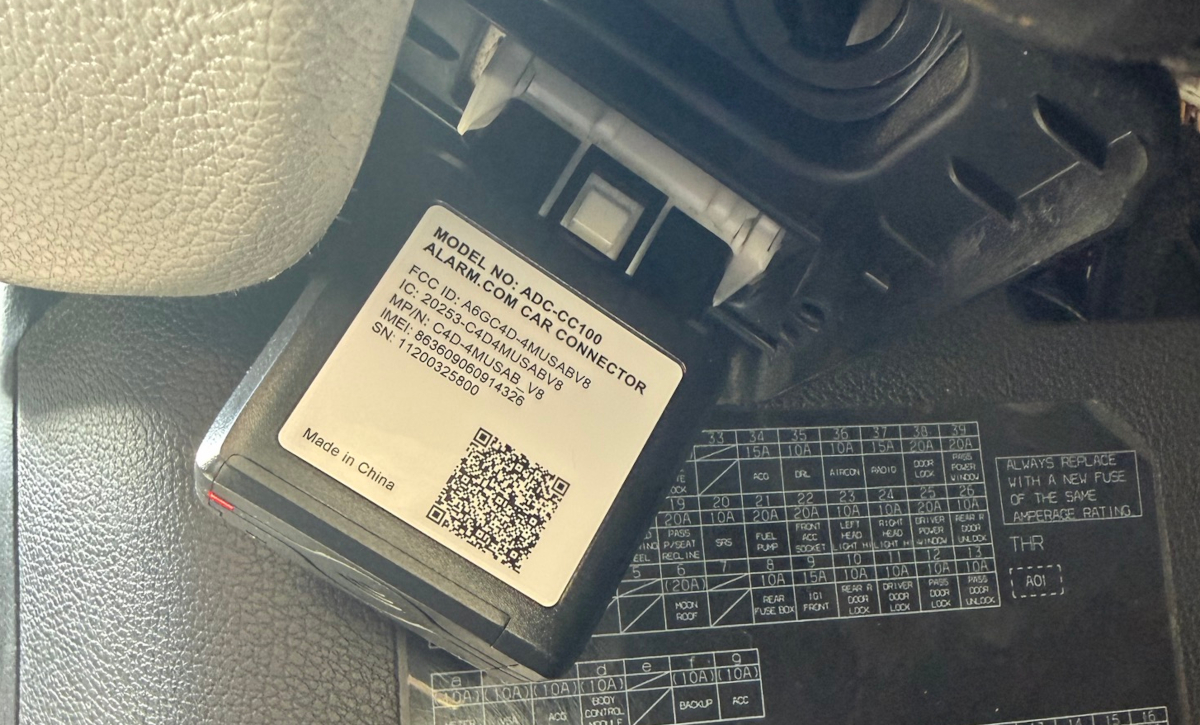
Alarm.com Connected Fleet, available through Surety Business, uses the ADC-CC100-BX Car Connector: a plug-in OBD-II device that communicates over built-in LTE Cat-M cellular and reports vehicle health data to the Alarm.com dashboard and app in real time. Here is what it watches.
Low car battery. The OBD-II port has continuous access to the vehicle's 12V system voltage. When that voltage drops below the threshold that indicates a weak or failing battery, Connected Fleet sends an alert. A dead battery is one of the most common causes of fleet no-starts, and it almost always gives warning signs first. Catching it early turns a reactive tow-and-replace situation into a scheduled $90 to $200 battery replacement during the next service visit.
Unexpected movement. If a vehicle registers motion while the engine is off, Connected Fleet flags it immediately. The most common cause is unauthorized use or theft, but it also catches vehicles that roll on a slope or are towed without notification. Either way, movement with no engine activity is worth knowing about the moment it happens.
Maintenance reminders and document expiration. Connected Fleet can alert when scheduled maintenance is coming due and when user-entered documents like registration, insurance, or inspection certificates are about to expire. These are scheduling and compliance reminders that keep the fleet organized, not OBD-II signals. They live in the same vehicle health dashboard alongside the diagnostic data.
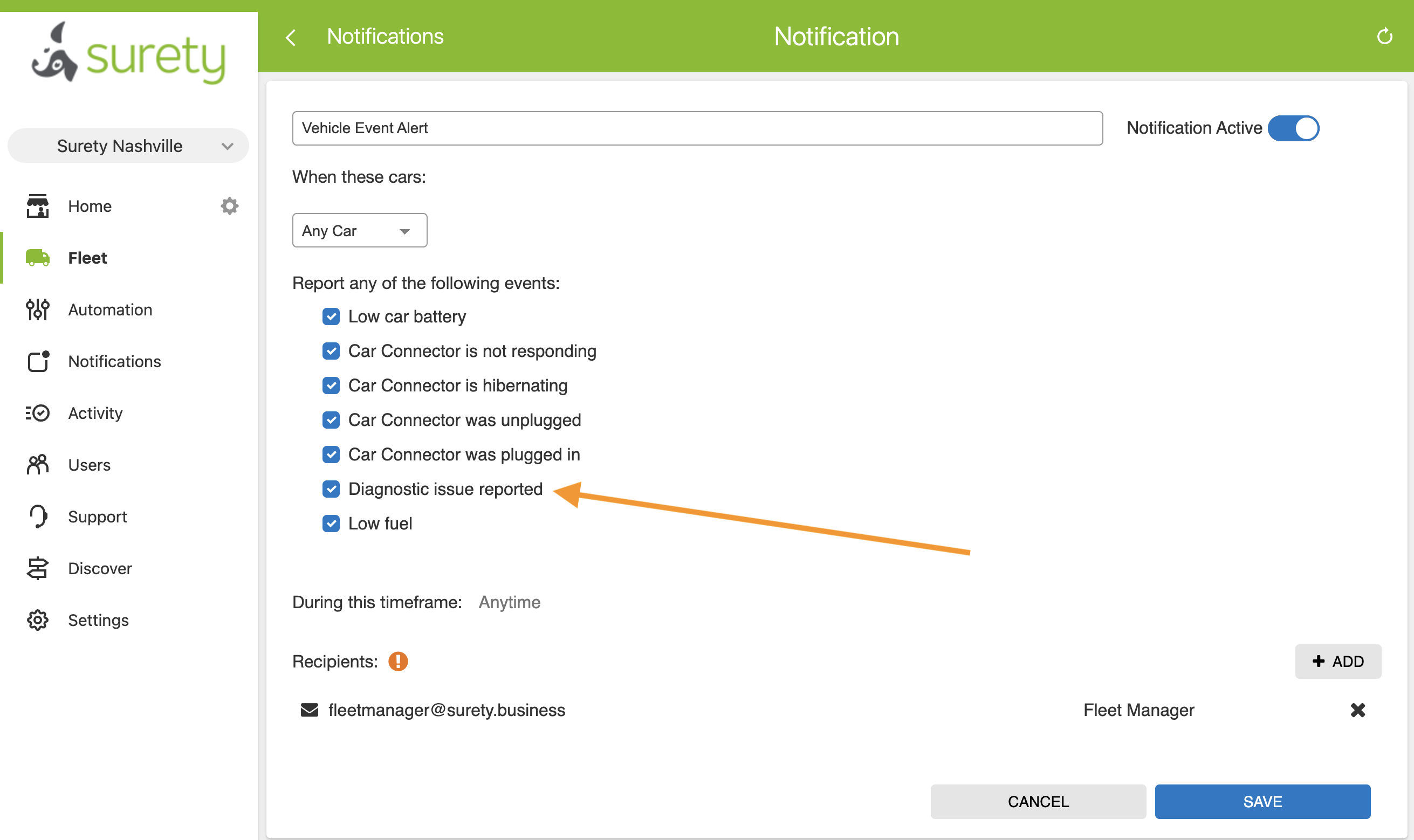
Diagnostic trouble codes. This is the feature that changes how fleet operators relate to vehicle health. When the vehicle's onboard computer stores a DTC, whether or not the check engine light has appeared on the dashboard yet, Connected Fleet captures it and sends an alert to the fleet manager. The alert shows the actual code, something like P0171 or P0300, along with a Learn More link that opens search results explaining what that specific code means and what typically causes it. More on this in the next section.
How to Read a DTC
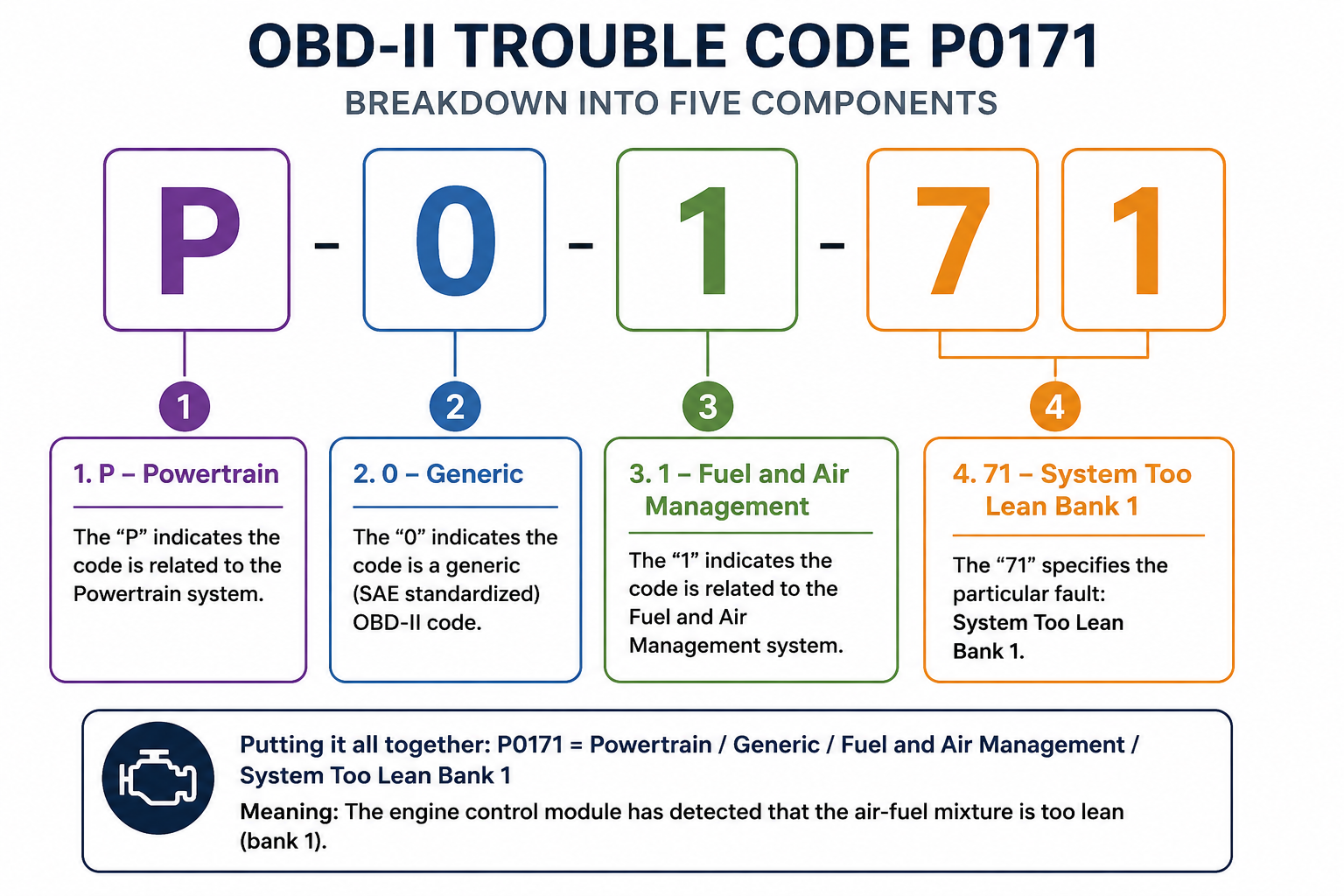
Every OBD-II Diagnostic Trouble Code follows the same five-character structure: one letter followed by four digits. Understanding the structure lets you make an initial assessment of the category and likely seriousness before you even look the code up. The breakdown, as defined by the OBD-II standard and summarized at OBD-Codes.com, works as follows.
The first character identifies the vehicle system involved. P codes (Powertrain) cover the engine and transmission and represent the vast majority of codes a fleet operator will see. B codes (Body) cover systems like airbags and climate control. C codes (Chassis) cover ABS, suspension, and steering. U codes (Network) indicate communication failures between the vehicle's control modules.
The second digit tells you whether the code is universal or make-specific. A 0 means it is a generic code standardized across all manufacturers: P0171 means the same thing on a Ford as it does on a Chevy. A 1 means it is an enhanced, manufacturer-specific code, which requires knowing the make and model to interpret correctly.
The third digit identifies the subsystem within the system. For the P (Powertrain) codes that dominate fleet diagnostics: 1 is fuel and air management, 2 is the fuel injector circuit, 3 is ignition and misfires, 4 is emission control, 5 is vehicle speed and idle control, 6 is computer and output circuits, and 7 or 8 is the transmission.
The fourth and fifth digits identify the specific fault within that subsystem. P0300 is random multiple cylinder misfires; P0301 through P0308 each pinpoint the misfire to a specific cylinder.
Common Fleet DTCs and What They Mean
The table below covers the OBD-II codes most likely to appear in a typical SMB service fleet, along with what they signal and how urgently they generally need attention. These are starting points for research, not repair diagnoses: always confirm with a mechanic who can perform a hands-on inspection.
| Code | Subsystem | What It Signals | Urgency |
|---|---|---|---|
| P0300-P0308 | Ignition/Misfire | Cylinder misfire, random or specific cylinder | High: continued driving can damage the catalytic converter and cause engine damage |
| P0171 / P0174 | Fuel/Air | System running too lean, Bank 1 or Bank 2 | Medium: often a vacuum leak, dirty MAF sensor, or failing O2 sensor; reduces fuel economy |
| P0420 / P0430 | Emission | Catalytic converter efficiency below threshold | Medium: expensive repair if left to fail; schedule inspection before emissions test |
| P0401 | Emission | Insufficient EGR flow | Medium: common on higher-mileage vehicles; affects emissions compliance |
| P0500 | Speed/Idle | Vehicle speed sensor fault | Medium: can affect transmission shift behavior and cruise control |
| P0700 | Transmission | Transmission control system fault | High: broad ECU flag indicating the transmission needs diagnosis before long trips |
| U0100 | Network | Lost communication with ECM/PCM | High: potential wiring or module failure that can cause erratic behavior across multiple systems |
It is also worth understanding the three states a code can be in. A pending code means the vehicle's computer detected the fault once but has not confirmed it across enough consecutive drive cycles to turn on the check engine light. A confirmed code (also called a stored code) means the fault appeared consistently enough that the check engine light illuminated. A permanent code means the fault has been confirmed and the code will not clear even if someone manually resets it with a scanner: the vehicle's own monitoring system must verify the repair is complete before the code clears. The relevance for fleet operators is that Connected Fleet can surface a pending code before the check engine light is visible to the driver, giving you an earlier warning window to investigate.
The Learn More Workflow
The practical value of seeing the actual DTC in Connected Fleet is that it turns a vague problem into a specific one. Before telematics, the conversation went: "The check engine light is on." Now it can go: "We have a P0171 on the white van. That is a lean fuel condition on Bank 1, probably a vacuum leak or a dirty mass airflow sensor. I'll have the shop check those first." That shift from vague to specific saves diagnostic time at the shop, where nearly half of U.S. repair shops charge $120 to $159 per hour, and it lets you make a better-informed decision about whether the vehicle needs to come in today or can run through the end of the week.
When Connected Fleet shows a diagnostic alert, the Learn More link opens search results for that specific code. The results are not a repair manual: they tell you what the code category means and what mechanics commonly find as causes. The actual diagnosis still requires a mechanic with hands on the vehicle. But going into a shop appointment knowing the code, the likely system, and the two or three most common causes is meaningfully different from walking in and pointing at a light.
Proactive vs. Reactive: The Business Case
The cost difference between catching a DTC early and ignoring it until failure is not small. A P0300 misfire code that surfaces as a pending alert might mean a worn spark plug: a $30 part and an hour of shop time. The same misfire left unaddressed long enough can destroy a catalytic converter, a repair that routinely runs $1,200 to $2,500. A P0700 transmission flag caught early can mean a $200 solenoid replacement. The same flag ignored until the transmission fails can mean $5,000 to $6,000 or more for a full replacement.
Consider a concrete example: a five-van plumbing company catches a P0420 on their highest-mileage vehicle during a routine week. They schedule the catalytic converter replacement before the vehicle's state emissions test, avoiding a failed inspection, a $400 retest fee, and the possibility of the van being taken off the road at the worst time. The repair still happens, but on their schedule, not the vehicle's.
Beyond the repair cost itself, an unexpected breakdown during a service day carries compounding costs. A tow alone averages around $129 but can run well over $400 depending on distance. A missed service appointment means lost revenue and a customer who may not reschedule. If the only van rated for a specific job type is the one that broke down, the downstream scheduling impact ripples across the week. For a small fleet where each vehicle represents a significant portion of daily revenue capacity, one prevented breakdown can pay for a year of telematics monitoring. Proactive maintenance also reduces what you pay for fleet insurance: insurers increasingly reward documented vehicle maintenance and telematics use with lower premiums.
How Alarm.com Connected Fleet Fits In
The hardware is a single $99 device per vehicle: the ADC-CC100-BX Car Connector, which plugs into the OBD-II port under the dashboard in about five seconds. No wiring. No installer appointment. No tools. It powers on automatically, connects over its built-in LTE cellular, and begins reporting. A backup battery keeps it active even if the vehicle battery dies or the connector is unplugged, and you will receive an alert for either event.
All of the vehicle health alerts described above appear in the Alarm.com app and web dashboard alongside GPS tracking, trip history, driver behavior scores, and idle time data. The same platform that flags a P0171 also tracks idling and routing patterns that directly affect fuel costs. Alerts can be configured as push notifications, email, or SMS. For businesses already on Surety Business for facility security and cameras, fleet data shares the same platform, the same login, and the same app: no second software layer and no additional vendor.
Surety Business prices Connected Fleet at $15 per month for the first vehicle, $12 for vehicles two through twenty, $10 for vehicles twenty-one through fifty, and $8 per vehicle for fleets of fifty-one or more. No long-term contracts. If you already have a Surety business security plan, fleet adds on with a $3 per month discount. A five-van HVAC company pays $64 per month for complete fleet visibility including real-time location, driver behavior monitoring, and live OBD-II diagnostic alerts across the whole fleet.
Frequently Asked Questions
- What is an OBD-II diagnostic trouble code?
A Diagnostic Trouble Code (DTC) is a five-character code stored by a vehicle's onboard computer when a sensor or system reports a fault. The format is one letter (P for Powertrain, B for Body, C for Chassis, U for Network) followed by four digits that identify the specific subsystem and fault. These are the same codes a mechanic reads with a scanner during a shop visit.
- Does the check engine light have to be on for Connected Fleet to detect a code?
Not necessarily. The OBD-II system stores pending codes when a fault is detected once, before the check engine light illuminates. Connected Fleet can surface these early-warning codes, giving you a head start before the driver notices anything on the dashboard.
- What does the Learn More link in a Connected Fleet diagnostic alert do?
It opens search results for that specific OBD-II code. The results explain what the code category means and list the most common causes, so you can have a specific, informed conversation with your mechanic rather than walking in with only "the check engine light is on." The search results are a research starting point, not a repair diagnosis.
- Are all check engine codes equally urgent?
No. Some codes, like a random misfire (P0300) or a transmission flag (P0700), need attention before the vehicle goes on a long trip. Others, like a marginal lean fuel condition (P0171), may give you several days to schedule service without risking immediate damage. The Learn More workflow helps you make that judgment call without a mechanic on speed dial for every alert.
- What vehicles work with the Alarm.com CC100 Fleet Connector?
The CC100 is compatible with any gas-powered vehicle manufactured after 1996, when OBD-II became mandatory in the United States. Hybrid and electric vehicles with an OBD-II port are also supported.
- Do I need an existing Surety security system to use Connected Fleet?
No. Connected Fleet is available as a completely stand-alone product with no security alarm required. If you do have a Surety business security plan, fleet integrates into the same Alarm.com platform at a $3 per month discount. See surety.business/plans for details.
