

When your business alarm trips, an ordinary unverified signal is one of the lowest-priority calls a police department handles, and in a growing number of cities it may not get an officer dispatched at all. A video-verified alarm is different: because someone has actually confirmed a person or crime on camera, police treat it as a crime in progress and respond at high priority. That single distinction, whether an alarm is verified, increasingly decides how fast help arrives, whether it arrives, and whether you get fined for the false ones.
This matters because the numbers behind alarm response are worse than most business owners realize, and because verification is now something a self-managed business can turn on without a long dealer contract. Here is how alarm response actually works, why unverified alarms are losing priority, and what video verification changes for a business.
Your Alarm Might Be a Low-Priority Call (Here Is Why)
The uncomfortable reality is that police have learned to distrust alarms, and the data explains why. When an alarm signal reaches a monitoring center, a remote guard first tries to clear it by phone, a practice the industry calls Enhanced Call Confirmation, which requires at least two calls to different numbers (typically the premises first, then a second contact such as the owner's cell phone) to see whether it was a mistake. It is called enhanced because the older standard was a single call, and requiring that second call to a different number is the enhancement. If they cannot reach anyone or clear it, they request police. The problem is what officers find when they arrive.
94 to 98 Percent of Alarm Calls Are False
According to a U.S. Department of Justice problem-oriented policing guide on false burglar alarms, between 94 and 98 percent of alarm activations are false, and the rate is higher in some jurisdictions. False alarms account for somewhere between 10 and 25 percent of all calls to police, and each one consumes roughly 20 minutes of police time, usually for two officers. The same guide notes that in 2002 police responded to about 36 million alarm activations at an estimated annual cost of 1.8 billion dollars. When almost every alarm turns out to be nothing, departments respond accordingly, and unverified alarms drift to the bottom of the priority list.
Businesses have it worse than homes. That same Department of Justice research found commercial properties can have false alarm rates as much as three times higher than residential ones, largely because more employees share the system and training is uneven. User error (an employee entering the wrong code, leaving a door propped, or arming with a back room still occupied) is the single largest cause of false alarms. In other words, the busier and more staffed your business, the more false trips you are likely to generate, and the less seriously your alarm gets taken.
The Rise of Verified Response: When Police Won't Come for an Unverified Alarm
Faced with this flood, many cities stopped treating all alarms equally. Some adopted verified response, a policy under which police will not dispatch to an alarm unless a human, audio, or video has confirmed an actual crime. Las Vegas is a prominent example. According to the Las Vegas Metropolitan Police Department's communications FAQ, the department does not dispatch a unit to a tripped burglar alarm on its own, so an unverified alarm gets no officer sent. In a verified-response city like this, confirmation of an actual crime is what earns a police response, and that is exactly what video verification supplies: once a remote guard has verified an intrusion on camera, it is a confirmed crime that police will respond to. The results of policies like this are striking. A peer-reviewed study in the International Review of Law and Economics examined Salt Lake City's move to verified response and found it was associated with an 87 percent annual reduction in police alarm response calls, a 26 percent reduction in burglaries, and faster response to all police calls. Private responders in that model arrived on average within about 15 minutes and requested police only when they confirmed a burglary.
Not every city has gone that far. Many instead follow the Security Industry Alarm Coalition's Model Alarm Ordinance, which keeps police responding but shifts cost and accountability onto chronic offenders. In a study covered by SecurityInfoWatch on the SIAC Model Alarm Ordinance, communities that adopted it cut false calls while maintaining police response, and the share of registered alarms generating zero dispatches in a year reached as high as 92 percent in Charlotte-Mecklenburg. That ordinance explicitly credits Enhanced Call Confirmation together with video, audio, and other means of confirmation for the improvement. The direction of travel is clear: confirmation is becoming the price of a real police response.
What Video Verification of an Alarm Actually Means
Video verification is the fix that lines up with where policing is headed. It pairs your intrusion alarm with cameras so that a real person can see what set the alarm off before anyone calls the police.
From "Routine Alarm" to "Crime in Progress"
Here is the shift. When an unverified alarm comes in, the dispatcher knows only that a sensor tripped, and given the odds, treats it as probably nothing. When a remote guard has looked at the live video and can report an actual person inside your building, the call is no longer a routine alarm, it is a crime in progress. That reclassification is the whole point. It earns a priority dispatch, it dramatically improves the odds an officer arrives while the suspect is still on scene, and it sidesteps the non-dispatch problem in verified-response cities. The Salt Lake City outcomes above show what verification-based approaches do at the community level, and the same logic protects your individual building: a confirmed intrusion gets treated like the emergency it is.
How It Works: Sensor Trips, a Remote Guard Checks the Live Video
The mechanism for visual verification is triggered by your alarm. An intrusion sensor, a door or window contact, a motion detector, or a glass-break sensor, trips the alarm. That signal prompts a remote guard at the monitoring center to pull up your live cameras, confirm whether it is a genuine break-in or a false trigger, and dispatch police on a verified crime in progress. Because the trigger is a sensor, the perimeter has typically already been breached by the time the guard is watching, so the priority is a fast, verified dispatch to catch an intruder who is already inside. The guard can also speak to the intruder directly through a camera to warn them off. You are not left out of the loop either: you receive the alarm with camera clips in the Alarm.com mobile app and can confirm or dismiss it yourself.

The Remote Guard's Visual Confirmation Is What Stops False Dispatches
It is worth being precise about how verification cuts down on false alarms, because the mechanism is often described wrong. With visual verification of alarms, the trigger is still an alarm sensor, so the alarm itself can still be tripped by wind, a pet, or an employee mistake. What verification changes is whether that false alarm becomes a false police dispatch, the kind that wastes officers and generates fines. When the alarm fires, the remote guard looks at the video, sees there is no intruder, and simply does not call the police. The false trip gets dismissed instead of dispatched. It is the human eyes on the video, not any automated filter, that keep a false alarm from turning into a false dispatch, and that keep your business off the chronic-offender list.
The Payoff: Faster Response, Fewer Fines, Better Odds of an Arrest
Put the two together and a verified alarm outperforms an unverified one on nearly every axis that matters.
| Factor | Unverified (traditional) alarm | Video-verified alarm |
|---|---|---|
| How police classify it | Routine alarm, assumed likely false | Crime in progress, confirmed |
| Dispatch priority | Low | High |
| Likelihood of dispatch in a verified-response city | May not be dispatched at all | Dispatched, because it is confirmed |
| False alarms that become false police dispatches | Common | Filtered out by the remote guard before dispatch |
| Remote guard reviews live video before dispatch | No | Yes, available today |
| Talk the intruder down through the camera | No | Yes, available today |
| Odds of an on-scene arrest | Low | Much higher |
| Exposure to false alarm fines | High | Reduced |
| Visual proof for insurance and police reports | No | Yes |
The fine column is not a small matter, and the arrest column is where the community data becomes personal. An officer sent to a confirmed crime in progress arrives expecting to find someone, while an officer sent to yet another probable false alarm does not. That difference in urgency, multiplied across the priority bump verification earns, is why confirmed alarms produce far more on-scene apprehensions.
The Hidden Cost of False Alarms to Your Business
False alarms are expensive even when nothing is stolen, and the costs stack up in ways that are easy to overlook. The most direct is fines. Cities set their own schedules, and they escalate. San Francisco's alarm program, for example, charges penalties for operating without registration on top of per-incident false alarm fees, and the Los Angeles Police Commission's alarm policy sets a fee for the first false alarm in a year with an added amount for each one after that, with the fees higher for users who lack a valid alarm permit. These are examples, not universal figures, and they vary widely by jurisdiction, but the pattern is consistent: the more false dispatches you rack up, the more each one costs.
False Alarm Fines and the "Chronic Abuser" List
Beyond the per-incident fees, repeated false alarms can land a business on a chronic-offender list, which in some cities means steeper fines and, under verified-response rules, the loss of police response entirely until the problem is fixed. There is also the quieter cost of the alarm that no one answers: if your unverified signal is deprioritized or ignored and a real break-in is underway, the loss happens anyway. A rough way to frame the annual exposure is worth sketching out before you decide verification is not for you.
Annual false-alarm cost ≈ (False dispatches per year × Average fine) + Risk-weighted cost of a real break-in that goes unanswered
The first term is what most owners see on an invoice. The second term is the one verification most changes, because a verified alarm is the one that actually brings police when it counts.
Talking the Intruder Down: Deterrence and the Reactive-vs-Proactive Difference
Verification confirms a break-in, but the systems built around it can also try to stop one, and it helps to understand three distinct layers.
The first is automatic and available today. On-camera AI Deterrence detects a person in a zone you define and, with no human involved, plays a spoken warning through the camera speaker while triggering lights and sirens, recording the whole event. Cameras like the ADC-V730 build this in, as described in Alarm.com's announcement of the V730 spotlight camera with proactive deterrence. Because it is automatic, it responds instantly, but it is the camera acting on its own, not a person.
The second layer is the human remote guard, and it is part of visual verification of alarms today. Once a sensor trips, the remote guard can speak live to the intruder through the camera, making clear they are being watched, in addition to dispatching police. Alarm.com's underlying capability for this live video review and talk-down is its Remote Video Monitoring Console.
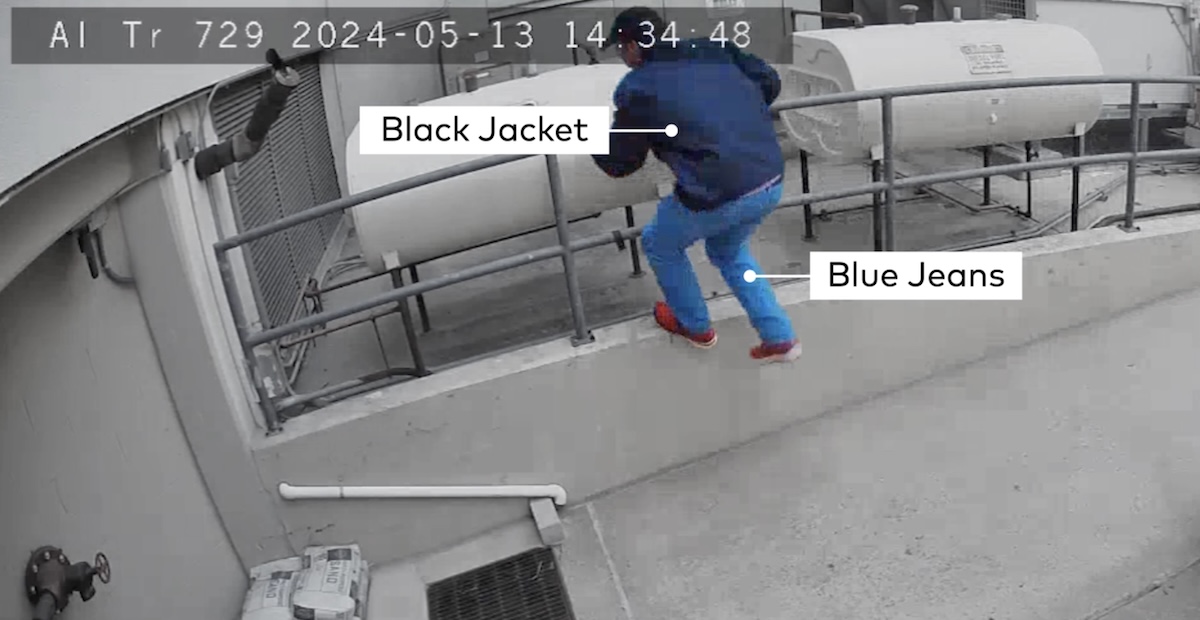
The third layer moves the human guard earlier in the timeline, and it is where the reactive-versus-proactive distinction matters. With visual verification, an alarm sensor is the trigger, so the perimeter is usually already breached and the guard's job is to verify and get police there fast. A proactive service instead uses the cameras' own video analytics, person and vehicle detection, typically on outdoor cameras, as the trigger, so a remote guard is watching the moment someone approaches, before the building is breached. That changes the guard's goal from verify-and-dispatch to deter-and-prevent: the guard tries first to warn the person off and stop the break-in from happening, while still able to dispatch police. Surety already runs this proactive service for homes as Surety Cam Pro, and the business version, Business Cam Pro, is launching soon. It is a more capable form of coverage, and because analytics detect far more events than an alarm sensor ever would, the guard checks in much more often, so proactive monitoring costs more than sensor-triggered verification. The payoff is catching trouble at the fence line rather than in the stockroom.
Where Video Verification Falls Short
Video verification is a strong upgrade, not a magic wand, and it is worth being clear about the limits.
It only works where your cameras can see. A verified response depends on a camera covering the entry or the sensor zone, so blind spots mean no visual confirmation. Plan camera placement around the doors, windows, and assets that actually matter.
You do need the right ingredients, though visual verification itself is not a separate line item. It is included with a professional alarm monitoring plan that has cameras, so what it requires is professional monitoring (so a remote guard is available) plus cameras positioned to see the protected areas. You enable visual verification and tell the monitoring center which cameras the remote guard may access. The cost consideration is having monitoring and cameras at all, not an extra verification charge. The proactive service described above, Business Cam Pro, is the more involved, higher-cost option.
Sensor-triggered verification is also reactive by design. Because the alarm sensor is the trigger, the perimeter is usually already breached by the time the guard is watching, so its strength is a fast verified dispatch, not prevention. That still beats an unverified alarm, and the proactive analytics-triggered approach is the one aimed at stopping a breach before it happens.
Local rules vary, so check your own city's alarm ordinance rather than assuming any one policy applies. Some cities still respond to unverified alarms with fines for repeats, others require verification, and permit requirements differ. Cameras also carry privacy and notice considerations when they capture employees or public areas, so keep coverage focused on security-relevant zones, a balance we cover in our guide to monitoring without creating an HR problem. Finally, verification improves the odds of an arrest sharply, but it is not a guarantee, since response times and outcomes still depend on local police.
How to Add Video-Verified Alarms to Your Business (Without a Long Contract)
Surety Business is the only DIY Alarm.com dealer focused specifically on Alarm.com for Business, built for companies that want to self-manage. The Alarm.com platform is sold only through authorized dealers and never direct to consumers, so a dealer is how any business gets on it, and Surety's entire model is built around putting you in control: you build and run your own system, month to month, with no long-term contract, and you own your equipment. Professional monitoring is the optional add-on, and self-installing does not mean self-monitoring: you can manage the system day to day and still have a 24/7 monitoring center standing by.
The recipe for video-verified alarms is straightforward. Add professional monitoring, put cameras where they can see your entries and assets, then enable visual verification and choose which cameras the remote guard can access. From that point on, an alarm brings a remote guard to your live video before police are called, a false trip gets dismissed instead of dispatched, and a real intrusion gets treated as a crime in progress. Business Cam Pro, the proactive analytics-triggered service for engaging intruders before a breach, is coming soon as a higher-tier option.

Two housekeeping steps make the whole thing work better. Register your alarm with your local jurisdiction so you have a valid permit, which lowers fine exposure in most cities. And keep employee training current, since user error is the top cause of false alarms and no amount of verification makes untrained staff stop propping the back door. For real-world setup questions, the Surety support forum is full of business deployments to learn from.
Frequently Asked Questions
- Why is police response to my business alarm so slow?
Because most alarm calls are false. A U.S. Department of Justice guide on false burglar alarms found that between 94 and 98 percent of alarm activations are false, so departments rank unverified alarms as low priority and some cities will not dispatch at all without verification. A video-verified alarm is treated as a crime in progress and gets a priority response.
- What is a video-verified alarm?
It is an alarm where a trained remote guard reviews the live camera video to confirm an actual person or crime in progress before police are dispatched. The alarm sensor fires first, then a remote guard (and you, in the app) checks the cameras. That confirmation reclassifies the call from routine alarm to crime in progress, which earns a faster, higher-priority response and filters out false triggers like wind, shadows, and pets.
- Will video verification reduce my false alarm fines?
Typically yes. With visual verification of alarms, when a sensor trips, a remote guard reviews the live video and only requests police on a confirmed threat, so a false alarm gets dismissed instead of becoming a false police dispatch (the kind that generates fines). Fewer false dispatches keeps you off the chronic-abuser fine schedules that cities like San Francisco and Los Angeles apply, where fines escalate with repeat incidents and are higher without a valid permit.
- Does self-installing my system mean I have to self-monitor it?
No. With Surety Business you can self-manage the system day to day and still add 24/7 professional monitoring with visual verification of alarms, month-to-month, with no long-term contract. Self-installed refers to who sets up the equipment; monitoring is a separate choice.
- Can a remote guard see my cameras and talk to an intruder?
Yes. With visual verification of alarms, when an alarm sensor trips, a remote guard pulls up your live cameras, confirms whether it is a real intrusion, and can speak to the intruder through the camera to warn them off before or while police are dispatched. A service launching soon for business, Business Cam Pro, uses the same remote guard but triggers on video analytics (person or vehicle detection) on outdoor cameras, so the guard can engage before the perimeter is breached. Surety already offers that proactive version for homes as Surety Cam Pro.
- What is the difference between visual verification and proactive video monitoring?
The remote guard has the same capabilities in both (review live video, talk down, dispatch police), but the situation changes what they do. Visual verification of alarms is triggered by an alarm sensor, so the perimeter is usually already breached and the guard's priority is verifying the break-in and dispatching police fast. Proactive video monitoring (Business Cam Pro) is triggered by video analytics on outdoor cameras, so the guard engages someone before they get in and typically tries first to deter and scare them off to prevent the break-in, while still able to dispatch police.
- Does video verification cost extra?
Visual verification of alarms is not a separate paid add-on. It is included with a professional alarm monitoring plan that has cameras, so all you need is professional monitoring plus cameras for the remote guard to verify with. You do have to enable it and choose which cameras the remote guard can access. For most businesses with real theft or vandalism exposure it is well worth having, since it buys priority police response, fewer fines, and video proof for insurance and police reports. Proactive video monitoring, Business Cam Pro, is a more involved, higher-cost service. See current options at Surety Business plans.
