

If you operate a senior living community, the math is uncomfortable. The CDC reports that one in four adults aged 65 or older falls each year, falls are the leading cause of injury death in that age group, roughly 3 million older adults are treated in emergency departments for fall injuries annually, and one in five falls causes a serious injury such as a broken bone, a head injury, or a hip fracture. Most of those falls happen where no one is watching: a 2025 study in JAMDA found that as many as 81% of older-adult falls are unwitnessed, occurring in bathrooms and bedrooms when no caregiver is present. At the same time, the Bureau of Labor Statistics projects faster than average growth for nursing assistants, home health aides, and personal care aides through 2033 against a labor pool that already turns over faster than almost any other workforce. Demand for care is climbing, the staff to deliver that care is harder to keep, and family members increasingly expect a level of insight into a parent's daily wellbeing that no amount of in-person rounds can produce on its own. Wellness monitoring is the technology layer most operators reach for to close that gap. This guide explains what wellness monitoring actually is, how Alarm.com Wellness (offered through Surety Business as the Resident Wellness plan) works at the feature level, what the dashboards show, where it fits across independent living, assisted living, memory care, and group homes, and how it compares to the consumer pendants, nurse call systems, and purpose built activity platforms most communities already have in place.
In one paragraph: wellness monitoring is a non-intrusive technology layer that observes residents' daily activity in their units and across the community using motion sensors, contact sensors, bed and chair sensors, and emergency pendants, learns each resident's baseline routine over time, and notifies staff in real time when something is off. Operators and staff only have access to cameras in common areas; a resident can optionally have cameras in their own unit that only the resident has access to, so staff still see only wellness data from that unit. It runs on the same Alarm.com login a community already uses for security, video, and access control, so staff work in one app instead of four or five and operators manage one vendor relationship instead of stitching together separate nurse call, pendant, camera, access control, and resident monitoring systems.
How Senior Living Communities Often Approach Wellness Monitoring
Many operators arrive at this conversation with some combination of systems already in place. The shape of that patchwork matters because it informs what wellness monitoring is replacing or augmenting, and because it explains why so many communities feel like they are managing technology rather than care.
The most common baseline, especially in group homes and independent living buildings, is the consumer medical alert pendant. Devices from brands like Life Alert, Medical Guardian, and Bay Alarm Medical are easy to procure and familiar to residents and their families. They also have a known failure mode: they are entirely resident initiated. If the resident cannot or does not press the button (because they are unconscious, disoriented, or simply did not realize they were in trouble), nothing happens. There is no passive monitoring, no staff dashboard, and no activity analytics behind a pendant.
Mid size and larger assisted living and memory care communities often run dedicated nurse call infrastructure from vendors like Rauland (Responder), Jeron, or Cornell Communications. These systems are reliable and purpose built for healthcare environments, but they are expensive to install, require service contracts, and remain fundamentally reactive. They do not track daily activity patterns, learn individual baselines, or surface anomalies before a crisis occurs, and they do not integrate with the community's security cameras, access control, or environmental monitoring. Those remain separate systems on separate platforms.
A growing segment of senior living operators, typically mid size to large chains, has adopted purpose built resident monitoring platforms such as CarePredict (a wearable plus environmental sensors with AI driven anomaly detection), EarlySense (contactless bed and chair sensors focused on sleep and vitals), or SafelyYou (camera based fall detection AI, primarily for memory care). These platforms offer genuinely strong analytics in their specific domains. The trade offs for smaller operators are real: they are priced and contracted for enterprise volume, require dedicated implementation and support relationships, run in their own apps separate from everything else, and do not connect to the community's security, access control, or camera systems. A community using one of these platforms typically still has a separate camera vendor, a separate access control vendor, and a separate intrusion detection vendor.
Many memory care units also use dedicated elopement prevention systems like Wanderguard or RF Technologies. Those products work well for their specific purpose but add yet another vendor relationship and another monitoring interface to the stack.
The result is that an operator running a 40 unit assisted living community might realistically be managing four or five separate vendor relationships: nurse call, resident pendants, camera system, access control, and possibly a standalone activity monitoring tool. Each has its own contract, its own support line, its own hardware lifecycle, and its own app or web portal. Staff context switch between systems. There is no shared alert routing, no unified dashboard, and no single view of a resident's status across all of those touchpoints. Purpose built platforms do their specific jobs well. The question for most small and mid sized operators is whether they want to keep managing four or five vendors or consolidate onto one platform that does all of it.
What Alarm.com Wellness Actually Is
Alarm.com calls the commercial Wellness product Enterprise Wellness. Surety Business offers it as Wellness Monitoring. Both names refer to the same Alarm.com Wellness platform. It is a non-intrusive monitoring and analytics layer that observes residents' daily activity in their units and across the community, flags non routine patterns or emergencies, and notifies staff in real time. It uses motion sensors, contact sensors on doors and cabinets, bed and chair sensors, and emergency pendants connected to the Alarm.com cloud. Operators and staff only have access to cameras in common areas; a resident can optionally have cameras in their own unit that only the resident has access to, so staff still see only wellness data from that unit. Advanced analytics learn each resident's baseline routine over time and surface anomalies that may indicate an emerging issue (a fall, a missed meal, a UTI pattern of restlessness, an unusual nighttime wandering event).
There is no separate app for caregivers or staff. Wellness data and dashboards live inside the standard Alarm.com website and Alarm.com mobile app, the same app a community already uses for security, video, and access control. Staff do not have to learn a second application, and a community already on Alarm.com can layer Wellness onto the same login.
The platform delivers value in three ways. First, it raises the level of care: analytics flag changes in routines so staff can intervene early, and low cost early intervention avoids the much higher cost of reactive urgent care. Second, it improves operational efficiency: staff manage many residents from a single dashboard with campus wide awareness, prioritized notifications, and two way communication. Third, it protects and grows the business: wellness amenities differentiate the community in a competitive market, expandable add ons let residents age in place longer (reducing move outs to higher acuity settings), and the platform receives over the air updates so it stays current without forklift upgrades.
For multi site operators, the Enterprise Wellness dashboard provides a single view of wellness behavior metrics across all communities from one login. Locations can be organized into one or more Enterprise groups, and dashboard filters surface unusual behavior, last activity duration, and device trouble conditions across the entire population.
Who It Is For
Enterprise wellness monitoring is ideal for operator run facilities. The communities that get the most out of it fall into four groups.
Independent living buildings get a low touch safety net for residents who live on their own but want a backstop. Inactivity alerts, emergency pendants, and Sleep Behaviors data extend the building's value proposition without round the clock clinical staffing. Activity patterns also help building managers spot early signs of decline, so a resident can be guided toward additional support before a crisis forces a move.
Assisted living communities use the analytics layer to scale staff coverage. Caregivers handle larger resident loads with prioritized alerts rather than blanket rounds, and behaviors data feeds care plan reviews and state required documentation. The combination of passive monitoring plus resident pendants is the bread and butter use case.
Memory care units rely heavily on the passive side of the platform. Residents often cannot reliably press a panic button, so contact sensors on exit doors and motion patterns that flag unusual nighttime activity do most of the lifting. Wellness becomes the silent emergency catch for residents who cannot self report.
Group homes (small residential settings, typically 4 to 16 residents) benefit from the same platform at a much smaller scale. One Alarm.com account covers all residents and routes Personal Emergency, Away From Bed, and Up and About notifications to specific devices on the recipient list. To put the right alert in the hands of the right staff member during a given shift, communities typically use shared shift devices (a CNA phone, a manager phone) carried by whoever is working that shift, so the on-shift caregiver always receives the alert. The same login also runs the home's intrusion detection and front door video.
How Alarm.com Wellness Works
The architecture is straightforward. Sensors in each resident unit and across the community report to a security and wellness hub on site. The hub forwards events to Alarm.com over cellular and broadband. Alarm.com correlates incoming events with each resident's learned baseline, raises notifications when events match configured rules, and exposes the data to staff through the standard Alarm.com website and mobile app. Pendants and panic buttons fire emergency events that route to designated staff and, where applicable, to a professional monitoring center.
Pattern learning is per resident and per time of day. Two residents in identical units can have completely different baselines (one is up at 5 AM and in bed by 8 PM, the other sleeps in until 9 and stays up watching TV until midnight), and the platform learns both. Anomalies are scored against the resident's own history rather than a one size fits all template, which is what makes the analytics useful for a population whose normal varies widely from person to person.
What the Dashboard Shows
The Wellness section of the Alarm.com website and app is built around two axes: activity (what is happening now and what happened in the last 24 hours) and behaviors (how today compares to the resident's learned baseline). A "Select a View" dropdown switches between them.
The Activity by Sensor view is a 24 hour timeline of motion detector and occupancy sensor activations for the resident. It is color coded: a blue bar means the sensor was activated, a yellow bar means a sensor alert was sent, a red bar means an emergency button was pressed. A status box next to each sensor updates in real time, so a caregiver can glance at the screen and see whether the bedroom motion has fired in the last hour or the bathroom has been occupied for an unusually long time. The Activity by Rooms view rolls the same data up into a room by room breakdown of usage and day to day activity, useful for staff who want to see at a glance which spaces a resident has occupied and for how long.
The Behaviors view compares a single day's activity to the resident's averaged baseline, helping identify variations in sleep, movement, or restroom visits that could indicate a decline in resident health. The Trends view shows typical high and low points throughout the day for each sensor, so caregivers can see what is normal versus abnormal at a glance. Anomalies are flagged yellow for moderate deviation and red for stronger deviation, which gives staff a triage signal without requiring them to read raw data.
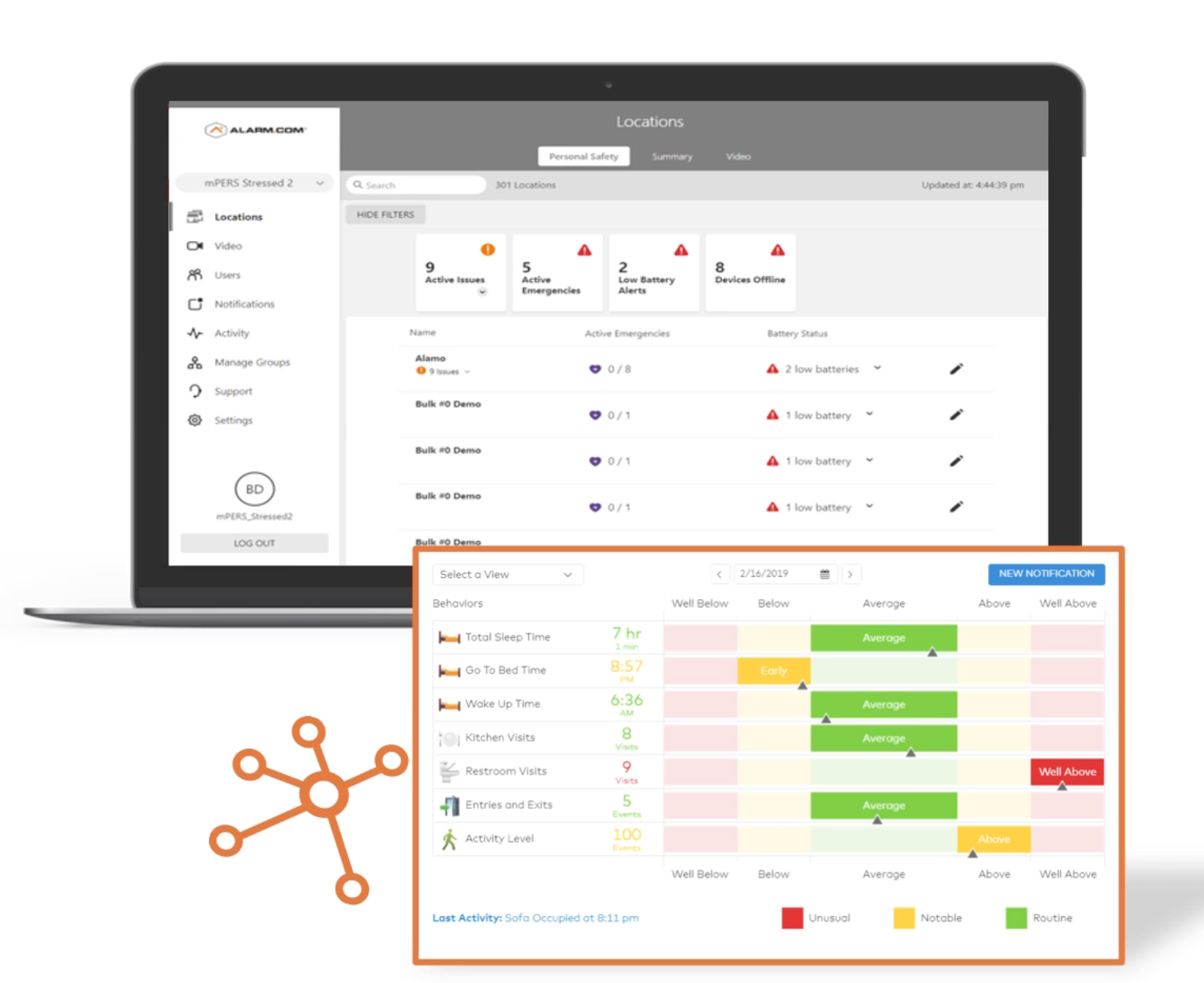
The platform tracks specific resident behaviors based on which sensors are deployed. The mapping below is the easiest way to see how physical hardware translates into care relevant analytics.
| Sensor type | Room | Wellness Behavior tracked |
|---|---|---|
| Exterior door / Front door | Exterior door | Exits and Entries |
| Bed sensor | Bedroom | Sleep behaviors (Total Sleep Time, Go To Bed Time, Wake Up Time) |
| Chair sensor | Living room | Activity Level |
| Living room motion | Living room | Activity Level |
| Bathroom motion | Bathroom | Restroom Visits |
| Kitchen motion | Kitchen | Kitchen Visits |
| Refrigerator door | Kitchen | Kitchen Visits |
| Medication cabinet door | Other | Activity Level (medication compliance) |
| Medication motion sensor | Other | Activity Level (medication compliance) |
One implementation detail worth understanding is Sensor Activity Monitoring (SAM), which governs how motion sensors report their state on a Wellness account. Motion sensors expose two states, Activated (recently detected motion) or Idle (no recent motion). To prevent excessive status flapping in event history, the sensor stays Activated until 20 minutes of inactivity have passed, at which point the Idle timestamp is backdated to three minutes after the last detection. Each new detection extends the Activated state another 20 minutes. The practical implication is that "no recent activity" alerts on motion sensors have an inherent resolution of roughly 20 minutes rather than instantaneous reporting. This smoothing applies only to motion activity monitoring on Wellness accounts, not to the rest of the system; without it, the SAM activity history would look extremely busy and the analytics would be hard to read.
Available Notifications
Wellness notifications are configured in the Alarm.com app or website with time of day awareness and multi recipient address book support. Ten notification types are available out of the box.
The most commonly used in senior living are Personal Emergency (fires when a resident presses a panic button or pendant), Up and About (fires after a long period of no activity in the resident's unit, the silent emergency catch), Still in Bed (fires when a bed sensor stays activated longer than expected), and Away From Bed (fires when a bed sensor is unoccupied for a specified duration during a specific time window, such as a resident being out of bed at 3 AM). Missed Medication or Sensor Not Activated fires when a sensor (typically a medication cabinet door) is not activated during a specified time window. The remaining types (Sensor Activity, Sensor Closed or Occupied, Sensor Left Closed or Occupied, Sensor Left Open or Vacant, and Safe Inside) provide more granular building blocks for community specific scenarios.
A small number of these notifications carry most of the weight. Personal Emergency is the resident initiated channel, the modern equivalent of the medical alert pendant, and it is what a resident presses when they feel something is wrong. Wearable PERS pendants with built-in fall detection extend this channel by firing a Personal Emergency event automatically the moment a fall is detected, even if the resident cannot or does not press the button (Alarm.com supports a range of fall-detection-capable pendants on Wellness accounts). Up and About is the inactivity-based silent emergency catch for the cases where neither a button press nor an automatic fall detection fires: a resident on the floor of a room without their pendant, a nighttime stroke where the resident never got out of bed, an episode of incapacitation in a chair. Away From Bed flips that scenario at night: if a bed sensor reports unoccupied at 3 AM in a memory care unit, staff get a ping before the resident has wandered out of view. Missed Medication is the lowest acuity but highest frequency notification: a medication cabinet that was not opened during a scheduled window suggests the resident skipped a dose, and staff can do a quick check rather than waiting for the next round.
In addition to the wellness-specific notifications, Alarm.com's general Unexpected Activity notification is highly relevant in senior care. It fires when activity is detected at a time or in a location that falls outside the resident's learned routine, surfacing behavioral changes that may indicate agitation, confusion, or an emerging health pattern worth investigating. It is not a wellness-specific notification, but it is included on Alarm.com plans and lands well alongside the wellness data.
For Personal Emergency presses specifically, communities can layer the professional monitoring add-on so a trained monitoring center responds when staff do not acknowledge in time. That bridges the gap for buildings without 24/7 on-site staff (independent living, group homes) and provides a backstop for assisted living and memory care when the on-shift caregiver is occupied with another resident.
Privacy and Dignity by Design
The privacy posture of the platform is one of the reasons operators choose it. Wellness monitoring uses motion sensors, contact sensors, and bed and chair sensors. The wellness data staff see does not depend on any camera in a private resident room. Operators and staff only have access to cameras in common areas (lobby, hallways, dining, exterior). A resident can optionally have cameras in their own unit that only the resident has access to, so staff still see only wellness data from that unit. Alerts are designed to surface only when patterns suggest something is off, not on every movement, so staff are not bombarded with noise and residents are not subjected to the experience of being watched second by second. Residents retain agency through emergency buttons. They control when to call for help directly, and the passive layer is there specifically so the absence of a button press does not become the absence of a response.
On the technical side, the platform is designed with role-based access controls, encrypted data transport, and activity audit logs suitable for HIPAA-adjacent care environments. Staff see only what their role requires, and every data access is logged. Most senior living settings (independent living, most assisted living, memory care, group homes) are not HIPAA covered entities, but families, surveyors, and insurers expect the documentation posture to look HIPAA-aligned anyway. Whether or not HIPAA technically applies to the community, that posture holds up under scrutiny.
This matters for resident dignity, family trust, and regulatory considerations. Assisted living is state regulated, and many states have specific requirements around wellness checks, incident reporting, and resident rights. The annual NCAL Assisted Living State Regulatory Review is the canonical reference for the current state by state landscape. A platform that produces auditable activity data while keeping staff camera access limited to common areas tends to land well with residents, families, and surveyors at the same time.
How It Fits With Security, Access, Cameras, and Energy
Wellness sits on the same Alarm.com platform as intrusion detection, access control, video, environmental monitoring, and energy management, so a community can run all of them on one dashboard and one app. Wellness monitoring covers each resident's unit, intrusion detection and cameras cover the common areas, access control covers perimeter and interior doors, water sensors and smart thermostats cover mechanical rooms, and the building's energy use is visible in the same view. A resident who wants more can layer their own intrusion detection, smart thermostat, or cameras inside their unit on top. In-unit cameras are scoped so only the resident has access. A resident-controlled thermostat can still surface temperature alerts to staff (hypothermia in winter, overheating in summer) without giving staff control over the setpoint, which matters because vulnerable seniors are at real risk from extreme indoor temperatures. The integrated approach reduces vendor count, reduces contract overhead, and gives staff a single place to look when something is happening at the building.
Putting wellness, intrusion, access control, and cameras on the same platform does not mean every caregiver has the keys to the whole building. Alarm.com user permissions are role based and configured per login, so the operator decides who sees what and who can do what. A CNA's login can be scoped to resident wellness alerts and emergency notifications without touching access control, intrusion arming, or camera footage. A house manager's login can add common-area cameras and the ability to arm and disarm the building. A regional director's login can include cross-site dashboards and user administration. The unified platform is a benefit because it consolidates vendors and apps, not because it gives every staff member access to every system.
The practical version of this integration is what most communities care about. The night manager checks the same app for a fall alert, an exterior door event, and a hallway camera clip. The closing routine arms the building and shifts thermostats to setback in one tap. The access control system that lets the day shift in through a credentialed door is the same system that flags an after hours exit on a memory care unit. None of these integrations require third party glue or a separate dashboard.
Multi Site Management for Chains and Regional Operators
For operators running multiple communities, the Enterprise Wellness multi location dashboard rolls wellness data up to a corporate view. Operators compare incident rates, response times, equipment utilization, and behavior trends across sites, organize locations into Enterprise groups, and apply filters to surface unusual behavior, last activity duration, or device trouble conditions across the entire population. Best performing sites become reference points for the rest of the portfolio, and underperforming ones get focused attention. Surety has a deeper write up of the broader Enterprise Groups platform in Alarm.com multi-site enterprise management for SMBs, and the same Enterprise group surfaces security, access, and cameras across the portfolio alongside wellness.
Real World Examples
A mid size assisted living community of 60 units installs activity sensors in each unit. Each sensor learns each resident's baseline routine over a few weeks. The night shift CNA covers 30 residents and gets pings only when something is unusual: a missed bathroom trip for a resident who normally goes at 2 AM, an unusually long stretch of inactivity in a resident with a known fall history, a Personal Emergency button press in a bathroom. Panic pendants worn on wristbands reach the CNA's phone instantly. Activity reports inform monthly care plan reviews. The same Alarm.com app shows perimeter cameras and access controlled doors so the night manager can keep an eye on the building at the same time.
A 16 resident memory care unit puts contact sensors on exit doors to flag elopement attempts. Motion sensors notice a resident who normally settles by 9 PM but is wandering at 2 AM, surfacing a possible UTI or sleep disruption that staff can investigate the next morning. Cameras cover hallways and common areas, but private rooms stay camera free. The unit's safety posture improves materially without changing the look or feel of the resident space.
An independent living building with no on site clinical staff runs call pendants for residents and inactivity alerts to the building manager. Pendant presses route to a professional monitoring center, which calls the building manager first during business hours and dispatches an ambulance or contacts family after hours. Bathroom Visits and Sleep Behaviors data flow to family members through opt in notifications, which extends the building's value proposition without the cost of round the clock clinical staffing.
A group home with six residents covers all of them on a single Alarm.com account. Personal Emergency presses route to a professional monitoring center for 24/7 dispatch, while Away From Bed and Up and About notifications go as push alerts to the staff phones on the recipient list. The same login also runs the home's intrusion detection and the front door video, so the entire technology stack is one app and one bill.
A regional senior living operator with eight communities rolls wellness data up to a corporate dashboard via the free Enterprise Wellness multi location feature. Incident rates, response times, and equipment utilization compare across sites. The corporate team uses the data to study what the best performing sites are doing differently and propagate it to the rest of the portfolio, all on the same Enterprise group that already shows security, access, and cameras across the eight buildings.
Documented Outcomes Cited by Alarm.com
Alarm.com's Enterprise Wellness reference cites several quantified outcomes from real deployments. These are documented examples of the kind of intervention Wellness enables, not guaranteed outcomes for every customer.
Wellness has reduced the cost of care by up to $2,000 per month per resident in some deployments, with savings reallocated to more specialized therapies. In one case, a resident left their bed without their emergency button at night and fell in the bathroom. Caregivers were alerted to the extended absence from bed via the Away From Bed notification and intervened immediately. Without Wellness, the resident would have been on the floor for at least 10 hours, leading to a likely hospital admission for dehydration ($7,442 average cost). In another case, a monitoring relative noticed via the Bathroom Visits behavior that her 87 year old mother had used the bathroom six times in one night. Oral antibiotics treated the UTI before it progressed to a bladder infection requiring IV antibiotics in a hospital setting ($2,399 average cost).
The savings come from avoided urgent care and hospitalization, the most expensive line items in the senior care system. The analytics also surface conditions that staff would either miss entirely or catch only at the point of crisis: a resident pattern of six bathroom visits in a night is invisible to a CNA doing rounds every two hours, but it is obvious in the Behaviors view the next morning.
How Wellness Monitoring Compares to the Alternatives
The three column comparison below captures the practical differences between the consumer pendant baseline most communities start with, the purpose built senior care platforms that some have moved to, and the integrated Alarm.com Wellness platform delivered through Surety Business. Purpose built platforms are genuinely capable in their specific domains. The consolidation, accessibility, and pricing advantages of the Alarm.com approach speak for themselves for small to mid size operators.
| Dimension | Consumer Medical Alert | Purpose Built Senior Care Platform | Alarm.com Wellness on Surety Business |
|---|---|---|---|
| Primary capability | Resident initiated panic alert | Passive activity analytics, anomaly detection, resident health insights | Resident initiated panic plus passive activity analytics plus caregiver dashboard |
| Falls and silent emergency coverage | Only if resident can press the button | Yes, via passive monitoring | Yes, via inactivity alerts (Up and About, Away From Bed) plus optional fall-detection pendants |
| Cameras inside resident rooms | None | Some platforms use cameras (e.g., SafelyYou); others do not | None for the wellness service or operator deployment; resident-controlled cameras possible on the same platform with access scoped to the resident |
| Multi resident dashboard for staff | No | Yes | Yes, with configurable per-recipient notification rules |
| Multi site operator view | No | Yes (enterprise plans) | Yes, included free (Enterprise Wellness) |
| Integrated with security, access, cameras | No | No, standalone system, separate app | Yes, same Alarm.com login as intrusion, access control, and cameras |
| Activity reporting for care plans and state surveys | No | Yes | Yes (Behaviors, Trends, Activity by Sensor, Activity by Rooms) |
| Dedicated senior care app | No | Yes (separate from everything else) | No, lives inside the standard Alarm.com app staff already use |
| Vendor count for a fully equipped community | 1 (pendant only) | Up to 6 separate vendors (PERS, activity platform, elopement prevention, security alarm, cameras, access control) | 1 (Surety Business covers all) |
| Contract model | Month to month or annual | Typically multi year enterprise contract | Month to month, no long term contract |
| Accessible to small operators and group homes | Yes | Typically priced for larger facilities | Yes, transparent and affordable pricing, scalable to 4 unit group homes |
| Documented cost avoidance examples | None published | Vendor specific case studies | Up to $2,000/month per resident; specific cases ($7,442 dehydration, $2,399 UTI) cited by Alarm.com |
Hardware: What Connects to the Platform
The bill of materials varies by deployment, and the list below is illustrative rather than exhaustive. Alarm.com's compatibility list is broader than what any single article can name, and the right mix of devices for an independent living building looks different from the right mix for a memory care unit or a small group home. Direct readers to the Surety Business senior living page for specifics on a given community.
Wireless motion sensors handle activity monitoring in resident units, common areas, hallways, kitchens, and bathrooms. Long range, long battery life models matter in a multi room community deployment because they cover the full footprint of a building without requiring hard wiring or a dense mesh of repeater devices. Bed sensors are pressure based occupancy sensors that report whether the resident is in bed and power Wellness Behaviors like Total Sleep Time, Go To Bed Time, and Wake Up Time, plus Still in Bed and Away From Bed notifications. Chair sensors are pressure based sensors that detect when a resident is sitting in a designated chair and contribute to Activity Level analytics in the living room.
Refrigerator door sensors are contact sensors on the resident's refrigerator door (in independent living units with kitchens) that contribute to Kitchen Visits behavior tracking, a proxy for meal patterns. Medication cabinet door sensors and medication motion sensors are contact and motion sensors that surface medication cabinet activity and power the Missed Medication or Sensor Not Activated notification. Door and window contact sensors handle unit entry tracking (Exits and Entries behavior) and elopement risk monitoring on memory care exit doors.
For wearable devices, two pendant options serve different needs. The Alarm.com IndiGo portable panic pendant has built in cellular and built in two way voice, so a resident can press the button and speak with the professional monitoring center from anywhere with cellular service, including outside the building or off the property. The monitoring center then contacts staff and dispatches emergency services as appropriate. Other wearable panic pendants pair with the on-site security and wellness hub: they have long battery life, are worn as a pendant or wristband, and work anywhere on the property within range of the hub. They do not have onboard two way voice; when pressed, they trigger two way voice on the hub itself, so the resident speaks with the monitoring center through the hub speaker rather than through the pendant, which means the resident must be near the hub for voice to work. Either path requires the Professional Monitoring add-on, since the monitoring center is what initiates the voice session. Two way voice changes the latency of response from "minutes to assess what is happening" to "seconds to hear the resident describe the situation," which matters most in falls, cardiac events, and medical episodes where the first minute determines the outcome. Alarm.com also supports a list of wearable fall detection pendants on Wellness accounts; the published compatibility list is the best reference for current options.
Environmental and integrated devices round out the picture. A smart water valve and water sensors catch leaks or unattended faucets in resident bathrooms and common area kitchens. A smart thermostat provides environmental monitoring (overheating in summer, hypothermia risk in winter for vulnerable residents) and energy management. Cameras connect to the same platform too, with the access posture covered in the Privacy section above.
ROI and Operational Benefits
The honest framing for ROI on wellness monitoring is that it is rarely about staff replacement and almost always about staff leverage and avoided urgent care. A single avoided dehydration hospitalization at $7,442 (per the Alarm.com cited figure) covers years of platform cost for a small community. A single avoided UTI escalation at $2,399 covers months. The up to $2,000 per resident per month figure aggregates many smaller savings: fewer reactive urgent care trips, earlier intervention on declining residents (which preserves occupancy by avoiding move outs to higher acuity settings), fewer staff hours spent on pure rounds and more on direct care. A simple way to anchor the math for a given community is below.
Annual Avoided Cost ≈ Residents × Incidents Intervened Early per Resident per Year × Average Avoided Urgent Care Cost
A 40 unit assisted living community that intervenes early on one urgent care worthy event per resident per year at an average avoided cost of $3,000 lands at $120,000 in annual avoided cost, which is meaningful against any reasonable platform spend. The figure is not a guarantee, and the inputs depend on baseline incident rates, staff response patterns, and the local cost of urgent care. The point is that the math does not have to work out to the headline $2,000 per resident per month for the platform to pay for itself many times over.
Operational benefits compound on top of cost avoidance. Staff stop running blanket rounds to find what is wrong and start responding to specific signals. Care plan reviews are informed by activity data instead of self reported recall. Family expectations are met through opt in updates rather than escalating phone calls. Vendor consolidation removes the friction of managing four or five technology relationships at once. None of these are on the formula above, and all of them matter when the operator is asked to defend the spend.
How to Get Started With Surety Business Wellness Monitoring
Surety Business offers wellness monitoring through four per-unit-per-month plans on the Surety Business senior living page. The base plan, Resident Wellness, includes ADL monitoring, behavior baselines and anomaly detection, the named notifications, PERS pendants, and the Enterprise Wellness multi-unit and multi-site dashboard. Resident Wellness & Security adds intrusion detection plus remote and scheduled arming and disarming for the unit. Resident Wellness & Cameras adds private cameras inside the unit, scoped so only the resident has access (and shareable with staff at the resident's discretion). Resident Wellness Complete combines all three.
A separate professional monitoring add-on is available on the Resident Wellness & Security and Resident Wellness Complete plans. A trained monitoring center responds to Personal Emergency alerts when staff do not acknowledge in time, and on plans that include a security alarm it also provides 24/7 security alarm monitoring for the unit. The add-on is the practical bridge for communities that need round-the-clock emergency response without staffing it themselves. Pro monitoring requires a security alarm account on the Alarm.com platform, which is why it is bundled with the security-inclusive plans rather than offered on the base Resident Wellness plan.
The plans cover individual resident units. Each unit gets its own Alarm.com account, which can be shared with the resident for direct access and extended to family members for opt-in notifications. The facility itself (common areas, perimeter, hallways, staff-only spaces) runs on a separate Surety Business plan such as Business Alarm or Business Plus. The two layers work together, and the Enterprise Wellness dashboard ties the resident accounts and the facility account into a single operator view so the team manages the entire community from one place.
All plans are month to month with no long-term contracts, transparent pricing is published on the senior living page, and Surety has been an Alarm.com Gold Partner for five consecutive years. The setup workflow is fast: pick a plan, order equipment, install with guided setup, configure notifications and recipients, and let the platform learn each resident's individual baseline over the first few weeks.
Frequently Asked Questions
- What is wellness monitoring, and how is it different from a medical alert pendant?
A medical alert pendant fires only when the resident presses it. Wellness monitoring also tracks activity passively, so silent emergencies (falls where the resident cannot reach the button, missed routines, prolonged inactivity) get caught. Specific built in notifications cover that gap, including Up and About (long stretches of no activity), Still in Bed, Away From Bed, and Missed Medication, and the platform learns each resident's baseline so anomalies are graded against that resident's own history rather than a one size fits all template.
- Does wellness monitoring use cameras in resident rooms?
No. Activity is detected with motion sensors, contact sensors, bed sensors, and chair sensors, not cameras. Operators and staff only have access to cameras in common areas (lobby, hallways, dining, exterior). A resident can optionally have cameras in their own unit that only the resident has access to, so staff still see only wellness data from that unit. The privacy posture is part of the design, not an afterthought, and it lands well with residents, families, and state surveyors at the same time.
- Is there a separate app for caregivers?
No. Wellness data lives inside the standard Alarm.com mobile app and website, the same login already used for security, video, and access control. Staff do not have to learn a second app, and a community already on Alarm.com can layer Wellness onto the same login.
- Does this work for memory care residents who cannot reliably press a panic button?
Yes. The passive activity analytics (Up and About, Away From Bed, Sensor Left Open) catch problems even when the resident cannot initiate the alert. Contact sensors on memory unit exit doors also flag elopement attempts, and motion patterns surface unusual nighttime activity that may indicate a UTI, a sleep disruption, or another emerging issue.
- Can family members get notifications too?
Yes. The platform supports per recipient address book notifications with time of day rules, so family members can be added to a separate, simpler set of events than what staff receive. A daughter can opt in to a daily Sleep Behaviors summary or a Bathroom Visits anomaly without seeing the full operational alert stream the staff handle.
- Do the plans cover the whole facility, or just resident units?
The Resident Wellness plans are per-unit-per-month plans for individual resident living spaces. Each unit gets its own Alarm.com account, which can be shared with the resident for direct access and extended to family members for opt-in notifications. The facility itself (common areas, building perimeter, hallways, and staff-only spaces) runs on a separate Surety Business plan such as Business Alarm or Business Plus. The two layers work together: the facility plan covers the building as a business, and each resident plan covers that resident's unit. The Enterprise Wellness dashboard ties them together into a single operator view, so the team manages the entire community from one place without losing the per-resident account structure that gives residents and families their own access.
- Can wellness monitoring replace our nurse call system?
For smaller facilities and group homes that prefer mobile or remote notifications, wellness monitoring covers the core functions: residents press a PERS pendant to call for help, staff receive the alert instantly on their phones via the Alarm.com app, and the professional monitoring add-on responds when staff do not acknowledge in time. What it does not replicate is a hardwired annunciator panel at a central nurse station with flashing lights and audible tones. If the assisted living facility relies on staff stationed at a central desk responding to a physical panel, wellness monitoring handles the pendant and passive monitoring functions but does not replace that infrastructure. Some state ALF licensing regulations also specifically require a certified nurse call system, so operators in licensed assisted living settings should verify their state requirements before treating wellness monitoring as a full nurse call replacement.
- What does it cost?
Surety Business publishes transparent pricing for wellness monitoring on the senior living page. Plans are priced per unit per month across four tiers (Resident Wellness, Resident Wellness & Security, Resident Wellness & Cameras, and Resident Wellness Complete), with an optional professional monitoring add-on. Pricing is more affordable than traditional dealer only solutions or purpose built senior care platforms, the Enterprise Wellness multi-unit and multi-site dashboard is included with the right base plan, and all Surety Business plans are month to month with no long-term contracts.
