

Most businesses bought their cameras for one reason: to record, so that if something goes wrong there is footage to pull. The cameras run, the video piles up, and nobody looks at it unless there is an incident. That model is quickly being replaced. Artificial intelligence has turned the business camera into something that watches, warns, remembers, and reports: it can tell a person from a passing car, speak to an intruder by name of what they are wearing, let you find last week's saved clips by typing a plain-English question, and hand you operational data about how customers move through your space. The encouraging part for a small or mid-sized business is that this professional-grade AI is no longer something only national chains with enterprise budgets can afford. Everything described below is available today through Alarm.com, sold and supported by Surety Business, and this article walks through what the technology actually does and where it fits against the other cameras you could buy.
From Passive Recording to Active Intelligence
A traditional camera detects motion and records it. That is all it does, which is why old systems bury you in useless alerts every time a shadow moves or a car drives past. An AI-enabled camera interprets what it sees. As Alarm.com lays out in its April 2026 explainer on how AI is changing video surveillance for businesses, modern analytics can detect and classify activity (distinguishing a person from a vehicle from irrelevant motion), recognize details such as vehicle type or clothing color, filter out false triggers like wind and shadows, track movement and monitor crowds or queues, count people and vehicles, and even flag safety incidents like a slip or fall.
For the owner, the practical payoff is simpler notifications. Instead of a hundred motion pings a day, you get an alert when a person enters a restricted zone after hours, with a short clip already attached. The noise drops and the signal rises, which means you actually pay attention when your phone buzzes. The difference between the two approaches is stark.
| Capability | AI-enabled cameras | Traditional cameras |
|---|---|---|
| Detection | Classifies people, vehicles, and events | Detects motion only, no intelligence |
| Alerts | Context-based, far fewer false alarms | Frequent false alarms from shadows, wind, animals |
| Response | Automated deterrence and coordinated actions | Manual review after the fact |
| Oversight | Centralized across all locations | Separate system at each site |
| Scalability | Expand with consistent AI settings | Reconfigure manually per site |
Not All AI Cameras Are Equal: Where Alarm.com Fits
AI cameras are not one market. There are roughly three tiers, and where a system sits determines both what it can do and what it costs. Consumer-grade AI cameras (think Ring, Nest, or Wyze) are cheap and easy to self-install, but they are built for homes. For a business they bring real limits: cloud-only or weak storage, little or no integration with a commercial intrusion alarm or access control, consumer-level support, a different app for every product, and analytics tuned for a front porch rather than a sales floor or loading dock. Above all, they lack business-specific features: there is no multi-location enterprise viewing to manage every site from one dashboard, and no business intelligence or activity analytics to turn the cameras into an operations tool.
At the other end are enterprise cloud video platforms such as Verkada, Rhombus, Avigilon Alta, Eagle Eye Networks, and Genetec. The hardware and analytics are excellent, but the cost is built around a recurring per-camera software license, usually sold through an integrator. With Verkada, according to Verkada's pricing materials and a 2026 Verkada pricing breakdown, you buy each camera upfront and then pay a per-camera license sold in multi-year terms, from about $199 for one year up to roughly $1,799 for ten years, which works out to somewhere around $180 to $300 per camera per year. Eagle Eye Networks instead prices its cloud service per camera per month by resolution and retention; a plan comparable to a commercial video service (around 1080p at 30-day retention) is reported to run roughly $20 to $40 per camera per month, on top of a required on-site bridge or recorder and the cameras. Rhombus cameras run from a few hundred dollars to well over a thousand each and also require an ongoing per-camera license. The exact numbers vary by deal, but the structural point holds: on top of the cameras you pay a meaningful per-camera license, often on a multi-year commitment.
Alarm.com AI cameras from Surety Business sit in between, and that is exactly the point. They are genuinely professional-grade on both ends: commercial PoE camera hardware with local Stream Video Recorder storage, running on the same commercial cloud platform that large operations use. They deliver most of the capabilities that matter to a real business (AI video analytics, AI Deterrence, business activity analytics, continuous recording, and integration with alarm, access, and fleet) at a total cost much closer to consumer gear. A Surety Business camera runs roughly $100 to $400 in hardware, plus about $3 to $6 per camera per month for cloud video service, which works out to roughly $36 to $72 per camera per year. Set that next to a Verkada-style per-camera license at roughly $180 to $300 per camera per year: Surety's recurring cloud cost per camera is a fraction of that, the camera hardware is cheaper, and you are not locked into a multi-year enterprise contract. Because the system is self-managed, you also keep direct control.
The other advantage is integration, and this is where the comparison really separates. An Alarm.com camera is not a standalone gadget; it is one component of a single platform that also runs your intrusion alarm, access control, fleet, energy, and multi-site management, all in one app, one login, and one provider relationship. When the alarm trips, the relevant camera video is linked automatically so you can see what set it off and cancel a false alarm before police roll. The cameras can also record a cloud clip and send a notification with the video attached whenever a system event happens: an alarm, the start of an entry delay, a sensor opening or closing, the system arming or disarming, or a door locking or unlocking. You do not just get a text that the back door opened at 11 p.m., you get the clip of it. When a door unlocks, the access control event is tied to video so you can see exactly who badged in, or who tailgated behind them. A camera detection can trigger lighting automations, and because Z-Wave relays appear as lights in Alarm.com, it can switch anything a relay controls, not just lights (camera rules do not directly control locks or thermostats). And your fleet vehicles show up in the same app as your building cameras. Most consumer cameras integrate with almost nothing, and even the enterprise platforms generally stop at video plus access control without also unifying a full commercial intrusion alarm and fleet tracking. That breadth is unusual, and it makes each camera more useful as part of the whole.
| Consumer-grade AI cameras | Alarm.com via Surety Business | Enterprise cloud VMS | |
|---|---|---|---|
| Hardware grade | Home-grade | Commercial PoE + SVR/CSVR | Commercial |
| Cloud platform | Consumer app | Commercial cloud platform | Enterprise cloud platform |
| AI analytics | Basic (porch/driveway) | Deterrence, video search, activity analytics | Advanced, broad |
| Integration | Little to none | Alarm, access, fleet, energy, multi-site | Usually video + access |
| Install and support | DIY, consumer support | In-house installation, professional support | Integrator-installed |
| Pricing | ~$50 to $300/camera, low monthly | ~$100 to $400/camera + ~$3 to $6/camera/mo | Camera + per-camera license (Verkada ~$180 to $300/camera/yr) |
| Contract lock-in | None | None | Typically multi-year |
| Best fit | A single small space or home | Small and mid-sized businesses | Very large or specialized deployments |
To be fair about it: consumer cameras are cheaper and perfectly fine for a small business with minimal needs, and the enterprise platforms can be the right call for very large deployments running hundreds of cameras, or for organizations with specific advanced-analytics or compliance requirements. But for the typical small or mid-sized business, Alarm.com from Surety Business is the best value: an outlier on the price-to-capability curve that lands close to the high-end systems on quality and features at a fraction of the cost. Many small businesses assume low-cost consumer cameras will be enough, but their needs grow as the business does, more locations, more users, real analytics, tighter integration with the alarm and access systems. Alarm.com is a platform that grows with them, while consumer cameras reach a dead end.
Cameras That Talk Back: Real-Time AI Deterrence
The biggest shift AI brings is not better recordings, it is prevention. An old camera documents a break-in for the police report; an AI camera works to stop it at the perimeter, outside, before anyone gets in. The most visible version is one the intruder actually hears. AI Deterrence (AID) detects a person inside a zone you define after hours and plays an automated spoken warning through the camera's speaker. Per Alarm.com's March 2026 ISC West announcement, these warnings have been enhanced with adaptive messaging that can reference real-world details, such as the color of someone's clothing or where they are standing ("you in the red jacket by the loading dock"), and with Progressive Responses that escalate the message if the person keeps loitering. On floodlight & spotlight cameras, the lights snap on at the same moment, and the entire event is recorded. This works because it is personal: a would-be intruder who hears that they have been individually identified behaves very differently than one who has merely tripped a motion light. AID runs automatically, but the most effective form of before-entry deterrence adds a live human: professional video monitoring, where a trained agent watches the moment a camera detects someone outside, speaks to them directly, and dispatches police on a verified threat. That layer is covered below.
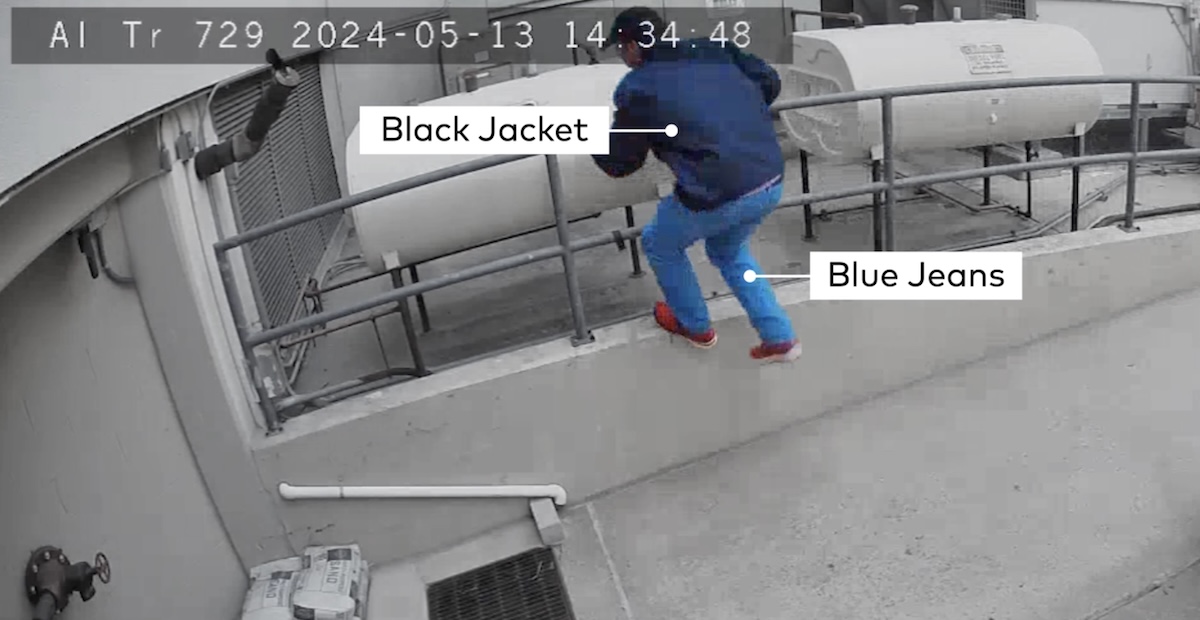
Two related analytics deserve a brief mention. On outdoor cameras, Familiar Vehicle Analytics can learn vehicles you mark as "familiar" and alert you when an unfamiliar one enters a lot or after-hours space, and a Familiar Face Analytics feature (currently available on the ADC-VDB775 doorbell camera) can recognize a few people you have saved for personalized arrival alerts. Both are privacy-gated and cap at five saved faces or vehicles per account. They can be handy for a small business watching a single entrance, for example flagging a regular versus an unknown arrival, but most of the security value for a business comes from the broader people and vehicle detection described above, not from these "familiar" features.
Ask Your Footage a Question: AI Video Event Search
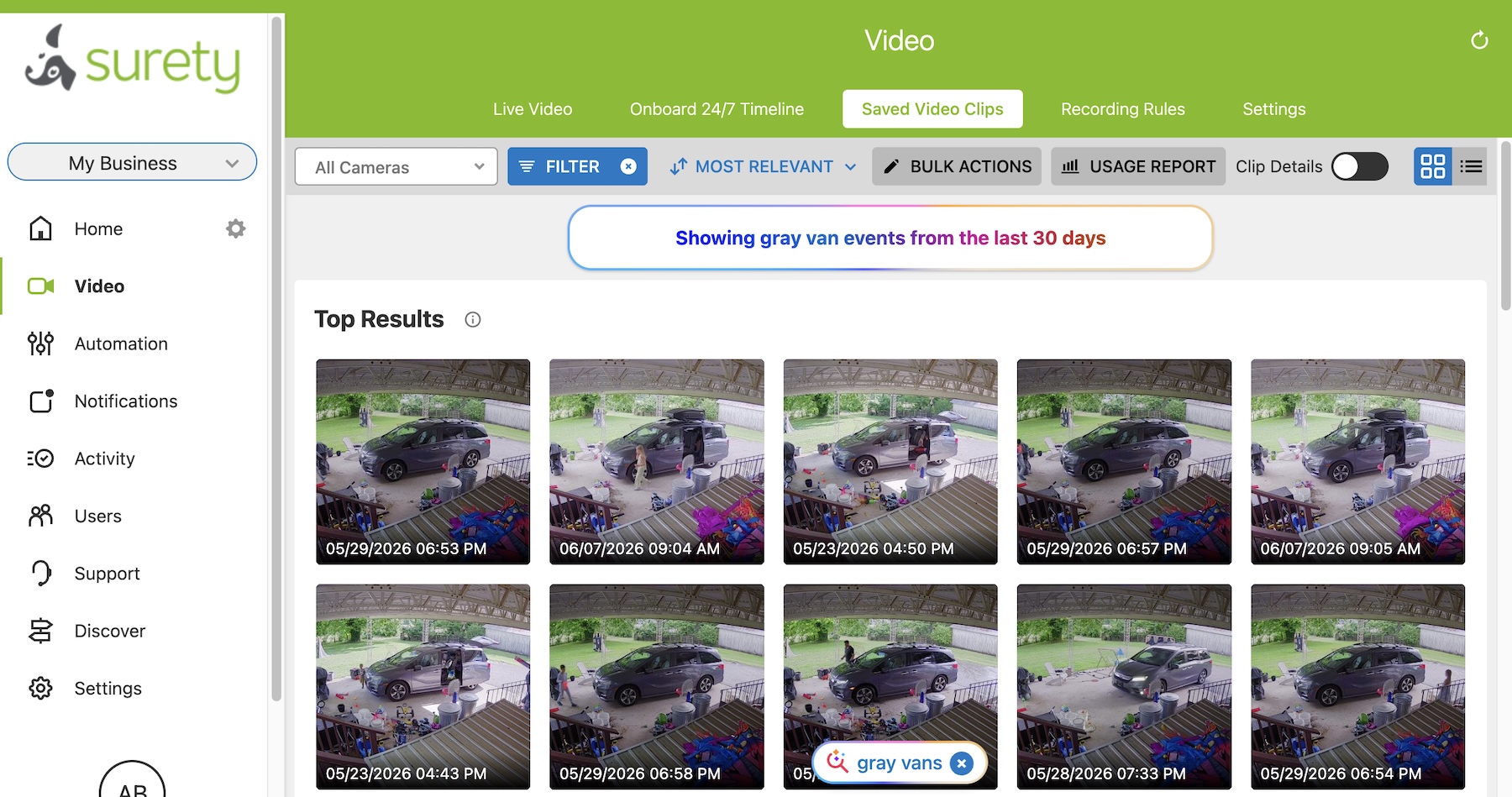
Anyone who has ever scrubbed through hours of video looking for one moment knows how painful it is. AI Video Event Search replaces that with a question. As described in Alarm.com's March 2026 ISC West announcement, you can search your saved video clips using plain language, like "red pickup truck last week," "grocery bag at front door Friday," or "package delivery yesterday," and the system surfaces the most relevant clip thumbnails instead of making you watch the timeline. One clarification matters here: this search runs over the event-triggered clips that the cameras upload to the Alarm.com cloud when they detect something (a person, a vehicle, and similar), not over the continuous 24/7 recording stored locally on a recorder. In other words, the AI is searching the moments your cameras already flagged as worth saving.
This is the practical superpower behind "what actually happened?" Instead of dedicating an afternoon to an investigation, you ask a question and get the moment back in seconds, whether you are resolving a customer dispute, chasing down a shrinkage question, or confirming a delivery. The feature is a newer AI capability rolling out across Alarm.com video, and it is built with control in mind: only users who already have permission to view your retained video can run searches, and you can exclude specific cameras from search results at any time.
The 24/7 Memory: Continuous Recording and Going Back in Time
AI clips capture the events the system flags, but for full coverage many businesses also want continuous 24/7 recording, so the entire timeline is there to revisit. Alarm.com supports this in two ways, and the choice between them is a real tradeoff worth understanding. The camera needs somewhere to store footage: either a Stream Video Recorder (SVR) or an onboard microSD card inside the camera.
A Stream Video Recorder, including the Commercial SVR (CSVR) built for more serious commercial sites, stores video on a separate recorder rather than on the camera. That is the more secure and tamper-resistant choice: if a thief steals or smashes a camera, the footage is safe on the recorder. These units scale, too. A Pro Series Commercial SVR can continuously record up to 16 camera streams (at up to 4MP with Pro Series cameras), a smaller 8-channel model covers up to 8 cameras, and units can hold dual hard drives for substantial storage (for example up to 8 TB each, 16 TB on a single device). Onboard recording is lower cost and simpler, but it keeps the video in a less secure place, on the camera itself, so if that camera is taken the footage on it goes with it. Onboard does have one resilience edge: if the network connection drops, which matters most for Wi-Fi cameras, the camera keeps recording to its own card, whereas an SVR can lose footage from a camera it cannot reach during the outage. Some businesses run both, using onboard as a fallback and the SVR as the secure primary. Either way, as Alarm.com notes on its business security camera page, footage is retained locally and stays accessible through the cloud, so you can pull up a camera and scrub its full timeline from anywhere to the exact minute you need.
It helps to think of the two layers as complementary. The event clips in the cloud are the moments your cameras flagged, and those are what AI Video Event Search queries by plain-language question. The continuous 24/7 recording is the complete timeline on the local recorder, which you review by scrubbing to a time and place rather than by AI search. Together they are the "go back and verify the past" capability, and it settles arguments that used to come down to one person's word against another's. Pull the exact moment and timestamp of a slip-and-fall to handle a liability claim. Resolve an employee or customer dispute with the actual footage. Investigate internal shrinkage. Confirm whether a delivery arrived, check who opened or closed and whether a door was left unlocked, or settle a "he said, she said" at the register. Whether you jump straight to a flagged clip or scrub the continuous timeline, the moment is there to review.
Your Cameras Are Also an Operations Tool
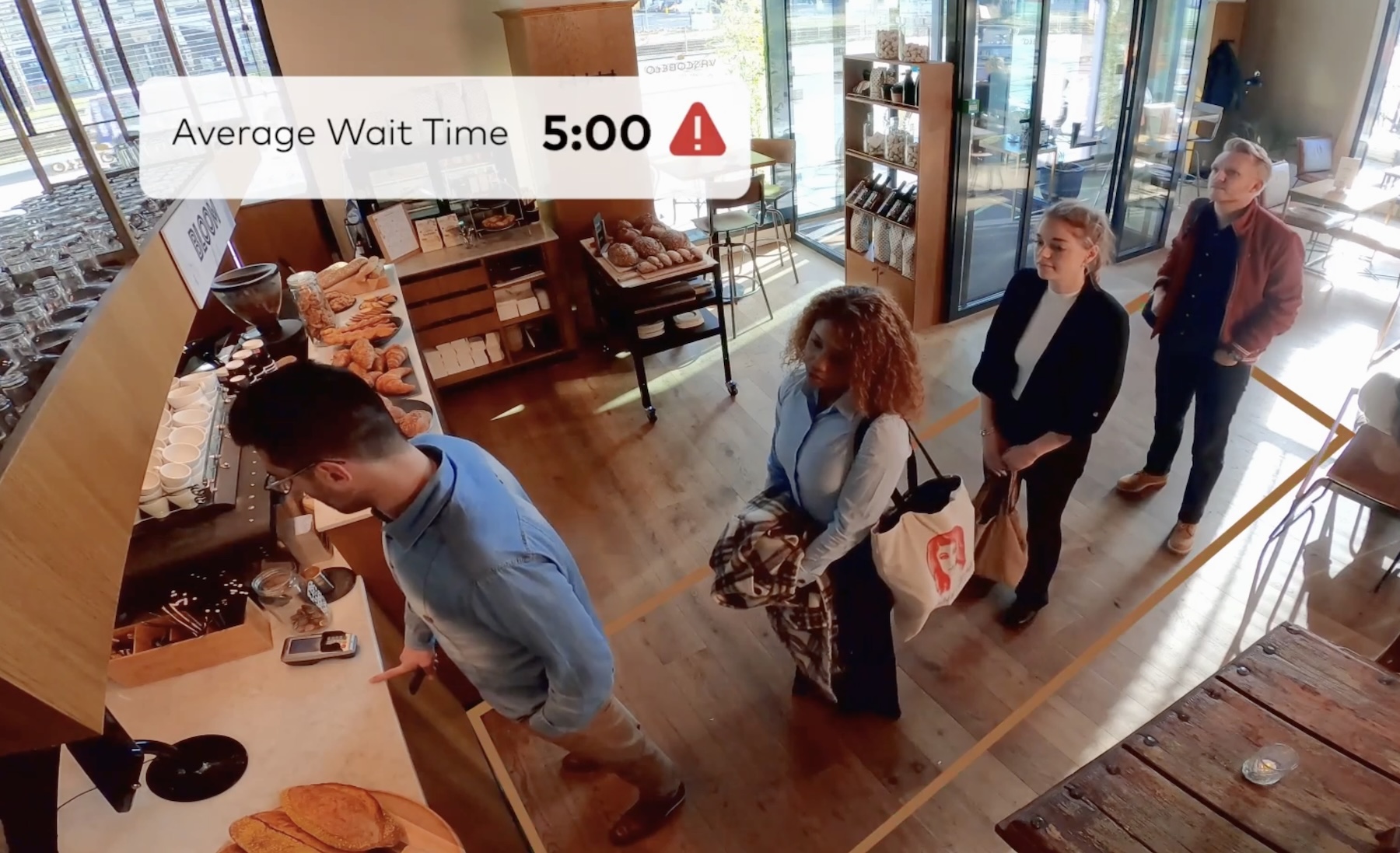
The same cameras that protect the business can also tell you how it runs, with no additional hardware. Alarm.com Business Activity Analytics turns video into operational data: heat mapping that shows where people spend time, occupancy and people counting for true foot traffic and peak periods, directional counting that maps how people flow between entrances and zones, crowd-gathering alerts when an area gets too full, and queue monitoring that tracks line length and average wait time.
Those numbers translate directly into decisions. Staff to your actual peak hours instead of guessing. Move a display or rework a layout and measure whether it changed behavior. Get an alert to open another register when the checkout line crosses a threshold you set. The point is that a camera you already installed for security quietly becomes a source of business intelligence. We cover the five analytics rules and how to configure them in detail in our guide on turning your security cameras into a business intelligence tool.
Putting It Together by Business Type
Retail store
After hours, AI Deterrence warns off anyone who approaches a rear entrance before they get in, and the event is recorded. Add professional video monitoring and a live agent verifies a real prowler on camera, speaks to them, and dispatches police on a confirmed event, which is the difference between deterring a break-in and just filming one. During the day, AI Video Event Search resolves a refund or shoplifting dispute in seconds rather than an afternoon of scrubbing, and heat maps and queue alerts tell you where to move product and when to add a cashier.
Restaurant and quick service
Continuous 24/7 recording settles a slip-and-fall claim or an order dispute with the exact footage and timestamp. Crowd and queue analytics flag when the lobby or the line is backing up so a manager can react before customers walk. After-hours AID covers the rear entrance and dumpster area, where break-ins and loitering tend to start, warning intruders off before they reach the door, and professional video monitoring adds a live agent who can intervene and call police on a real threat.
Warehouse and distribution
Person detection in restricted or hazardous zones catches someone where they should not be, and after-hours AID warns off anyone approaching the dock or yard before they breach it. On a high-value yard, professional video monitoring puts a live agent on a real intrusion to verify it and dispatch police on a priority, verified call. People counting at dock doors gives you throughput data you can actually schedule against.
Multi-location business
AI analytics and alerts are centralized in one dashboard, so a regional manager reviews linked video and consistent alerts from every site in one place, with the same settings applied everywhere. Our guide to multi-site management on Alarm.com covers how that works across locations.
Privacy and Control
Powerful AI on cameras raises fair questions about privacy, and Alarm.com's approach is built around customer control. You decide which AI features are turned on and how they are used, and you can exclude specific cameras from AI search entirely. Per its March 2026 announcement, the platform also surpassed $1 billion in annual revenue with millions of active video cameras deployed across its commercial base, which is worth noting only because scale tends to come with maturity in how this data is handled.
It is also worth being clear about limits. AI is not magic. Detection and analytics accuracy depend on sensible camera placement, adequate lighting, and correct setup; a camera mounted at the wrong angle will count people poorly no matter how good the software is. This is why a well-planned system, with cameras placed and configured carefully for the areas that matter, outperforms cameras thrown up haphazardly without much thought, and Surety Business is happy to help you plan placement and settings so your self-installed system gets it right.
The Human Layer: Professional Video Monitoring
The single biggest win of AI cameras is stopping a crime before it happens, and the most powerful form of that is professional video monitoring. Instead of an alarm that sounds after someone is already inside, a trained agent watches the moment a camera detects a person outside, at the perimeter, after hours. The agent can speak to the intruder directly through the camera, making clear they are being watched live, and most people leave at that point. If the threat is real, the agent dispatches police on a verified event, and because a human has actually seen the intruder on camera, that call typically gets a higher-priority response than a blind alarm signal. This is the difference between a system that records a burglary and one that prevents it.
This capability is proven on the Alarm.com platform, and Surety already runs it for homes today as Surety Cam Pro. The commercial version, Business Cam Pro, is coming soon: a remote guard video monitoring service for businesses in which trained agents watch camera alerts during set hours, verify real events on live video, issue talk-down warnings through the camera speaker, and escalate confirmed incidents to police with a verified, priority response. Until Business Cam Pro launches, the automated layer (AI Deterrence) delivers much of that proactive, before-entry deterrence on its own, and everything else in this article is available right now.
The short version is that a business camera in 2026 is a different tool than it was a few years ago. It classifies what it sees, deters intruders at the perimeter before they get inside, remembers everything and lets you search the saved clips in plain language, and doubles as an operations sensor, all while tying into your alarm, access, and fleet on one platform. For a small or mid-sized business, Alarm.com from Surety Business delivers that professional-grade capability at a price that makes it the clear value choice.
Frequently Asked Questions
- Do AI security cameras need a separate computer or server?
No. The AI runs on the camera itself and in the Alarm.com cloud, so there is no separate computer to maintain. If you want continuous 24/7 recording, you add storage in the form of a Stream Video Recorder (SVR) or an onboard microSD card in the camera.
- What is AI Video Event Search?
It is a natural-language search over your saved video clips. Instead of scrubbing hours of footage, you type something like "red pickup truck last week" and the system surfaces the most relevant clips. Only users who already have permission to view your video can run searches, and you can exclude specific cameras from results.
- Will AI cameras reduce false alarm notifications?
Yes. Because the AI classifies what it sees, it can ignore shadows, wind, and animals and alert you to the people and vehicles that actually matter, rather than every bit of motion. That is the single biggest day-to-day difference owners notice versus older motion-only cameras.
- Can I review footage from before an alert went off?
Yes, if you have continuous 24/7 recording set up through an SVR or onboard storage. AI event clips capture only the flagged moments, but continuous recording keeps the full timeline so you can scrub back to any moment to verify what happened. Note that AI Video Event Search runs over the saved event clips in the cloud, while the continuous local recording is reviewed by scrubbing the timeline.
- Does someone monitor my cameras and respond for me?
AI Deterrence lets the camera respond on its own with spoken warnings today. For a live human layer, professional video monitoring has a trained agent watch a detection, talk down the intruder, and dispatch police on a verified event, which usually gets a higher-priority response than a blind alarm. Surety already offers this for homes as Surety Cam Pro, and the commercial version, Business Cam Pro, is coming soon.
- How do Alarm.com AI cameras compare to Verkada or to consumer cameras like Ring?
Consumer cameras like Ring are inexpensive but built for homes, with limited commercial integration. Enterprise platforms like Verkada are powerful but expensive, with per-camera annual or multi-year licenses sold through integrators. Alarm.com via Surety Business is professional-grade hardware and cloud at a cost much closer to consumer gear (roughly $100 to $400 per camera plus about $3 to $6 per camera per month), with no enterprise license lock-in, which makes it the best value for most small and mid-sized businesses.
