

When you add smart locks, thermostats, a garage door, or other automation devices to your Alarm.com business system, those devices connect over a wireless protocol, and on Z-Wave you now have two ways to do it: the traditional Z-Wave mesh, or the newer Z-Wave Long Range (Z-Wave LR). The difference matters more in a commercial building than it does in a house, because businesses are bigger, more spread out, and built from materials that are hard on a wireless signal. In a larger building, a Z-Wave mesh is genuinely hard to build and keep reliable.
Z-Wave Long Range changes the model. Instead of relaying signals from device to device across a mesh of repeaters, every Long Range device talks directly to the panel. For a business that means you can skip the mesh entirely and still reach a lock at the far end of the building, a thermostat in a back suite, or a bay door across the lot. The payoff is not clever networking, it is reliability, longer battery life, and less time spent troubleshooting, which are the things that actually cost a business money. If you want the full technical case for why Long Range works the way it does, an in-depth guide to Z-Wave Long Range covers the benefits in detail.
Why commercial buildings are hard on a Z-Wave mesh
A Z-Wave mesh extends its reach by hopping signals from one always-on powered device to the next until the signal gets where it needs to go. That works well in a typical house full of switches and plugs spaced close together. A commercial space is a different environment: more square footage, longer runs, concrete and masonry walls, steel studs, fire-rated partitions, metal racking, and equipment, plus devices that often sit far from the security panel. To cover that with a mesh, you need enough powered repeaters in the right places to carry every signal back to the panel, and the spots where you most need a device (a far exterior door, a mechanical room, an outbuilding) are frequently the spots with nothing nearby to repeat. The result is the classic mesh headache: a device at the edge of the building that is slow, intermittent, or shows "not responding," and the troubleshooting that comes with it.
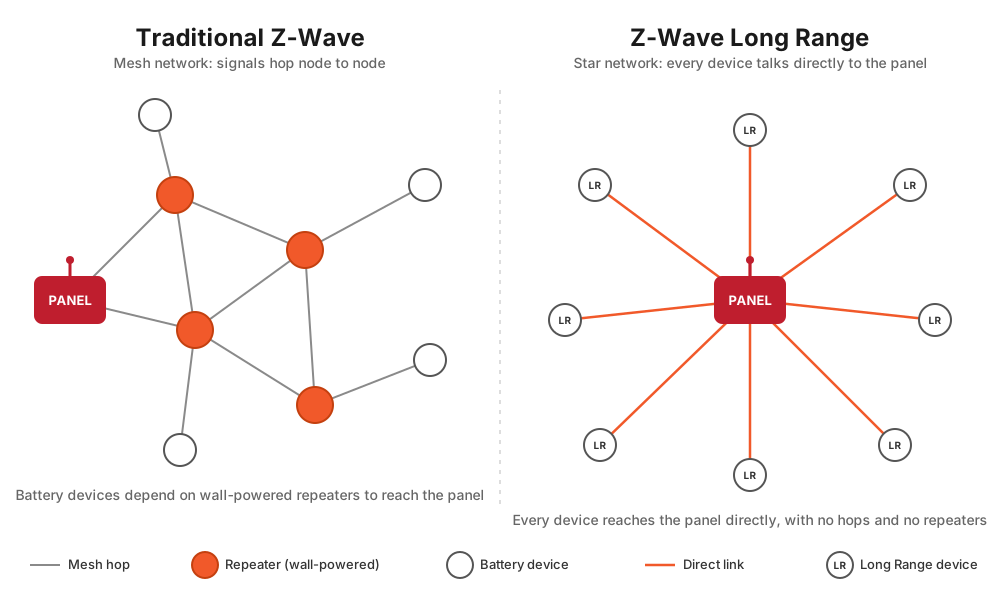
Long Range sidesteps all of that. Because each device connects directly to the panel, coverage no longer depends on the layout of your powered devices or the health of a relay chain. There is simply less to design, build, and maintain.
Example business problems Long Range solves
Here are the places where, in practice, Long Range turns a mesh problem into a non-problem. For each, the device just connects to the panel and works, without a network of repeaters between it and the panel.
Smart locks across a larger building
Companies increasingly put Z-Wave smart locks on back doors, supply and stock rooms, IT closets, suite doors, and after-hours entrances, and those locks tend to be scattered across a building, often far from the panel. Locks are also battery devices, which means they never act as repeaters themselves, so on a mesh they depend entirely on other powered devices to carry their signal home. Get that wrong and the lock at the far door is the one that lags or drops. Long Range lets each lock talk straight to the panel no matter where it is, with no repeaters in between. There is a battery angle too: a lock fighting a weak mesh retransmits over and over, which drains batteries faster, and in a business a dead lock battery can mean a door that will not secure or an unplanned service call. Longer battery life is both a reliability win and a cost win. For more on access control options, see our guide to smart access control for small business.
Multiple thermostats, some far from the panel
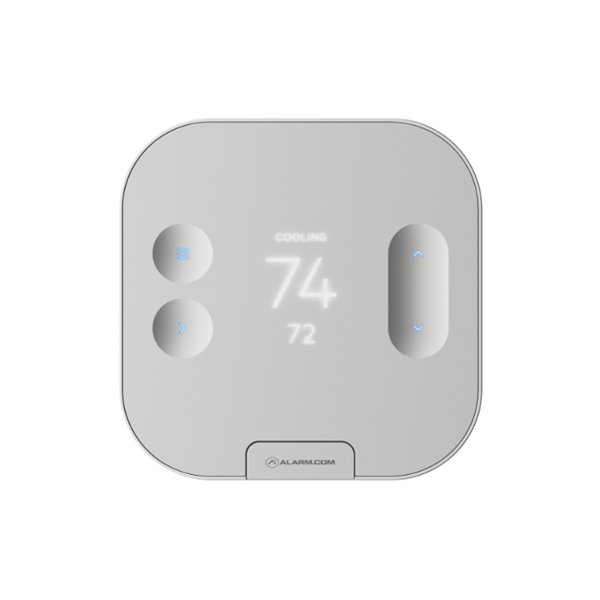
Many businesses run several thermostats: multiple HVAC zones, separate suites, or front-of-house and back-of-house areas. Some of them inevitably sit far from the panel, where a mesh has to relay through enough well-placed repeaters to stay reliable, and those are the ones that lag or drop when the relay chain is thin. With Long Range, each thermostat connects directly to the panel, so multi-zone control stays reliable across the whole building with no repeaters to place. Battery thermostats (the ones without a C-wire) also get the longer battery life Long Range is known for. A Long Range capable thermostat like the Alarm.com Intelligent Thermostat (ADC-T25) is a good fit, reporting straight to the panel from a back suite or far zone. Once the thermostats are connected, scheduling, setback when the system is armed, and temperature monitoring all run through the Alarm.com app, which we cover in our guide to smart energy management for small business.
Overhead garage and bay doors, gates, and detached structures
Businesses often need to control an overhead garage or bay door, a gate at the entrance, or a device in a detached structure across the lot. These are exactly the spots a mesh struggles to reach, and where you would otherwise have to add repeaters just to push a signal out there. A contractor whose shop bay door or yard gate sits across the lot from the panel is the textbook case: on a mesh it is a project, while a Long Range controller simply reaches the panel directly. A Long Range capable garage door controller like the Ecolink GDZW7-LR is a good example, connecting a bay door straight back to the panel from across the building.
Relays for existing equipment
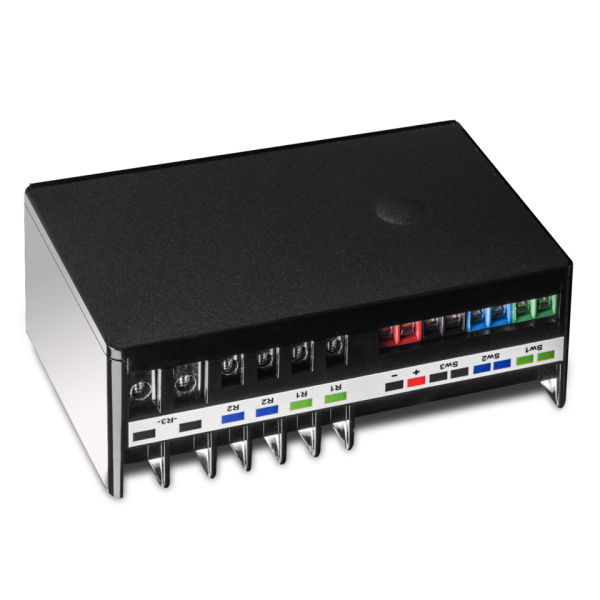
Z-Wave relays let you bring existing equipment under Alarm.com control, a bell, a sign, a fan, a gate operator, or a piece of equipment driven through a contactor. These modules usually live in mechanical rooms, ceilings, or far corners, none of them friendly to a mesh. Long Range gets them on the system reliably without building a relay chain to reach them. A Long Range capable relay like the Zooz ZEN16 MultiRelay is a good example, sitting in a mechanical room and reporting straight back to the panel.
Water leak detection and automatic shutoff
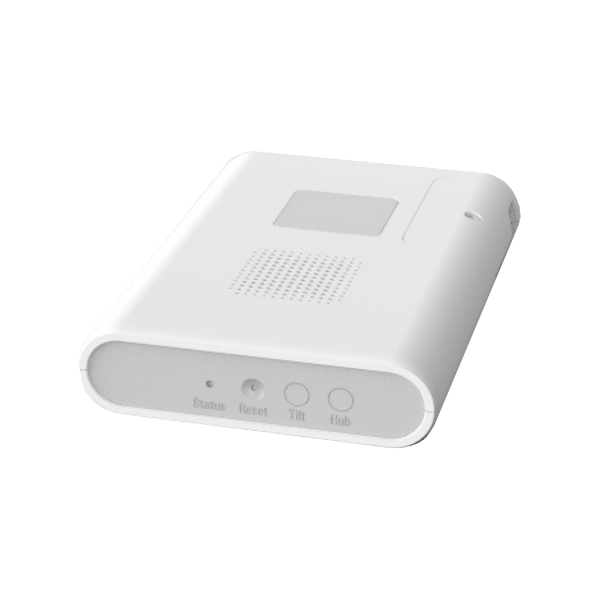
Water damage is one of the most expensive and disruptive losses a business can take, and the worst leaks happen where nobody is looking: a back mechanical closet, an upstairs restroom, a utility room, or an unstaffed building over a long weekend. Those low-traffic, far-from-the-panel spots are exactly where a mesh tends to be weakest. Two Z-Wave Long Range devices address this on Alarm.com. The Alarm.com Water Dragon is a whole-building leak detector built on Z-Wave Long Range that mounts on the incoming water main (no plumber required) and uses ultrasonic sensing to catch unusual water activity downstream, from hidden leaks in walls and floors to running fixtures, while also watching pipe temperature for freeze risk and showing water-usage trends in the app. Because it is a Long Range device, it reports straight to the panel from a utility room or basement where a mesh signal would be weak. It is a monitor: it detects and alerts, but it does not shut off the water.
For the shutoff itself, pair it with a valve actuator like the Zooz ZAC36 Titan, an Alarm.com-supported Z-Wave valve that supports Long Range. It clamps onto an existing quarter-turn shutoff valve and can close the water on an Alarm.com rule or from the app, so a detected leak can trigger an automatic shutoff. That combination turns "we found out Monday morning" into "the water shut itself off Saturday night." Because device support varies, confirm the specific valve, its Long Range support, and the automation behavior with Surety before you rely on it. One distinction worth knowing: the Water Dragon and the Titan valve are the Long Range automation and monitoring pieces, while dedicated point leak and flood sensors enrolled as security-system sensors are typically PowerG.
Whole-building energy monitoring
Z-Wave energy meters are Long Range automation devices, and the electrical panel they clamp onto is almost never next to the security panel; it is in a back room, a basement, or a separate electrical closet. On a mesh, that distance is a problem. On Long Range, the meter reports directly to the panel. The Aeotec Home Energy Meter Gen 8 is the device to know here: a clamp-on meter installed at the electrical panel that reports whole-location usage in kilowatt-hours and dollars in the Alarm.com app, which is useful when you are trying to see where your power, and your money, is going. For what you can do with that data, see the smart energy management guide.
Exterior, parking-area, and sign lighting
The lights a business most wants to schedule or trigger automatically, parking-lot poles, building-exterior and entry lighting, signage, or lighting on a detached structure, are usually the farthest things from the panel, out at the edge of the lot or on an exterior wall. Z-Wave switches and plugs for these run directly to the panel on Long Range, so you can schedule them to business hours, trigger them on an alarm or motion event, or run them on sunrise and sunset offsets, all without dropping repeaters across the parking lot to keep a signal alive. Anything outdoors needs an exterior-rated, weatherproof device or enclosure, and once connected the lighting works in the same rules and schedules described in our guide to automation rules, scenes, and schedules.
Multi-building businesses and unstaffed outbuildings
Plenty of businesses are not a single building. You might have a main building plus a detached shop, a separate storage building, or a standalone structure across the lot, and many businesses have outbuildings nobody occupies day to day: a pump house, a well house, a storage shed, or a detached garage. Running a reliable mesh across the gap between structures is impractical, because there is nothing in between to repeat, and you would not want to install and power repeater devices inside an empty building just to carry a signal. Long Range lets a lock, a thermostat, a relay, or a leak monitor in that second structure talk directly to the panel in the main building. This works best for nearby structures rather than far-flung ones, so where construction is heavy or a building is well across the property, test placement and range before a permanent install.
Why this matters to the bottom line
The business case for Long Range is not about the technology being elegant. It is about cost and reliability.
You only buy and install the devices you actually want. Many businesses care about locks, bay doors, or thermostats, and nothing else, and those happen to be the devices that do not repeat. On a mesh, reaching them reliably means installing extra always-on repeaters you never wanted, lights or plug-in modules placed purely to carry the signal, which is added hardware cost plus the labor to mount and wire them. With Long Range there are no repeaters to add: you install just the locks, doors, and thermostats you need, and each one talks directly to the panel. Fewer devices to buy, fewer to install, and nothing on the wall whose only job is to relay.
Downtime and troubleshooting are costs. A mesh that needs tuning, healing, and the occasional "why is this node offline" investigation consumes staff or technician time. Long Range removes most of that simply by removing the mesh, leaving fewer moving parts to diagnose. Battery replacement is a recurring cost too: in a business with many battery devices, especially locks, batteries that drain fast mean recurring labor and the risk of a device failing at the worst moment. Long Range's efficient, single-hop communication stretches battery life, which means fewer service trips. And simplicity scales: as you add devices or reconfigure a space, a mesh has to be re-thought, while Long Range devices just connect to the panel, and moving or removing one does not disturb anything else.
There is one tradeoff to keep in mind. Long Range needs a usable direct path to the panel, and in the rare case where that path is entirely blocked, for example a metal-walled room or a vault sitting directly between the device and the panel, a mesh could route around the obstruction where Long Range cannot. This is uncommon, but in a building with heavy construction it is worth testing placement before a permanent install. There are also a couple of specific reasons to keep a device on the classic mesh, mainly if you rely on direct association or have older devices that do not support Long Range, both of which our in-depth Z-Wave Long Range guide explains.
Z-Wave Long Range vs. PowerG for business
If you already use Alarm.com for business, you have probably run into PowerG, and it is worth understanding how the two relate, because in this application they are very similar. Both Z-Wave Long Range and PowerG use a direct, point-to-point (star) architecture where each device talks straight to the panel instead of hopping through a mesh, both reach far across a building, and both deliver the reliability and battery efficiency a business wants. In other words, PowerG already gives you the same core advantage Z-Wave Long Range does, which is why many businesses choose PowerG locks and lighting in the first place. If you are happy with your PowerG devices, you are already getting the same benefits.
The difference is device selection. Z-Wave has a much larger, multi-vendor ecosystem, and it covers categories PowerG does not currently offer at all, notably thermostats and relays, along with a wider range of locks, switches, plugs, and specialty automation devices. So a business that wants smart thermostats across several HVAC zones, or relays to bring existing equipment under control, will generally need Z-Wave (ideally Long Range), because those device types are not available in PowerG. The clean way to decide: use PowerG (if you prefer) where a good PowerG device exists and use Z-Wave Long Range when you need the breadth of the Z-Wave ecosystem or a device type PowerG does not make, while still getting the same direct-to-panel reliability. Device lineups change, so confirm a specific device and its compatibility with Surety.
One thing Long Range does not change: on Alarm.com, your security and life-safety sensors (door and window contacts, motion, glass break, smoke) are PowerG devices, while Z-Wave Long Range is the protocol for automation devices like locks, lights, thermostats, garage and gate control, and relays. This is a matter of which protocol carries which device category on the platform, not a knock on Z-Wave's security. Both protocols encrypt with AES-128 (Z-Wave Long Range using its S2 security framework, PowerG combining it with frequency-hopping and TDMA), so your LR locks and other devices are just as protected; PowerG is simply where the dedicated security and life-safety sensors live. The two protocols run side by side on the same system. For more on the underlying technology and the PowerG comparison, see our technical overview of Z-Wave Long Range in Alarm.com.
| Factor | Z-Wave Long Range | PowerG |
|---|---|---|
| Architecture | Direct-to-panel (star) | Direct-to-panel (star) |
| Range | Up to ~1.5 mi line-of-sight | Up to ~2 km (~6,000 ft) open air |
| Device breadth | Large, multi-vendor ecosystem | Smaller, single-vendor |
| Thermostats | Yes | Not currently offered |
| Relays | Yes | Not currently offered |
| Locks and lighting | Yes, wide selection | Yes, select PowerG models |
| Security and life-safety sensors on Alarm.com | Not used for sensors (automation devices only) | Yes, the sensor protocol on IQ Security & DSC systems |
| Security / encryption | AES-128 (Z-Wave S2 security) | AES-128 (with FHSS and TDMA) |
| Best fit | Device breadth, thermostats, relays, reaching far devices | Security and life-safety sensors, plus tight integration where a PowerG device exists |
Both range figures are line-of-sight, open-air numbers. Real indoor range is shorter, which the next section explains.
A realistic word on range
The roughly 1.5 mile figure for Z-Wave Long Range is a line-of-sight, open-air number, not the range you get through a building. Concrete, masonry, steel studs, fire-rated walls, metal racking, and equipment all weaken the signal, so the real indoor reach is shorter, and the more solid the construction between a device and the panel, the shorter it gets. The practical point is comparative rather than absolute: for any given far device, one strong direct link to the panel beats a chain of weak mesh hops, and Long Range typically reaches far enough to cover a normal small or mid-sized business, or a nearby second structure, without repeaters. For heavy construction or longer building-to-building distances, test placement and confirm expected range for your specific property before a permanent install.
| Business scenario | Mesh problem | Long Range solution |
|---|---|---|
| Smart lock at a far door | Battery lock with no nearby repeater drops or lags | Lock connects directly to the panel, no repeaters |
| Multiple thermostat zones | Far thermostats lag without repeaters between them | Each thermostat reports straight to the panel |
| Overhead bay door or gate | No powered devices out there to carry the signal | Controller reaches the panel directly |
| Relay in a mechanical room | Dead spot deep in the building | Relay connects directly, no relay chain |
| Leak monitoring and shutoff on the water main | Utility room is a weak mesh corner | Water Dragon plus Titan valve report and act directly |
| Energy monitoring at the electrical panel | Panel is far from the security panel | Home Energy Meter Gen 8 reports directly |
| Parking-lot or exterior lighting | Edge-of-property devices need scattered repeaters | Switches and plugs connect directly to the panel |
| Device in a detached outbuilding | Nothing between buildings to repeat | Device in the second structure reaches the panel directly |
What you need to use Z-Wave Long Range
Two things have to be in place. First, an LR-capable Alarm.com panel, in practice a current 2GIG EDGE or Qolsys IQ Panel 4 or IQ Panel 5 on up-to-date software. Second, an LR-capable device, enrolled with SmartStart by scanning its QR code (a device added through traditional inclusion joins the classic mesh instead, even if the hardware supports Long Range). Which panels and devices qualify is maintained on the Surety Z-Wave Long Range compatibility list, and the enrollment steps are in the SmartStart enrollment guide. Surety primarily stocks PowerG automation devices, which are not sold through retail channels, but you are free to source compatible Z-Wave devices online (Zooz and Shelly are strong, widely available brands), and Surety is happy to help with compatibility questions. If you are new to the platform, our overview of what Alarm.com for business is is a good starting point.
Frequently Asked Questions
- Is Z-Wave Long Range better than a Z-Wave mesh for a business?
For most business automation devices on a modern Alarm.com panel, yes. Each device talks directly to the panel, so you avoid building and maintaining a mesh of repeaters across a large building, and you get better reliability and battery life. Use the classic mesh only for specific reasons, mainly if you rely on direct association or have older devices that do not support Long Range. See our in-depth Z-Wave Long Range guide for the details.
- How is Z-Wave Long Range different from PowerG?
They are very similar in practice. Both are direct-to-panel, long-range, and reliable, which is why many businesses already use PowerG locks and lights. The main difference is device selection: Z-Wave has a much wider ecosystem and offers categories PowerG does not, like thermostats and relays. Both encrypt with AES-128 (Z-Wave Long Range via its S2 security, PowerG with added frequency-hopping and TDMA), so both are secure; on Alarm.com, PowerG is simply the protocol used for security and life-safety sensors, while Z-Wave Long Range handles automation devices.
- Can I use Long Range for smart locks far from my panel?
Yes, that is one of its best business uses. A lock at the far end of a building connects straight to the panel without repeaters, which is hard to achieve reliably on a mesh. Confirm the specific lock is Long Range capable on the Surety compatibility list.
- Do I need new equipment to use Z-Wave Long Range?
You need an LR-capable Alarm.com panel (a current 2GIG EDGE or Qolsys IQ Panel 4 or IQ Panel 5 on up-to-date software) and LR-capable devices enrolled with SmartStart. Confirm your panel and devices with Surety and the compatibility list.
- How far does Z-Wave Long Range actually reach inside my building?
The roughly 1.5 mile figure is line-of-sight in open air, not what you get through walls. Concrete, steel, and dense equipment shorten the real indoor range, sometimes substantially. The practical point is comparative: one strong direct link to the panel beats a chain of weak mesh hops, and Long Range typically covers a normal commercial building or a nearby second structure without repeaters. For heavy construction or longer building-to-building distances, test placement and confirm expected range with Surety.
- Can Z-Wave Long Range shut off my water if there is a leak?
The Alarm.com Water Dragon is a Long Range whole-building leak detector and monitor; it detects and alerts, but it does not close the water. To shut off automatically, pair it with an LR-capable, Alarm.com-supported valve actuator like the Zooz ZAC36 Titan, so an Alarm.com rule can close the valve. Confirm the specific devices, Long Range support, and automation behavior with Surety.
