

Alarm.com for Business is a cloud-based commercial security platform that lets business owners manage intrusion alarm, video, access control, energy, fleet, and multi-site operations from a single app and dashboard. It is the commercial tier of the Alarm.com platform, sold exclusively through authorized dealers, and powers commercial security systems for businesses ranging from single-location shops to chains with thousands of sites. The platform is built and operated by Alarm.com Incorporated, a publicly traded company headquartered in Tysons, Virginia, that has focused on cloud-based smart security since 2000.
If you are researching the business platform for the first time, the most important thing to understand up front is that Alarm.com for Business is a genuinely separate commercial product layer, not a residential system rebranded for offices. It includes feature sets, dashboards, and hardware that are not available on the residential side. This guide walks through what is in it, how each module works, the kinds of businesses that use it, and how to actually buy and deploy it.
Here is Alarm.com for Business at a glance:
| Aspect | Detail |
|---|---|
| What it is | A cloud-based commercial security and operations platform |
| Modules | Intrusion alarm, video surveillance, access control, energy and automation, fleet tracking, multi-site management, business analytics, gunshot detection |
| Sold by | Authorized Alarm.com dealers only (never direct from Alarm.com to end customers) |
| Deployment options | Traditional dealer (full-service install and contract) or self-install through Surety Business |
| Scale | Single-location shops to chains with thousands of sites |
| Operator | Alarm.com Incorporated, founded 2000, Tysons, Virginia |
What is in this guide:
- What Alarm.com for Business Is (and Is Not)
- The Core Modules of Alarm.com for Business
- Alarm.com for Business vs. Alarm.com for Home
- How Surety Business Compares to Traditional and DIY Security
- What Types of Businesses Use Alarm.com for Business
- How to Get Alarm.com for Your Business
What Alarm.com for Business Is (and Is Not)
Alarm.com for Business is software (the mobile app, web dashboard, monitoring and reporting infrastructure, AI analytics, and automation engine) paired with a broad catalog of compatible commercial hardware. The official descriptions live on Alarm.com's commercial business page and Alarm.com's small & medium-sized business page.
What it is not: Alarm.com is not a hardware-only product, not a consumer-grade system, and not something Alarm.com sells to a business directly. Every account, regardless of size, is provisioned and supported through an authorized dealer. That dealer model is intentional. It gives the business a local point of contact for installation, activation, and support, while letting Alarm.com focus on the platform itself. Surety Business is one of those authorized dealers, uniquely focused on small and mid-sized businesses that want to run the platform on a self-managed, month-to-month basis.
The Core Modules of Alarm.com for Business
Alarm.com for Business is organized into a set of core modules. Most businesses start with one or two and expand over time. Alarm, cameras, access control, fleet management, and gunshot detection can each run as stand-alone services, so a business that only needs cameras (or only needs fleet tracking) is not forced to bundle an alarm. That said, each module becomes significantly more useful when combined with the others. Access events tie into the security event log, cameras can trigger on alarm events, arming and access schedules align, and everything lives in one activity feed.
Intrusion Detection and Business Alarm
The intrusion detection module is a full commercial security alarm: panel, sensors, optional professional monitoring, and the same mobile app that controls every other module. Some dealers offer it as a core intrusion plan and a higher tier that bundles intrusion with energy management, automation, and smart lock control on the same platform.
The commercial intrusion feature set goes well beyond a residential setup. Schedule-based auto-arming and auto-disarming align the alarm to actual business hours (for example, arming automatically at 10pm and disarming at 8am on weekdays). Per-user alarm codes with role-based permissions let managers, cleaning crews, and delivery personnel each have their own code with their own time windows, so an audit log always shows exactly who disarmed and when. Instant app and SMS alerts on a trigger event include the ability to cancel a false alarm remotely before dispatch, which reduces nuisance dispatches and the fines that come with them.
Two supervision features are specific to the commercial plans and worth calling out, because they catch operational problems the residential platform simply does not look for. Arming Supervision sends an alert if the system has not been armed by a specified time (for example, by 11pm on a weeknight), which surfaces a closing manager who forgot to arm before leaving, or a location that closed early without setting up properly. Disarming Supervision sends an alert if the system has not been disarmed by a specified time (for example, by 8:30am on a weekday morning), which surfaces a location where the opener never showed up. Commercial packages can also use a No-Show Alert variant that fires when an expected opening or closing simply does not happen at all. Together these turn the alarm panel into a quiet attendance and operations check, not just a break-in detector.
Communication redundancy is one of the most underrated features of the platform. It is included in the residential plans as well, but it matters even more for a business, where a cut phone line or severed coax has historically been a standard tactic in commercial burglaries. Burglary remains one of the most frequent property crimes against U.S. businesses according to the FBI's Uniform Crime Reporting program data, and commercial offenders are more likely than residential ones to attempt to defeat the alarm communication path on the way in. The panel reports over both cellular and internet simultaneously (dual-path). If the internet is cut, cellular keeps reporting. If cellular fails, the internet path picks up. Crash-and-smash protection sends a signal the instant a sensor trips, before the entry delay expires, so destroying the panel mid-disarm does not silence the alarm. Silent panic buttons (via the app or a keyfob) and duress codes let staff signal the monitoring station without triggering an audible alarm, which is critical during a robbery or threat situation. Two-way voice lets monitoring operators speak through the panel during an event to verify a false alarm, give emergency instructions, or challenge an intruder directly.
On the hardware side, Alarm.com is somewhat panel-agnostic. Compatible panels include the Qolsys IQ Panel 4 (an all-in-one touch panel with smart automation support), the Qolsys IQ Pro (a commercial-grade hardwired panel for businesses with stronger security needs), nami systems, DSC PowerSeries Neo and Pro, 2GIG, Honeywell, and others. Sensors are whatever the chosen control panel supports: door and window contacts, motion detectors, glass break detectors, smoke and CO detectors, keyfobs, and so on. Optional 24/7 professional monitoring routes confirmed alarms to trained operators who contact authorities on your behalf. Commercial Activity Reports (automated emails covering open/close times versus scheduled hours, user activity by code, unexpected disarm events, and schedule compliance) can be delivered daily, weekly, or monthly.
A restaurant intrusion scenario: a restaurant owner sets the system to auto-arm every night at 10pm. At 11pm a motion sensor triggers. The owner gets an app notification, pulls up a live camera view, sees it was the cleaning crew using a newly issued keypad code, and cancels the alarm remotely before dispatch. The activity log captures the event with a timestamp and the code that was used, and the next morning the owner can confirm the cleaning crew arrived and left when they were supposed to.
Video Surveillance
The video module can run on its own or alongside a security alarm. Alarm.com offers two commercial camera service plans, Commercial Video and Commercial Video Plus, both of which are built for business operations in ways the residential video plans are not. Both plans include Business Activity Analytics (foot-traffic, occupancy, and operational pattern data), the Enterprise Security Console for multi-location video management, 24/7 Video Recording with on-premises SVR (Stream Video Recorder) and onboard camera recording, support for up to 256 video devices per account, and support for up to 30 SVRs. Commercial Video is what most businesses use. Commercial Video Plus extends the platform to support a broader set of third-party hardware and adds an AI search layer on top of the recorded footage: it adds analytics support for third-party Axis and Hanwha cameras, support for third-party panoramic (fisheye) cameras, support for third-party PTZ (pan-tilt-zoom) cameras, and AI video search across stored video, so an operator can search recorded footage by attributes like "blue truck" or "person in red jacket" rather than scrubbing a timeline.
What you get on the platform side is 1,000 cloud-stored event clips per camera plan plus 24/7 onboard recording on supported cameras, live streaming from anywhere in the Alarm.com app or web dashboard, and the ability to share a clip from your phone as easily as sending a text. For businesses that already have ONVIF-compatible cameras (most major brands) or Axis VAPIX cameras, the Alarm.com Commercial Stream Video Recorder (CSVR) brings existing hardware into the Alarm.com app so the business does not have to rip and replace.
The thing that genuinely differentiates Alarm.com video from generic IP cameras is the AI analytics, which run both on the camera and in the cloud. Instead of alerting on every motion (every blowing leaf, every passing headlight), the system understands what it sees. That matters for loss prevention as well as physical security: the annual NRF National Retail Security Survey consistently identifies external theft, organized retail crime, and internal employee theft as the top sources of retail shrink, all scenarios commercial AI video analytics are designed to detect and document. Specific analytics include familiar face recognition (the system learns your regular staff and frequent visitors, so you can either be notified when someone familiar arrives or filter to focus only on unfamiliar faces), unfamiliar face detection (alerts when an unknown person appears, especially valuable after hours), vehicle recognition (alerts on unfamiliar vehicles in your lot at night), package detection (instant alert when a package is dropped so it can be brought inside before it walks away), loitering alerts (someone lingering longer than normal at a back door, loading dock, or restricted zone), and virtual tripwires (a line drawn in the camera view that generates an alert when crossed).
Two related add-ons turn passive recording into proactive deterrence. AI Deterrence (AID) uses the camera itself to act on a detection in real time: spoken warnings through the camera speaker (often with descriptions of what the person is wearing or where they are), flashing lights, and similar interventions designed to make an intruder leave before anything escalates. Remote Video Monitoring (RVM) layers a trained human operator on top of that: when an alert fires during covered hours, a remote guard pulls up the live camera feed, verifies whether the activity is a real threat or a false trigger, can address the person directly through the camera's two-way audio, and dispatches police on confirmed incidents. AID and RVM work well together, and many businesses run AID 24/7 with RVM scheduled for the after-hours and overnight windows when the business is closed.
The camera lineup spans indoor AI cameras, outdoor AI spotlight cameras, PoE and Wi-Fi doorbell cameras, and floodlight cameras, with the platform AI analytics baked into each.
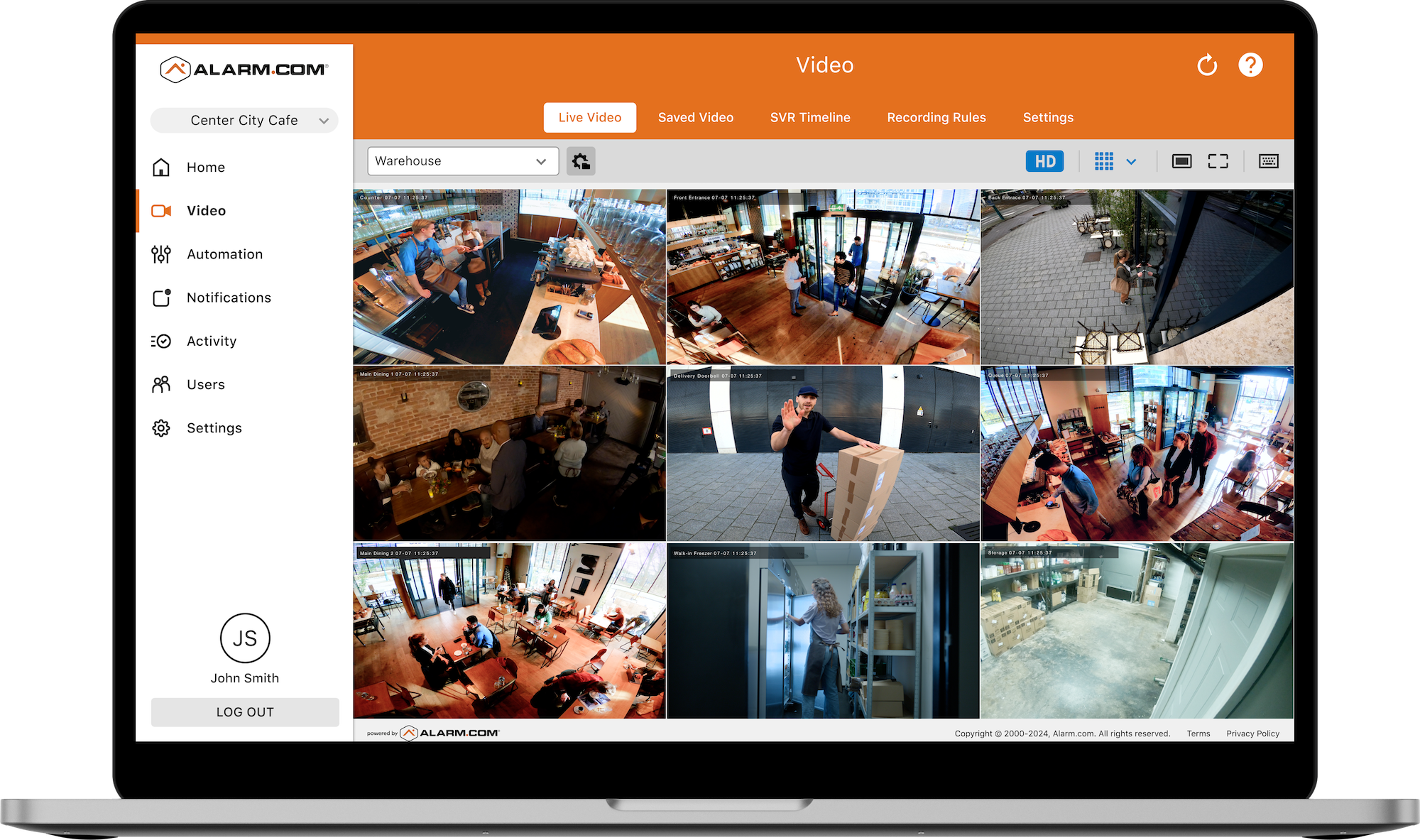
A retail-store scenario: a manager uses foot-traffic analytics from the Alarm.com cameras to discover that Saturday afternoons between 1pm and 4pm are the store's busiest window, and adjusts staffing accordingly. Later that month, the loitering alert flags a person who lingered near the back entrance for 18 minutes after close. The manager pulls the clip, shares it with police, and the person is identified as the same individual who broke into a neighboring business the prior week.
Access Control (and the Smart Lock Alternative)
Access control is the module most often misunderstood, because Alarm.com actually offers two different ways to control doors, and the right answer depends on the door hardware. One of them is commercial-only; the other works on residential plans too. For a deeper walkthrough of how smart access control works at the SMB scale, see our guide to smart access control for small businesses.
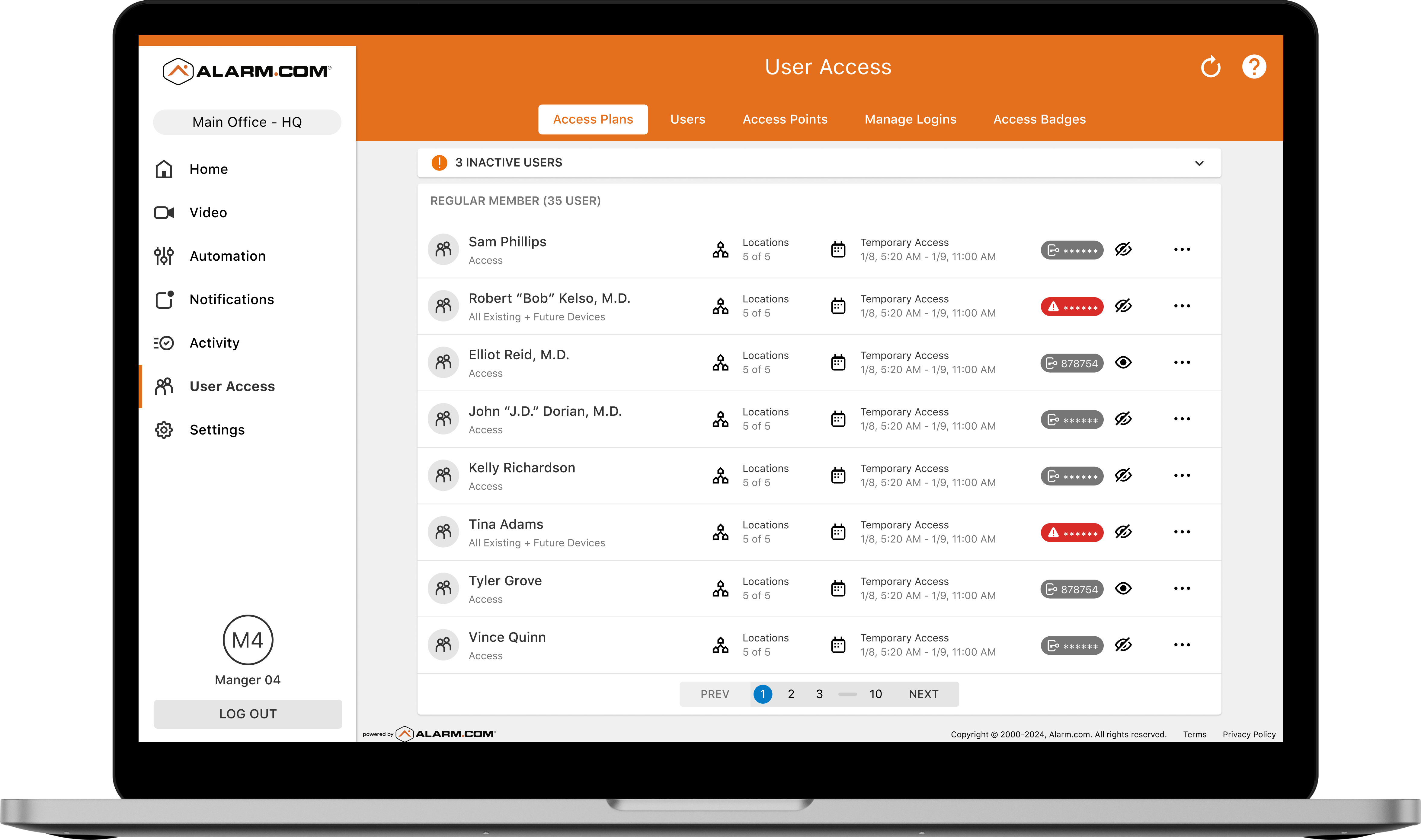
The first option is commercial access control, and this is available only on Alarm.com for Business. It is the dedicated access control plan that supports the kinds of doors found in larger offices, retail stores, healthcare facilities, and warehouses. It is designed for doors with electrified locks: magnetic locks (mag locks), electric strikes, and electric locksets (mortise or cylindrical). It is not for residential-style deadbolts. Credentials include mobile phones via the Alarm.com app, smart cards (DESFire or LEGIC), and key fobs. The system supports up to 68 doors per location and produces a full audit trail with timestamp, credential used, and door name for every entry. Time-based access schedules let a cleaning-crew credential work only Tuesday and Thursday evenings, automatically. Remote door control from the app lets a manager lock, unlock, or buzz in a visitor with one tap. A two-way video intercom integration lets that same manager see and speak with a delivery driver via the app before granting access. Visitor notifications can include a video clip when someone arrives at any access point, and scan-to-add card serial detection speeds credential enrollment. Offboarding (removing a departed employee's access across every door) takes seconds, with no rekeying. Access events and alarm events live in the same activity log, and door lockdowns can trigger automatically on an alarm. An Access Plus plan adds Access Control I/O, Dual-Access Mode, and professional access control monitoring.
One honest installation note: commercial access control hardware almost always requires a licensed contractor (a locksmith for door and lock hardware and possibly a low-voltage contractor for the access controller wiring). Most jurisdictions also require a permit, and fire safety, electrical, and ADA compliance must be verified with the local authority having jurisdiction. Even if you are self-installing the rest of your Alarm.com system, you will probably need to hire a licensed locksmith to install the door hardware itself.
The second option is smart locks, and these are available on both residential and commercial Alarm.com plans. Smart locks are often the right fit for smaller businesses with less door traffic and standard residential-style doors and deadbolts, where the overhead of commercial access control hardware is not warranted. They replace existing deadbolts and integrate directly with the Alarm.com platform. The feature set covers remote lock and unlock from anywhere, unique PIN codes per employee, scheduled access windows, full activity logging, left-unlocked alerts, and direct integration with alarm arming and disarming (lock all doors when arming, unlock the front door when disarming). For small offices, retail shops, restaurants, and any business with standard door hardware that does not need card readers or mag locks, this is usually the simpler and more affordable option. The important distinction is that smart locks are a residential-grade hardware category that Alarm.com happens to support across both tiers, while commercial access control is a meaningfully different capability that exists only inside Alarm.com for Business.
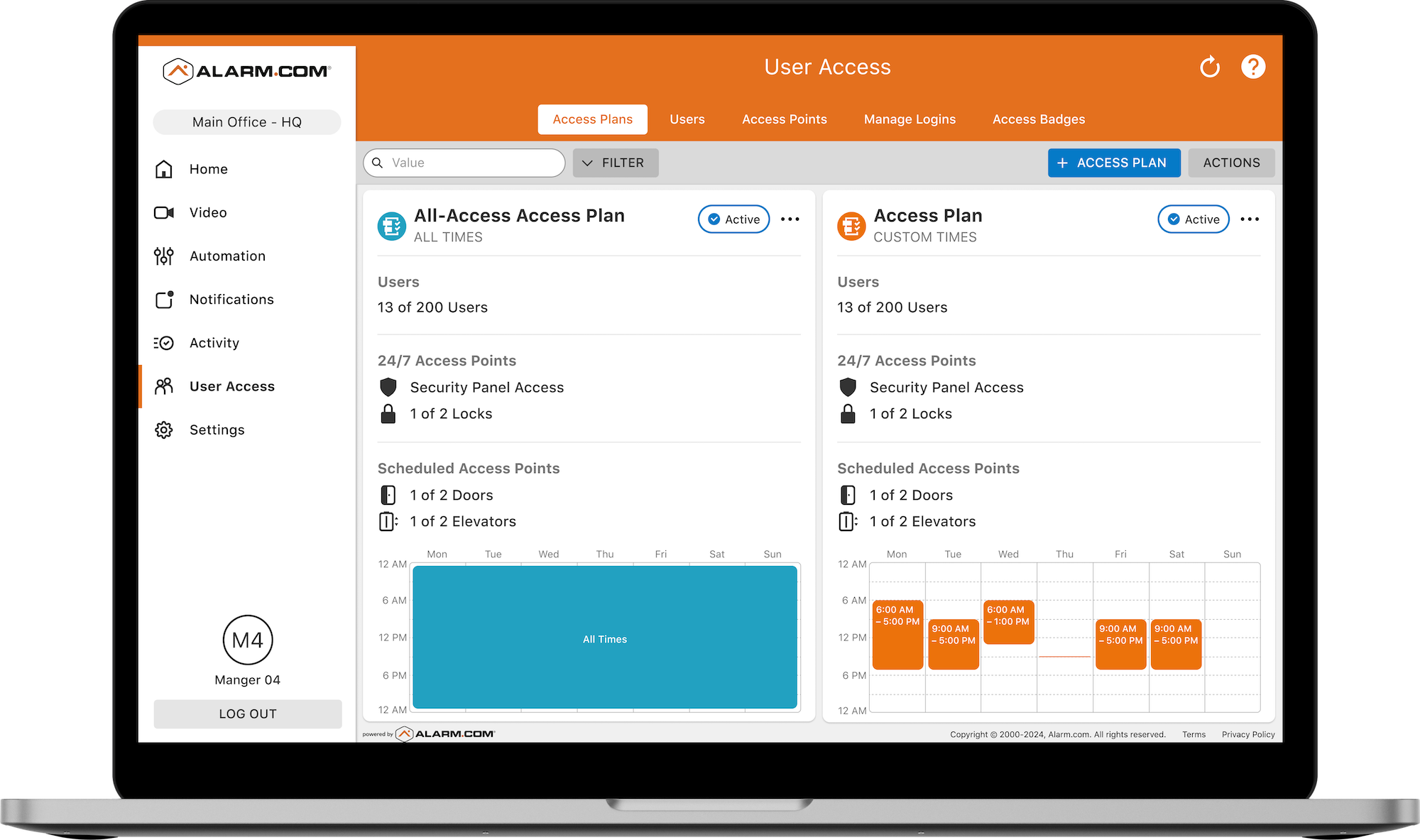
A medical-office scenario: a manager terminates a staff member on Friday afternoon. From her phone, in under 30 seconds, she removes the employee's mobile credential and card fob access to all three office doors, revokes their alarm user code, and checks the audit log to confirm their last entry was that morning. No locksmith, no rekeying, no residual access.
Energy Management and Automation
Energy management and automation are not part of the base commercial alarm plan. They are bundled into the higher-tier "Plus" alarm plan along with smart lock control. A business on the base alarm plan does not get thermostat scheduling, geo-fencing, lighting automation, or Automation Scenes; upgrading to the Plus plan turns those on. There is no separate stand-alone energy or automation product on Alarm.com for Business, so the path to using these features is always to be on the Plus alarm plan. For a deeper walkthrough of how SMBs use the platform's energy features, see our guide to smart energy management for small businesses.
The module covers thermostat scheduling (automatically setting business-hours versus after-hours setpoints, for example 70 degrees during open hours and 60 degrees overnight), remote thermostat control from the Alarm.com app, and tight integration with the security schedule. When the alarm is armed at close, thermostats switch to energy-saving setbacks. When the system disarms in the morning, the space starts warming or cooling before anyone arrives. Geo-fencing automation adjusts thermostats and other devices based on whether authorized smartphones are inside or outside the geofence around the property. Humidity monitoring tracks humidity alongside temperature, which matters for warehouses, medical offices, wine storage, and any space where humidity affects inventory or comfort. Lighting automation turns lights on before opening and off after closing, tied to the alarm schedule or to geo-services. Peak-demand management can automatically dial back thermostats and non-essential loads during high-rate utility periods to reduce demand charges. For multi-location operators, an energy comparison view shows usage and temperature patterns across every site from one dashboard.
Two specific temperature-sensor types are worth naming, because each fits a different commercial environment. Alarm.com Z-Wave temperature sensors trigger automations or alerts when readings cross a threshold. They also integrate directly with Alarm.com thermostats, so a thermostat can use the average temperature from multiple Z-Wave sensors placed around a space instead of just the temperature at the thermostat itself. That matters in any room where the thermostat lives in a corner that does not represent how the space actually feels, like a long retail floor, a deep office suite, or a warehouse mezzanine. They are well-suited to server rooms, storage closets, and back-of-house areas in general. DSC PowerG temperature sensors are part of DSC's PowerG encrypted wireless line and integrate with PowerG-compatible panels (Qolsys IQ & DSC panels). Long range and strong RF encryption make them a good fit for larger commercial spaces and warehouses, and the PowerG sensor supports an optional external waterproof sensing probe so the sensor body can sit in a protected location while the probe goes somewhere a regular sensor cannot, like inside a freezer or outdoors. Typical use cases for temperature sensors of either type include walk-in coolers and freezers (food spoilage prevention), wine storage, pharmaceutical and medical supply storage (cold-chain compliance), server rooms and data closets, greenhouses, and refrigerated staging areas. Continuous temperature monitoring is also increasingly tied to regulatory requirements: under FDA Food Safety Modernization Act (FSMA) rules covered in 21 CFR Part 1, Subpart S, certain food facilities must keep traceability records for time/temperature-sensitive foods, and pharmacies storing refrigerated medications follow USP General Chapter 1079 cold-chain guidance for temperature monitoring and excursion documentation.
Automation Scenes are routines that trigger on a schedule, an event, or a location change. Common examples are an opening routine (when the first employee disarms, unlock the front entrance, turn on interior lights, set the thermostat to occupied mode, and send a "store opened" notification to the manager), a closing routine (when the system arms, lock all doors, turn off non-security lighting, set the thermostat to setback), an after-hours access routine (when an authorized user disarms after hours, turn on entry lights only, notify the owner, auto-arm after 30 minutes of inactivity), and an emergency lockdown (triggered by a panic button, lock all exterior doors, start recording on all cameras, and notify monitoring and designated contacts).
A restaurant cooler scenario: the kitchen has a DSC PowerG temperature sensor mounted on the wall just outside the walk-in cooler, with its external waterproof probe routed through the door seal and hanging inside the cooler. The sensor body stays in the warm, dry kitchen where its electronics and battery hold up, and the metal-walled cooler interior gets a reliable reading from the probe with an alert threshold of 38 degrees. At 2am a door seal fails and the probe reads 45 degrees. The owner gets an alert on their phone, calls the on-duty manager, and prevents thousands of dollars of spoilage before opening. A retail comfort scenario: a clothing store's thermostat is in a back hallway near the stockroom, which runs noticeably warmer than the sales floor where customers actually shop. The owner adds two Z-Wave temperature sensors out on the floor and configures the thermostat to use the average of the floor sensors rather than its own reading, so the room cools to a comfortable temperature for customers instead of overcooling because the thermostat thinks the whole store is as warm as the stockroom hallway. A multi-location pharmacy scenario: each medication storage room uses DSC PowerG temperature sensors so the chain can satisfy cold-chain compliance requirements with automated reports available for audit.
Fleet Tracking
Fleet tracking on Alarm.com is called Connected Fleet. It can run as a stand-alone service or alongside an alarm plan that shares the same app, dashboard, and user management. For a deeper walkthrough of how Connected Fleet works, what the hardware does, and how it compares to standalone telematics products, see our guide to Alarm.com Connected Fleet.
The hardware is a plug-and-play OBD-II device called the CC100 Fleet Connector (ADC-CC100-BX). There is no technician visit and no wiring; the device plugs into the OBD-II port under the dashboard, powers on, and connects automatically. It is compatible with any gas-powered vehicle manufactured after 1996 (the year OBD-II became mandatory in the U.S.), and it also supports hybrid and electric vehicles that have an OBD-II port. Fuel-level monitoring requires a 2010 or newer vehicle. The device has built-in LTE Cat-M cellular connectivity (no Wi-Fi, hotspot, or phone tethering required), a built-in backup battery so it keeps reporting if the connector is unplugged or the vehicle battery dies, and GPS accuracy of roughly 2 meters under clear sky. Each location supports up to 100 vehicles, and the Enterprise Dashboard unifies the view across all locations.
The feature set is broad: real-time GPS location and status on a live map, full trip history with route replay (verify stops, investigate incidents, confirm customer visits), driver behavior scoring with harsh braking, hard acceleration, speeding, and excessive idling flagged and scored, custom alert thresholds for speeding or after-hours usage, geofence alerts when vehicles enter or leave job sites or restricted areas, idle-time tracking, nearest-vehicle dispatch for faster job response, engine diagnostics that surface fault codes before they become expensive repairs, fuel-efficiency reports for 2010 and newer vehicles, automatic per-vehicle mileage logs for reimbursement and IRS documentation, and scheduled fleet reports delivered daily, weekly, or monthly. When fleet is added to an alarm plan, it lives in the same Alarm.com app, dashboard, and bill as everything else, with shared user management.
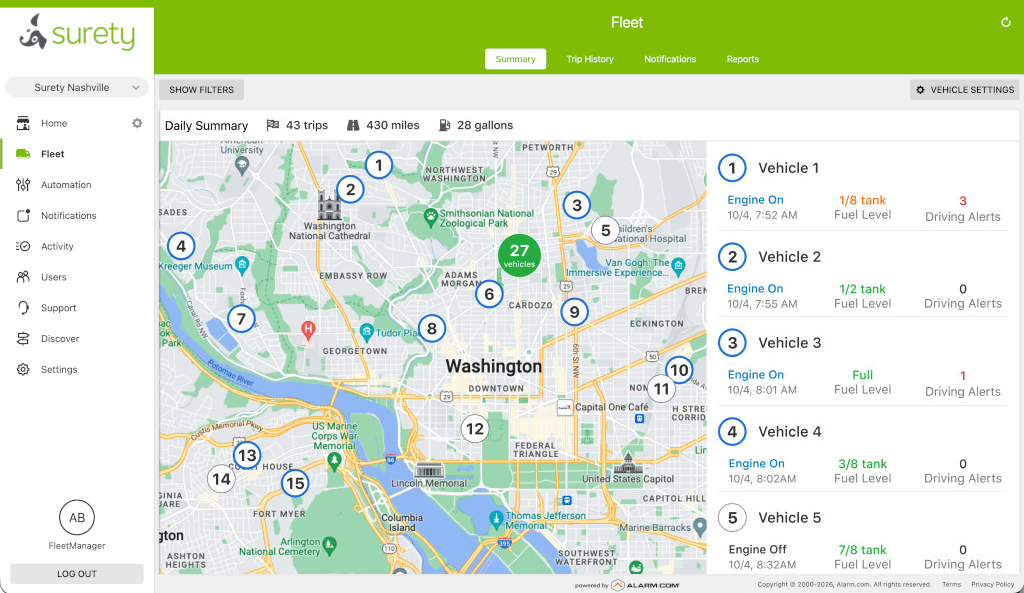
A scenario from a five-van HVAC company: the owner notices that one driver is idling for 20-plus minutes at the start of every shift. After a conversation backed by the idle-time data, the habit stops and fuel costs drop measurably. That same week, a geofence alert fires at 11pm showing one van driving in a neighborhood where the company never works. The owner calls the driver and discovers the van was borrowed without permission.
Multi-Location Management
Multi-location management is delivered through the Enterprise Dashboard. Whether you have two locations or 200, the same dashboard handles them. For a deeper walkthrough of how multi-site businesses use the Enterprise Dashboard day to day, see our guide to Alarm.com multi-site enterprise management for SMBs.
What it does is consolidate alarm status, camera feeds, access events, and temperature readings for every location into one screen, with no account switching. Cross-location reporting lets you compare open/close compliance, user activity, energy usage, and alert patterns across sites to spot trends and outliers. Consistent policy enforcement applies arming schedules, thermostat settings, and access rules to every location at once. A role-based admin structure lets regional managers see only their assigned locations, while corporate operations sees everything. New locations can be added in minutes by cloning the configuration of an existing site, so onboarding does not require a fresh installer visit. Credential revocation for a departed employee happens in seconds across every location they had access to, not site by site.
Alarm.com is used by businesses across the size spectrum, from single-location shops up to chains with thousands of sites. As a concrete data point, Bargain Hunt, a discount retail chain, uses Alarm.com's commercial platform across 80-plus locations with 1,000-plus employees. The same platform that fits a two-location dental practice also fits a national franchise.
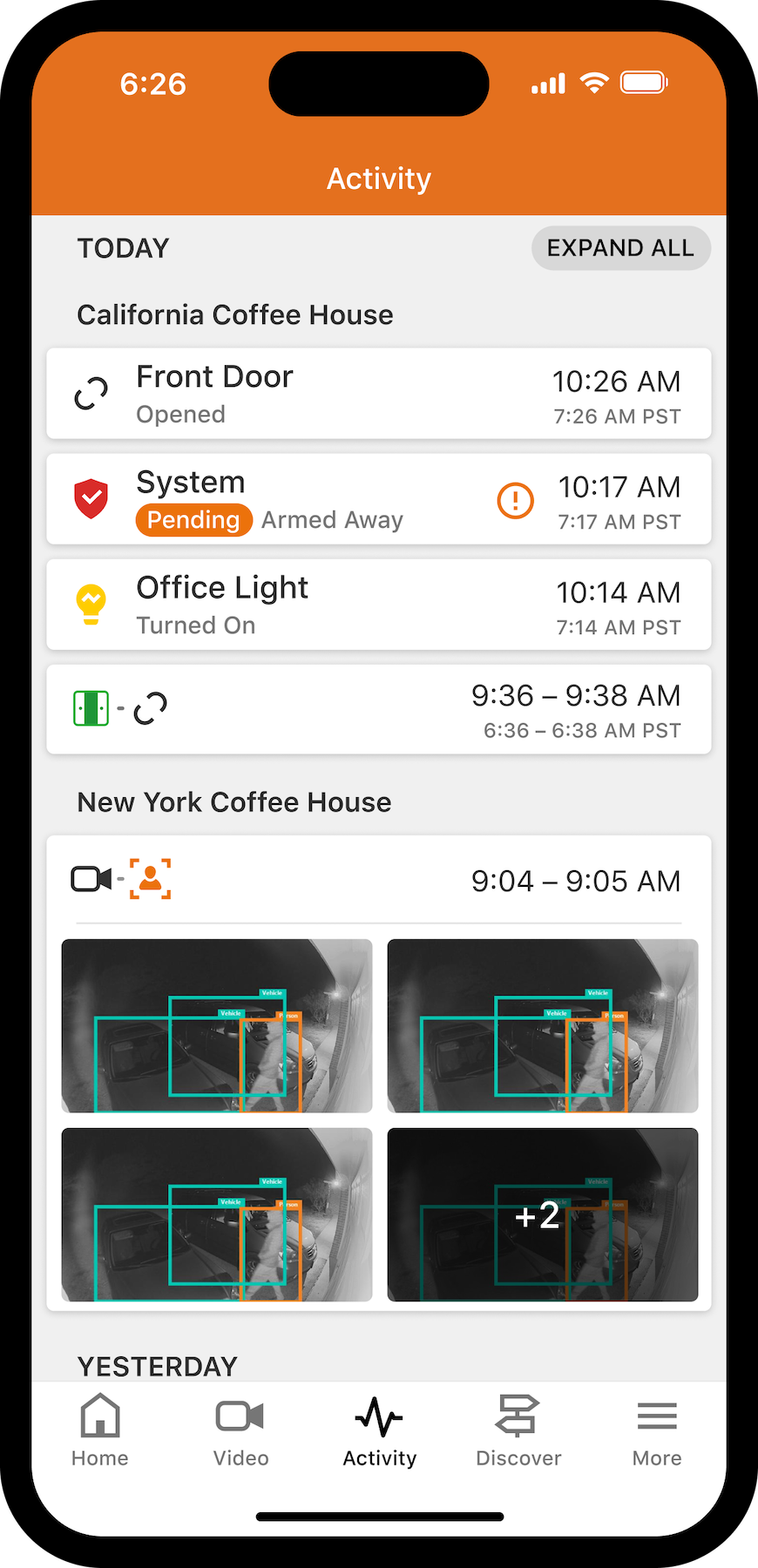
A QSR-franchise scenario: an operator with eight locations gets a corporate audit request for 90 days of open/close records, arm/disarm logs, and temperature monitoring data across every store. Because everything is in the Enterprise Dashboard, the response takes less than an hour. Without centralized management, the same request would have taken a day of calling each location manager.
Business Insights and Analytics
Business Insights is the analytics layer that sits on top of the security, access, and video data, surfacing operational signal that goes beyond pure security. It has two related but distinct sides: alarm and access analytics (driven by the panel and access events) and Business Activity Analytics (driven by the cameras).
On the alarm and access side, Commercial Activity Reports track open/close times against scheduled hours, user activity by code, unexpected disarm events outside normal windows, and schedule compliance across every location. Exception-based alerts notify owners only when something falls outside normal patterns instead of on every event, which is what keeps the alerts useful instead of ignored. Exportable activity logs answer "who did what, at which location, and when" in seconds. Scheduled report delivery sends daily, weekly, or monthly summaries by email to owners and managers automatically. For a deeper walkthrough of how SMBs put Commercial Activity Reports to work, see our guide to unlocking SMB insights with smarter business reports.
Business Activity Analytics (BAA) is the video-driven half of the analytics layer. It uses AI on top of compatible Alarm.com cameras to extract operational data from camera feeds in real time: how many people walked in today, where they spent the most time, how long the line at checkout is, whether a waiting room is overcrowded, and similar. No additional hardware is required beyond compatible cameras already on the account. For a deeper walkthrough with examples by industry, see our guide to Alarm.com Business Activity Analytics.
A retail-chain scenario for the alarm side: a loss-prevention manager sets an exception alert for any location that arms more than 30 minutes after its scheduled closing time. Three locations trigger the alert within a week, revealing that the closing shifts at those sites are routinely running late. The manager addresses it with those location managers before the late closes become a real security liability or a labor-cost problem. A BAA scenario for the video side: the same manager pulls a foot-traffic heat map of the busiest store and discovers that customers cluster around a fixture near the entrance for the first three minutes after walking in. The store moves a new promotional display into that zone the following week, and conversion on the promoted product measurably improves.
Gunshot Detection
Gunshot detection on the Alarm.com platform uses SDS by Alarm.com (Shooter Detection System), which is the only indoor gunshot detection system to hold the highest level of U.S. Department of Homeland Security SAFETY Act Certification. For a deeper walkthrough of how SDS works, what it costs, and how to deploy it in an SMB environment, see our guide to Alarm.com Shooter Detection Systems.
What separates SDS from acoustic-only gunshot detectors is dual-sensor confirmation. Each sensor combines a microphone that listens for the acoustic blast of a gunshot with an infrared sensor that detects the heat signature of the muzzle flash. Both have to trigger simultaneously to confirm a detection. A car backfire, a slammed door, or a dropped object produces an acoustic signal without infrared. A camera strobe or a heat source produces infrared without acoustic. Only an actual gunshot produces both at once. Detection happens in 0.5 seconds, and alerts fire to designated contacts via the Alarm.com app and SMS before anyone could dial 911. Documented accuracy is 99.99 percent, or fewer than one false alert per 5 million service hours.
Each sensor covers up to 2,500 square feet indoors and does not require direct line of sight to the event. Sensors are powered over Ethernet (PoE) for reliable permanent power, and dual-path communication (cellular plus broadband) ensures alerts go out even if the internet is down. A confirmed detection can trigger an automated response sequence: video recording starts, door lockdowns activate, mass notifications go out, and professional monitoring is dispatched simultaneously. One thing worth being explicit about, because it comes up frequently as a privacy concern: the sensor does not record audio. It detects acoustic events but does not store or transmit any audio. It is a pure event detector, not a listening device.
The pricing model is also worth understanding. SDS hardware is purchased once (CapEx). You own it. The ongoing cost is monitoring only; there is no per-sensor recurring subscription fee. That structure makes the 5-year total cost of ownership significantly lower than subscription-based dual-technology alternatives. SDS is available as a stand-alone monitored plan or alongside a security alarm plan, and integration with alarm, cameras, and access control enables a coordinated automated response.
Typical environments include houses of worship, retail stores, restaurants and bars, hotels, auto dealerships, office buildings, schools, healthcare facilities, convenience stores, pharmacies, and cannabis dispensaries. Grants are available for qualifying organizations, including K-12 schools (STOP School Violence and PASS grants, with SDS offering an approximately 15 percent hardware rebate for qualifying K-12 institutions on top of grant support), nonprofits and houses of worship (Nonprofit Security Grant Program), and some government and tribal entities.
A house-of-worship scenario: a mid-size church deploys SDS sensors across its sanctuary, classrooms, and fellowship hall, with the automated response sequence configured to trigger camera recording, lock all exterior doors, and send a mass notification to staff and clergy. During a midweek event, a starter pistol fired at a kids' track-and-field practice in the adjacent parking lot triggers acoustic but not infrared, so the system correctly does not alert. Two months later, a stress test conducted with law enforcement using a blank-firing weapon inside the sanctuary triggers both sensors at once: alerts reach designated staff and the monitoring center in well under a second, doors lock automatically, recording begins on every camera, and police are dispatched with confirmed video of the location. The committee that approved the deployment uses the test record as documentation for their insurance carrier and an upcoming Nonprofit Security Grant Program renewal.
Additional Capabilities Worth Knowing
Beyond the eight modules above, a handful of focused add-ons round out the platform. Safety Button is a personal panic device for staff (useful for lone workers, after-hours employees, or any employee who may need to request help quickly). Flex IO is an outdoor LTE sensor that monitors doors, gates, and outdoor assets without requiring a hub or Wi-Fi (good for outbuildings, gates, storage yards, and remote access points not connected to the main alarm system). Video Intercom enables video entry management for yards, gates, and facilities, and pairs with the access control system for visual verification before remote buzz-in.
Alarm.com for Business vs. Alarm.com for Home
Some business owners researching Alarm.com for Business already have Alarm.com at home and assume the business version is the same product with a different label. It is not.
If you use Alarm.com at home and love it, the good news is that the experience transfers. The app is familiar, the interface is consistent, and devices work the same way. The commercial platform is a distinct product layer built on top of that same foundation, with capabilities that simply do not exist in the residential tier. A business owner trying to run a three-location retail operation on a residential Alarm.com account would hit hard walls almost immediately: no Enterprise Dashboard, no arming schedules, no set business hours, no commercial access control, no fleet tracking, no open/close reporting, no role-based user management. These are not premium upgrades to the residential product. They are a separate commercial tier.
A side-by-side comparison of the most relevant differences:
| Feature | Alarm.com for Business | Alarm.com for Home |
|---|---|---|
| Multi-location Enterprise Dashboard | Included | Not available |
| Commercial access control (mag locks, card readers) | Up to 68 doors per location | Not available |
| Fleet tracking | Available (Connected Fleet, CC100) | Not available |
| Gunshot detection (SDS) | Available | Not available |
| Commercial Activity Reports | Included | Not available |
| Role-based user permissions | Per-user roles and time windows | Basic user codes |
| Shift-based arming schedules | Built around business hours and shifts | Basic schedules |
| Arming and Disarming Supervision (No-Show Alert) | Included | Not available |
| Business Activity Analytics (foot traffic, peak hours) | Included in Commercial Video and Commercial Video Plus | Not available |
| Enterprise Security Console for multi-location video | Included in Commercial Video and Commercial Video Plus | Not available |
| Up to 256 video devices and up to 30 SVRs | Included in Commercial Video and Commercial Video Plus | Not available |
| Third-party Axis/Hanwha analytics, panoramic and PTZ cameras, AI video search | Commercial Video Plus | Not available |
| Safety Button for staff | Available | Not available |
A few features exist in both tiers but work differently. User code management is basic on the residential side, while the commercial tier supports role-based permissions, time-restricted codes per role, and codes tied to access schedules across multiple locations. Both tiers offer AI video analytics, but the commercial tier adds business-specific analytics like foot-traffic counting and operational intelligence that are not part of the residential feature set. Professional monitoring is available on both, but commercial monitoring is configured for business scenarios (open/close exception monitoring, commercial dispatch protocols). And both support automation scenes, but commercial scenes are designed for business workflows like opening and closing routines, shift transitions, and after-hours lockdowns.
One related question comes up often: can a very small business just run on a residential Alarm.com plan to save money? With some dealers (Surety included), yes, and some single-person operations do exactly that. But the moment a business adds employees, multiple locations, access control needs, or vehicles, the commercial plans deliver features the residential tier simply cannot.
How Surety Business Compares to Traditional and DIY Security
A business shopping for security in 2026 is usually choosing among three categories: traditional commercial security companies (ADT, Brinks, and similar), Surety Business, and consumer DIY products (Ring, Arlo, SimpliSafe). Each represents a different point on the spectrum of capability, control, and cost, and understanding where each lands makes the right choice obvious for most businesses.
Traditional commercial security companies sit at the high-capability, high-cost, low-control end. They install enterprise-grade systems (often Alarm.com for Business itself, which is the platform many of them run on), professionally handle installation and configuration, bundle 24/7 monitoring, and operate inside the building so the business owner does not have to. The tradeoffs are real: a salesperson visits before you get a quote, pricing is opaque until you sign, contracts typically lock the business in for three to five years, monthly costs run noticeably higher than the underlying platform demands, and day-to-day administrative control over the system is often retained by the dealer rather than handed to the customer. For businesses that genuinely do not want to touch the system, or for complex deployments that require a full-time vendor relationship, that model still makes sense.
Consumer DIY products sit at the opposite end: low cost, full control for the owner, but consumer-grade capability. Ring, Arlo, and SimpliSafe are designed for residential customers. They lack true multi-site management, role-based access control, commercial-grade cameras with on-platform AI analytics tuned for business scenarios, dual-path communication, certified professional monitoring configured for commercial dispatch protocols, and the integration depth that lets a single arming event trigger door lockdowns, camera recording, and energy setbacks at once. They can work for a very small office, but they hit a wall the moment a business needs to manage staff codes, multiple sites, or commercial-grade door hardware.
Surety Business sits between those two extremes and is genuinely unusual in doing so. It sells the same Alarm.com for Business platform that traditional commercial security companies use (so the capability is professional-grade), but delivers it on a self-install, self-managed, month-to-month basis with transparent pricing (so the cost, contract terms, and control look like the DIY side). For a business that can comfortably manage its own security software, that combination is the best of both ends: enterprise-grade hardware and platform features with consumer-grade flexibility, transparency, and economics. The Alarm.com for Business feature set is the same; what differs from one Alarm.com dealer to the next is how that feature set is priced, contracted, installed, and supported.
Put side by side, Surety Business gives a business the professional-grade capability of a traditional commercial security company combined with the flexibility, control, and lower cost of a consumer DIY system:
| Aspect | Surety Business | Traditional Security Co. | Consumer DIY System |
|---|---|---|---|
| Commercial-grade alarm hardware | Yes, full Alarm.com for Business platform | Yes | No, consumer-grade only |
| Business video analytics tuned for commercial use | Yes (Commercial Video and Commercial Video Plus) | Yes, varies by provider | Basic motion only |
| Commercial access control (mag locks, card readers, mobile credentials) | Up to 68 doors per location | Yes, varies | Not available |
| Fleet tracking | Connected Fleet (CC100) | Sometimes offered, varies | Not available |
| Gunshot detection | SDS by Alarm.com | Available, varies | Not available |
| Multi-site management | Enterprise Dashboard included | Available, often a costly add-on | Not available |
| Professional monitoring with commercial dispatch protocols | Optional, your choice | Required, bundled into the contract | Optional, residential protocols only |
| Cloud video recording (no on-site NVR required) | Included | Varies | Yes, limited tiers |
| Self-install | Yes | No, dealer installs | Yes |
| Self-managed with full admin control | Yes | Limited, often gated through the dealer | Yes |
| No long-term contract | Yes, month-to-month | No, usually 3 to 5 years | Yes |
| Transparent published pricing | Yes | No, in-person estimate and quote | Yes |
| Equipment owned by the customer | Yes | Often leased or dealer-controlled | Yes |
The pattern across the rows is straightforward. On the top half of the table (the rows about commercial-grade capability), Surety Business and a traditional security company both check the boxes that a consumer DIY system cannot. On the bottom half (the rows about flexibility, control, and cost), Surety Business and a consumer DIY system both check the boxes that a traditional security company does not. Surety Business is the column that shows up on the favorable side of every row.
What Types of Businesses Use Alarm.com for Business
The short answer is "almost any small or mid-sized business with a physical location." The longer answer is that some use cases are particularly well served. Retail stores (single and multi-location) use the platform for loss prevention, foot-traffic analytics, and opening/closing oversight. Restaurants and food-service operations use it for refrigeration monitoring, employee access codes, and multi-location operations; for example, Cheesetique, a four-location restaurant chain with 160 employees, runs on Alarm.com for Business. Medical and dental offices rely on it for controlled access to medication storage, patient-records rooms, and parking lots. Light industrial businesses and warehouses use it for perimeter security, vehicle tracking, and large-area camera coverage. Professional services and office tenants use it for access control to data closets and executive areas, plus the energy savings from automated thermostat setbacks. Property managers and real-estate operators use it for remote management of multiple properties from one dashboard. Schools and childcare centers use it for access control, gunshot detection, and camera monitoring. Senior living facilities (independent living, assisted living, memory care, and group homes) use it for resident wellness monitoring, controlled access at exterior doors and medication rooms, and staff oversight across multiple buildings or campuses; our guide to wellness monitoring for senior living communities goes deeper on that use case. The pattern is consistent: any business with more than a handful of employees, more than one location, or a physical asset worth protecting can find a fit.
How to Get Alarm.com for Your Business
Alarm.com is sold exclusively through authorized dealers, and which dealer you choose has more impact on the overall experience than most people expect. The platform is the same regardless. Hardware is similar regardless. What differs is who does the work, who controls the system day to day, and what the total cost ends up looking like over three to five years. There are two distinct dealer models, and the right one depends on how much of the work you want to do yourself.
The first model is the traditional Alarm.com dealer. A salesperson visits the property, scopes the job, prepares a quote, schedules an installation crew, configures the system, and trains the staff. The dealer handles changes, additions, and service calls. This is convenient: you do almost none of the work, and there is always someone to call. The tradeoffs are real, though. Pricing is typically opaque and varies significantly, monthly costs run noticeably higher than the underlying platform demands, contracts are usually three to five years, and adding a camera or sensor generally means a service truck and a service charge. Day-to-day administrative control over the system, like adding users, adjusting schedules, or pulling reports, is sometimes restricted or gated behind the dealer. Traditional dealers also tend to specialize in a specific subset of the Alarm.com platform: a particular panel family, a particular camera line, the modules they install most efficiently. That focus is fine if your needs map cleanly onto their specialty, but it can mean a quieter version of vendor lock-in, where features you might want (fleet tracking, gunshot detection, a different camera, a different panel) are simply not offered by your dealer even though Alarm.com supports them. For large, complex, or very high-security deployments, or for businesses that genuinely do not want to touch the system, this model still makes sense.
The second model is the self-service dealer, Surety Business. With Surety, you sign up online with no sales call, buy the equipment outright, install it yourself (or hire your own contractor for any pieces that need one, like commercial access control hardware), activate the account through Surety, and manage the system in-house from there on. Plans are month-to-month with no long-term contract, pricing is published openly on the website, and you can cancel, downgrade, or upgrade at any time. Surety supports the entire Alarm.com for Business platform, not a curated slice of it, and is panel-agnostic: any Alarm.com-compatible panel (Qolsys IQ Panel 4, Qolsys IQ Pro, nami, DSC PowerSeries Neo and Pro, 2GIG, Honeywell, and others) and any Alarm.com-compatible camera, access controller, automation device, or sensor can be activated on a Surety account. If Alarm.com supports it, Surety supports it. Because you own the equipment and have full admin access to the account, adding a camera, moving a sensor, changing a schedule, or pulling an activity report is something you do yourself, in minutes, without a service call. Surety has been an authorized Alarm.com dealer for 15 years and an Alarm.com Gold Partner for 5 years, and remote technical support is included.
Neither model is universally right. The fit depends on how comfortable your team is configuring a control panel, mounting a camera, and managing a software dashboard. Most small and mid-sized businesses can comfortably handle the self-service path; large or very high-security businesses are usually better served by a traditional dealer.
Frequently Asked Questions
- What is Alarm.com for Business?
A cloud-based commercial security platform that gives business owners a single app and dashboard to manage intrusion detection, video surveillance, access control, energy management, fleet tracking, and multiple locations. It is sold through authorized dealers, not directly to businesses, and is used by companies ranging from single-location shops to chains with hundreds of sites.
- Who owns Alarm.com?
Alarm.com Incorporated is a publicly traded company headquartered in Tysons, Virginia. It was founded in 2000 and operates the cloud platform itself but does not sell directly to businesses or consumers; the product is delivered exclusively through a network of authorized dealers.
- What is the difference between Alarm.com and ADT?
ADT and Alarm.com are different categories of company. ADT is a traditional security dealer with its own brand, installation crews, and proprietary monitoring infrastructure, and it primarily runs its own platforms (ADT+, ADT Pulse, ADT Control). Note that ADT sold its commercial security division in 2023; the divested business now operates as Everon, which serves the commercial market that ADT used to. Alarm.com is a cloud security platform sold through a large network of independent authorized dealers; one of those dealers is Surety Business. The practical difference for a business owner is that with an Alarm.com dealer you can choose which dealer delivers the platform and how, including self-managed options, while with ADT (or Everon) you are committed to that company's installation, contract, and service model.
- Is Alarm.com for Business the same as the home version?
No. Alarm.com for Business is a distinct commercial tier, not a renamed version of the residential product. The business platform adds capabilities that simply do not exist in the residential tier: multi-location Enterprise Dashboard management, commercial access control with card readers and electric locks, fleet tracking, gunshot detection, Commercial Activity Reports, role-based user permissions, shift-based arming schedules, and business video analytics like foot-traffic counting and staffing pattern visibility. If you use Alarm.com at home, the app and interface will feel familiar, but the commercial platform is a meaningfully different product built for business operations.
- How much does Alarm.com for Business cost?
Pricing depends on the dealer and the services you need. Security alarm, cameras, access control, and fleet tracking are typically priced separately and can be combined or purchased on their own. Some dealers offer month-to-month service with no long-term contract. For current pricing through Surety Business, see Surety Business plans and pricing.
- Can I install Alarm.com for Business myself?
It depends on what you are installing. Alarm sensors (door/window contacts, motion detectors) and most cameras are designed for straightforward self-installation, and many small businesses handle this in-house. Fleet tracking only requires plugging an OBD-II connector into a vehicle port. Commercial access control hardware (mag locks, electric strikes, card readers) generally requires a licensed contractor in most jurisdictions. Self-managed dealers exist for business owners who want to run their own system, but installation complexity varies by service.
- Does Alarm.com for Business require a long-term contract?
That depends on the dealer. Most traditional Alarm.com dealers require multi-year contracts. Some self-service dealers offer month-to-month service with no long-term commitment, so you can cancel or change your plan at any time.
- What happens to my Alarm.com system if the internet goes down?
Commercial Alarm.com panels are configured for dual-path communication: they report over both cellular and internet simultaneously. If the broadband connection is cut, lost, or sabotaged, the cellular path keeps the system online and the monitoring station keeps receiving signals. If the cellular path fails for any reason, the internet path picks up. Live video streaming and remote app access depend on a working internet connection, but alarm signaling, sensor reporting, access control, and professional monitoring continue regardless of internet status.
- Can Alarm.com for Business manage multiple locations?
Yes. The Enterprise Dashboard is part of the Alarm.com for Business platform and gives a single view across all locations: alarm status, cameras, access events, and temperature readings. Alarm.com serves businesses from a single location up to chains with thousands of sites.
- Can I use a residential Alarm.com plan for my business?
It depends on your Alarm.com dealer. Some allow it, and many small businesses do use residential Alarm.com plans to keep costs down, particularly very small operations that just need basic intrusion detection and a few sensors. But residential plans lack most of the features that make Alarm.com genuinely useful for running a business: no Commercial Activity Reports, no open/close schedule compliance, no Enterprise Dashboard for multiple locations, no commercial access control, no fleet tracking, no gunshot detection, and no business video analytics. For a solo operator with a single small space, a residential plan may be a reasonable starting point. As soon as you have employees, multiple locations, access control needs, or vehicles, the commercial plans deliver capabilities that the residential tier simply cannot.
- What is the difference between Alarm.com access control and smart locks?
Alarm.com commercial access control is designed for doors with electric locks: magnetic locks, electric strikes, and electrified locksets. It supports card readers, mobile credentials, and enterprise-level user management, and is priced per door. It is available only on Alarm.com for Business, not on the residential plans. Smart locks are different: they are residential-style smart deadbolts that work on both residential and commercial Alarm.com plans. For smaller businesses with standard deadbolts, smart locks paired with the alarm system are a simpler and more affordable alternative; they include remote lock/unlock, unique PIN codes, scheduled access, and full alarm integration without requiring commercial door hardware or a licensed contractor for the lock hardware.
